

584
V. Skorych et al.
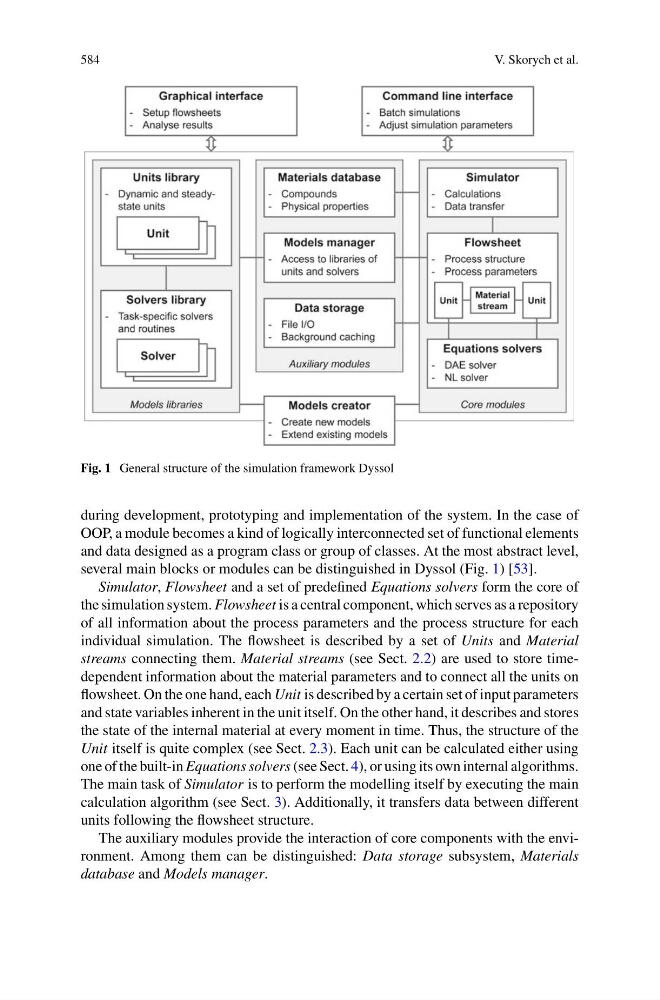
Fig. 1 General structure of the simulation framework Dyssol
during development, prototyping and implementation of the system. In the case of
OOP, a module becomes a kind of logically interconnected set of functional elements
and data designed as a program class or group of classes. At the most abstract level,
several main blocks or modules can be distinguished in Dyssol (Fig. 1) [53].
Simulator, Flowsheet and a set of predefined Equations solvers form the core of
the simulation system. Flowsheet is a central component, which serves as a repository
of all information about the process parameters and the process structure for each
individual simulation. The flowsheet is described by a set of Units and Material
streams connecting them. Material streams (see Sect. 2.2) are used to store timedependent information about the material parameters and to connect all the units on
flowsheet. On the one hand, each Unit is described by a certain set of input parameters
and state variables inherent in the unit itself. On the other hand, it describes and stores
the state of the internal material at every moment in time. Thus, the structure of the
Unit itself is quite complex (see Sect. 2.3). Each unit can be calculated either using
one of the built-in Equations solvers (see Sect. 4), or using its own internal algorithms.
The main task of Simulator is to perform the modelling itself by executing the main
calculation algorithm (see Sect. 3). Additionally, it transfers data between different
units following the flowsheet structure.
The auxiliary modules provide the interaction of core components with the environment. Among them can be distinguished: Data storage subsystem, Materials
database and Models manager.
V. Skorych et al.
Fig. 1 General structure of the simulation framework Dyssol
during development, prototyping and implementation of the system. In the case of
OOP, a module becomes a kind of logically interconnected set of functional elements
and data designed as a program class or group of classes. At the most abstract level,
several main blocks or modules can be distinguished in Dyssol (Fig. 1) [53].
Simulator, Flowsheet and a set of predefined Equations solvers form the core of
the simulation system. Flowsheet is a central component, which serves as a repository
of all information about the process parameters and the process structure for each
individual simulation. The flowsheet is described by a set of Units and Material
streams connecting them. Material streams (see Sect. 2.2) are used to store timedependent information about the material parameters and to connect all the units on
flowsheet. On the one hand, each Unit is described by a certain set of input parameters
and state variables inherent in the unit itself. On the other hand, it describes and stores
the state of the internal material at every moment in time. Thus, the structure of the
Unit itself is quite complex (see Sect. 2.3). Each unit can be calculated either using
one of the built-in Equations solvers (see Sect. 4), or using its own internal algorithms.
The main task of Simulator is to perform the modelling itself by executing the main
calculation algorithm (see Sect. 3). Additionally, it transfers data between different
units following the flowsheet structure.
The auxiliary modules provide the interaction of core components with the environment. Among them can be distinguished: Data storage subsystem, Materials
database and Models manager.