

from one experiment to the next, click on the corresponding Copy Settings
checkbox.
Weights are also assigned by COPASI to the dependent parameters, to
renormalize the curves so that, for example, in Fig. 6, the green and blue curves
are amplified to the same maximum height as the red one. Set the weights to 0 if you
wish to ignore an experiment during optimization. Clear the 0’s to have COPASI
reassign weights. You may need to first uncheck the Copy Settings to avoid
propagation. As an interesting use of this feature, we can, for example, duplicate
Exp1 in the data file experiment as Exp1a with only the data points of the regions
that we want to fit (e.g., the initial 1,000 s) and then use Exp1a for optimization and
Exp1 for visualization of the fit to the full data set.
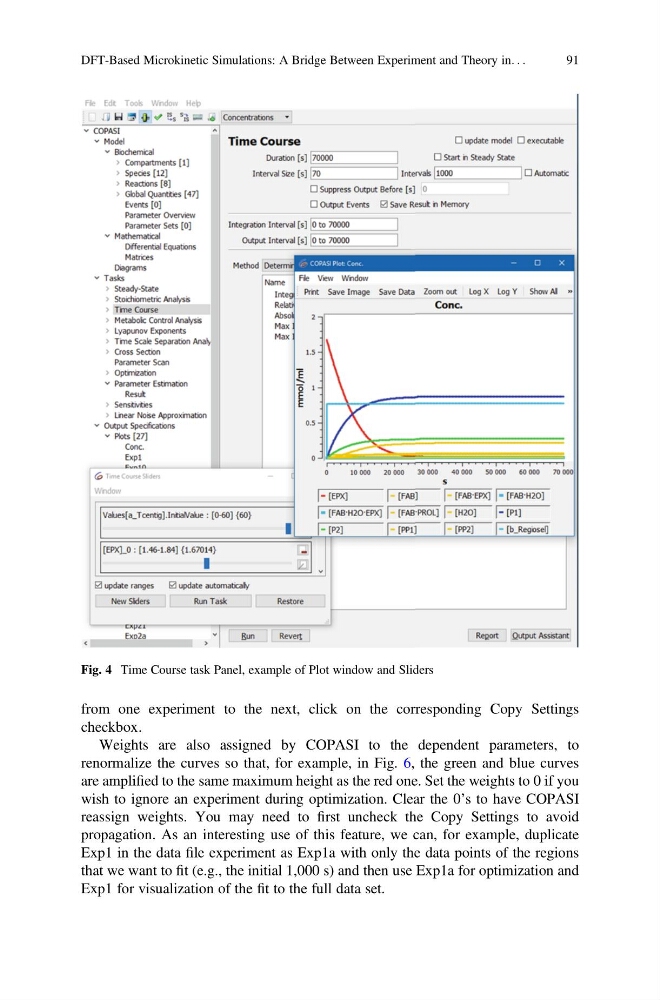
Fig. 4 Time Course task Panel, example of Plot window and Sliders
DFT-Based Microkinetic Simulations: A Bridge Between Experiment and Theory in. . .
91
checkbox.
Weights are also assigned by COPASI to the dependent parameters, to
renormalize the curves so that, for example, in Fig. 6, the green and blue curves
are amplified to the same maximum height as the red one. Set the weights to 0 if you
wish to ignore an experiment during optimization. Clear the 0’s to have COPASI
reassign weights. You may need to first uncheck the Copy Settings to avoid
propagation. As an interesting use of this feature, we can, for example, duplicate
Exp1 in the data file experiment as Exp1a with only the data points of the regions
that we want to fit (e.g., the initial 1,000 s) and then use Exp1a for optimization and
Exp1 for visualization of the fit to the full data set.
Fig. 4 Time Course task Panel, example of Plot window and Sliders
DFT-Based Microkinetic Simulations: A Bridge Between Experiment and Theory in. . .
91