

114
8 Imaging
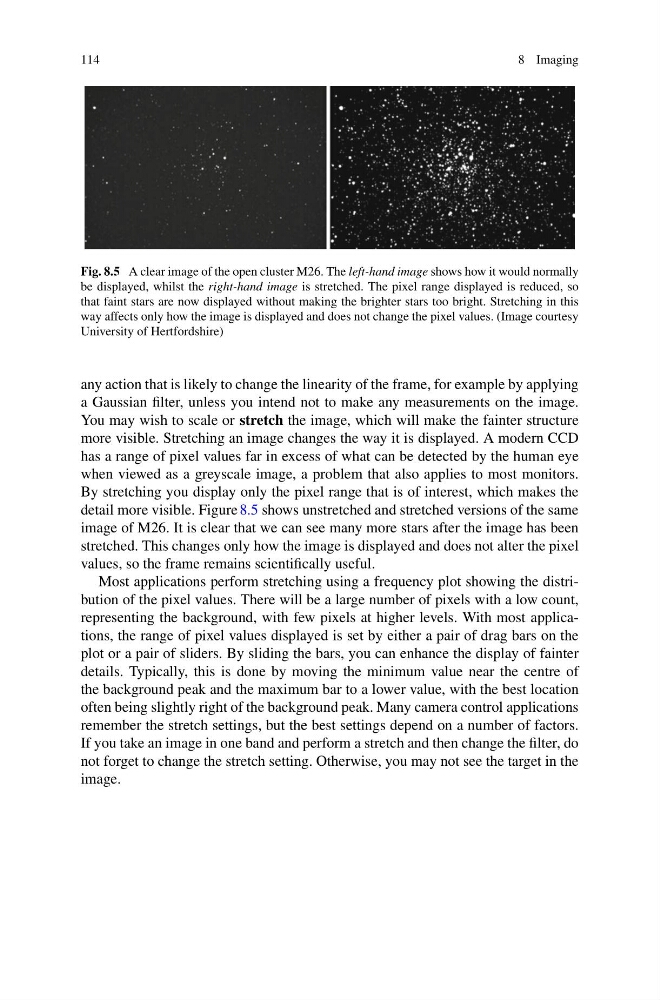
Fig. 8.5 A clear image of the open cluster M26. The left-hand image shows how it would normally
be displayed, whilst the right-hand image is stretched. The pixel range displayed is reduced, so
that faint stars are now displayed without making the brighter stars too bright. Stretching in this
way affects only how the image is displayed and does not change the pixel values. (Image courtesy
University of Hertfordshire)
any action that is likely to change the linearity of the frame, for example by applying
a Gaussian filter, unless you intend not to make any measurements on the image.
You may wish to scale or stretch the image, which will make the fainter structure
more visible. Stretching an image changes the way it is displayed. A modern CCD
has a range of pixel values far in excess of what can be detected by the human eye
when viewed as a greyscale image, a problem that also applies to most monitors.
By stretching you display only the pixel range that is of interest, which makes the
detail more visible. Figure 8.5 shows unstretched and stretched versions of the same
image of M26. It is clear that we can see many more stars after the image has been
stretched. This changes only how the image is displayed and does not alter the pixel
values, so the frame remains scientifically useful.
Most applications perform stretching using a frequency plot showing the distribution of the pixel values. There will be a large number of pixels with a low count,
representing the background, with few pixels at higher levels. With most applications, the range of pixel values displayed is set by either a pair of drag bars on the
plot or a pair of sliders. By sliding the bars, you can enhance the display of fainter
details. Typically, this is done by moving the minimum value near the centre of
the background peak and the maximum bar to a lower value, with the best location
often being slightly right of the background peak. Many camera control applications
remember the stretch settings, but the best settings depend on a number of factors.
If you take an image in one band and perform a stretch and then change the filter, do
not forget to change the stretch setting. Otherwise, you may not see the target in the
image.
8 Imaging
Fig. 8.5 A clear image of the open cluster M26. The left-hand image shows how it would normally
be displayed, whilst the right-hand image is stretched. The pixel range displayed is reduced, so
that faint stars are now displayed without making the brighter stars too bright. Stretching in this
way affects only how the image is displayed and does not change the pixel values. (Image courtesy
University of Hertfordshire)
any action that is likely to change the linearity of the frame, for example by applying
a Gaussian filter, unless you intend not to make any measurements on the image.
You may wish to scale or stretch the image, which will make the fainter structure
more visible. Stretching an image changes the way it is displayed. A modern CCD
has a range of pixel values far in excess of what can be detected by the human eye
when viewed as a greyscale image, a problem that also applies to most monitors.
By stretching you display only the pixel range that is of interest, which makes the
detail more visible. Figure 8.5 shows unstretched and stretched versions of the same
image of M26. It is clear that we can see many more stars after the image has been
stretched. This changes only how the image is displayed and does not alter the pixel
values, so the frame remains scientifically useful.
Most applications perform stretching using a frequency plot showing the distribution of the pixel values. There will be a large number of pixels with a low count,
representing the background, with few pixels at higher levels. With most applications, the range of pixel values displayed is set by either a pair of drag bars on the
plot or a pair of sliders. By sliding the bars, you can enhance the display of fainter
details. Typically, this is done by moving the minimum value near the centre of
the background peak and the maximum bar to a lower value, with the best location
often being slightly right of the background peak. Many camera control applications
remember the stretch settings, but the best settings depend on a number of factors.
If you take an image in one band and perform a stretch and then change the filter, do
not forget to change the stretch setting. Otherwise, you may not see the target in the
image.