

1.6 Typical Examples of Viruses and Trojans
61
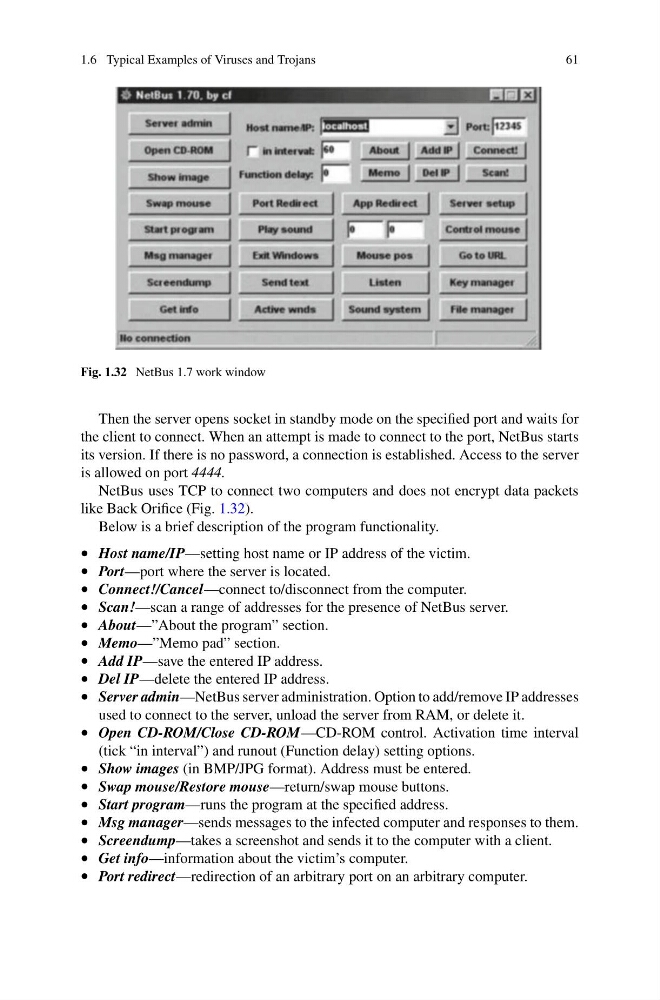
Fig. 1.32 NetBus 1.7 work window
Then the server opens socket in standby mode on the specified port and waits for
the client to connect. When an attempt is made to connect to the port, NetBus starts
its version. If there is no password, a connection is established. Access to the server
is allowed on port 4444.
NetBus uses TCP to connect two computers and does not encrypt data packets
like Back Orifice (Fig. 1.32).
Below is a brief description of the program functionality.
• Host name/IP—setting host name or IP address of the victim.
• Port—port where the server is located.
• Connect!/Cancel—connect to/disconnect from the computer.
• Scan!—scan a range of addresses for the presence of NetBus server.
• About—”About the program” section.
• Memo—”Memo pad” section.
• Add IP—save the entered IP address.
• Del IP—delete the entered IP address.
• Server admin—NetBus server administration. Option to add/remove IP addresses
used to connect to the server, unload the server from RAM, or delete it.
• Open CD-ROM/Close CD-ROM—CD-ROM control. Activation time interval
(tick “in interval”) and runout (Function delay) setting options.
• Show images (in BMP/JPG format). Address must be entered.
• Swap mouse/Restore mouse—return/swap mouse buttons.
• Start program—runs the program at the specified address.
• Msg manager—sends messages to the infected computer and responses to them.
• Screendump—takes a screenshot and sends it to the computer with a client.
• Get info—information about the victim’s computer.
• Port redirect—redirection of an arbitrary port on an arbitrary computer.
61
Fig. 1.32 NetBus 1.7 work window
Then the server opens socket in standby mode on the specified port and waits for
the client to connect. When an attempt is made to connect to the port, NetBus starts
its version. If there is no password, a connection is established. Access to the server
is allowed on port 4444.
NetBus uses TCP to connect two computers and does not encrypt data packets
like Back Orifice (Fig. 1.32).
Below is a brief description of the program functionality.
• Host name/IP—setting host name or IP address of the victim.
• Port—port where the server is located.
• Connect!/Cancel—connect to/disconnect from the computer.
• Scan!—scan a range of addresses for the presence of NetBus server.
• About—”About the program” section.
• Memo—”Memo pad” section.
• Add IP—save the entered IP address.
• Del IP—delete the entered IP address.
• Server admin—NetBus server administration. Option to add/remove IP addresses
used to connect to the server, unload the server from RAM, or delete it.
• Open CD-ROM/Close CD-ROM—CD-ROM control. Activation time interval
(tick “in interval”) and runout (Function delay) setting options.
• Show images (in BMP/JPG format). Address must be entered.
• Swap mouse/Restore mouse—return/swap mouse buttons.
• Start program—runs the program at the specified address.
• Msg manager—sends messages to the infected computer and responses to them.
• Screendump—takes a screenshot and sends it to the computer with a client.
• Get info—information about the victim’s computer.
• Port redirect—redirection of an arbitrary port on an arbitrary computer.