

2.6 Cookies Spyware
179
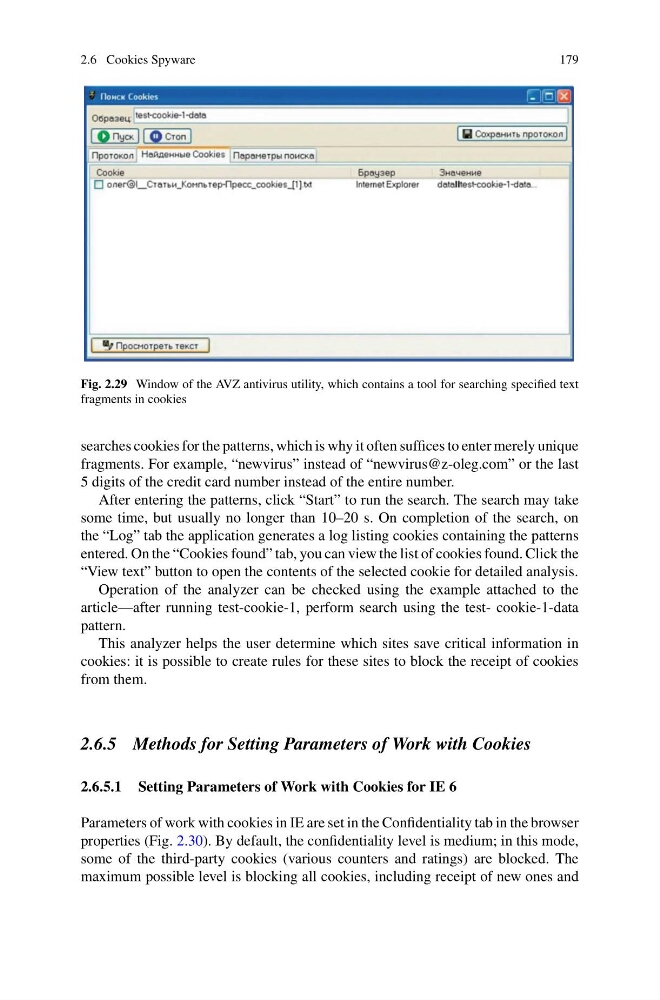
Fig. 2.29 Window of the AVZ antivirus utility, which contains a tool for searching specified text
fragments in cookies
searches cookies for the patterns, which is why it often suffices to enter merely unique
fragments. For example, “newvirus” instead of “newvirus@z-oleg.com” or the last
5 digits of the credit card number instead of the entire number.
After entering the patterns, click “Start” to run the search. The search may take
some time, but usually no longer than 10–20 s. On completion of the search, on
the “Log” tab the application generates a log listing cookies containing the patterns
entered. On the “Cookies found” tab, you can view the list of cookies found. Click the
“View text” button to open the contents of the selected cookie for detailed analysis.
Operation of the analyzer can be checked using the example attached to the
article—after running test-cookie-1, perform search using the test- cookie-1-data
pattern.
This analyzer helps the user determine which sites save critical information in
cookies: it is possible to create rules for these sites to block the receipt of cookies
from them.
2.6.5 Methods for Setting Parameters of Work with Cookies
2.6.5.1 Setting Parameters of Work with Cookies for IE 6
Parameters of work with cookies in IE are set in the Confidentiality tab in the browser
properties (Fig. 2.30). By default, the confidentiality level is medium; in this mode,
some of the third-party cookies (various counters and ratings) are blocked. The
maximum possible level is blocking all cookies, including receipt of new ones and
179
Fig. 2.29 Window of the AVZ antivirus utility, which contains a tool for searching specified text
fragments in cookies
searches cookies for the patterns, which is why it often suffices to enter merely unique
fragments. For example, “newvirus” instead of “newvirus@z-oleg.com” or the last
5 digits of the credit card number instead of the entire number.
After entering the patterns, click “Start” to run the search. The search may take
some time, but usually no longer than 10–20 s. On completion of the search, on
the “Log” tab the application generates a log listing cookies containing the patterns
entered. On the “Cookies found” tab, you can view the list of cookies found. Click the
“View text” button to open the contents of the selected cookie for detailed analysis.
Operation of the analyzer can be checked using the example attached to the
article—after running test-cookie-1, perform search using the test- cookie-1-data
pattern.
This analyzer helps the user determine which sites save critical information in
cookies: it is possible to create rules for these sites to block the receipt of cookies
from them.
2.6.5 Methods for Setting Parameters of Work with Cookies
2.6.5.1 Setting Parameters of Work with Cookies for IE 6
Parameters of work with cookies in IE are set in the Confidentiality tab in the browser
properties (Fig. 2.30). By default, the confidentiality level is medium; in this mode,
some of the third-party cookies (various counters and ratings) are blocked. The
maximum possible level is blocking all cookies, including receipt of new ones and