

166
2 Computer Viruses, Malicious Logic, and Spyware
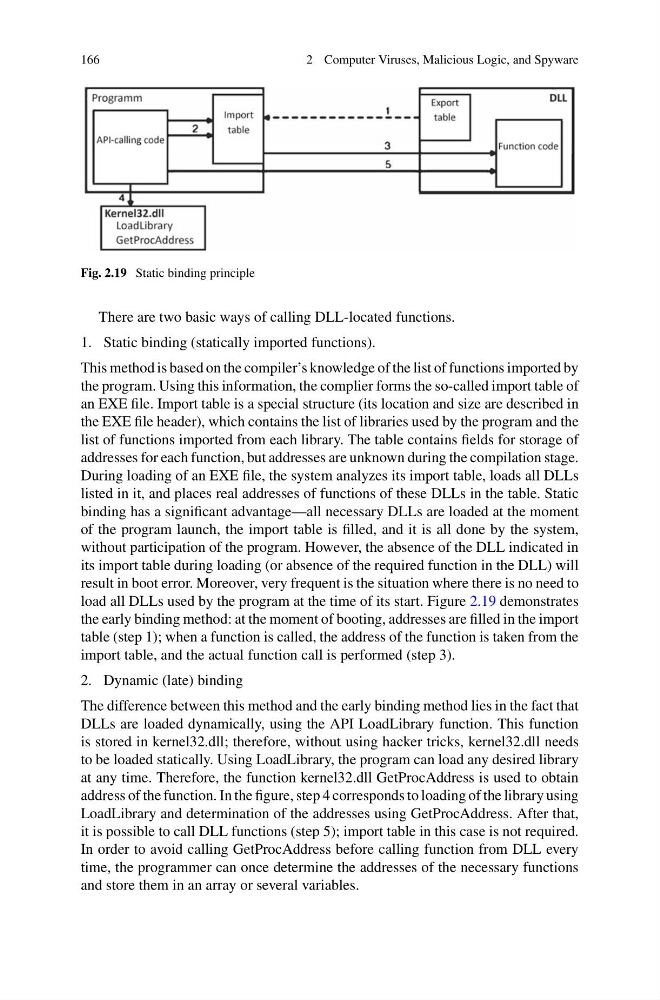
Fig. 2.19 Static binding principle
There are two basic ways of calling DLL-located functions.
1. Static binding (statically imported functions).
This method is based on the compiler’s knowledge of the list of functions imported by
the program. Using this information, the complier forms the so-called import table of
an EXE file. Import table is a special structure (its location and size are described in
the EXE file header), which contains the list of libraries used by the program and the
list of functions imported from each library. The table contains fields for storage of
addresses for each function, but addresses are unknown during the compilation stage.
During loading of an EXE file, the system analyzes its import table, loads all DLLs
listed in it, and places real addresses of functions of these DLLs in the table. Static
binding has a significant advantage—all necessary DLLs are loaded at the moment
of the program launch, the import table is filled, and it is all done by the system,
without participation of the program. However, the absence of the DLL indicated in
its import table during loading (or absence of the required function in the DLL) will
result in boot error. Moreover, very frequent is the situation where there is no need to
load all DLLs used by the program at the time of its start. Figure 2.19 demonstrates
the early binding method: at the moment of booting, addresses are filled in the import
table (step 1); when a function is called, the address of the function is taken from the
import table, and the actual function call is performed (step 3).
2. Dynamic (late) binding
The difference between this method and the early binding method lies in the fact that
DLLs are loaded dynamically, using the API LoadLibrary function. This function
is stored in kernel32.dll; therefore, without using hacker tricks, kernel32.dll needs
to be loaded statically. Using LoadLibrary, the program can load any desired library
at any time. Therefore, the function kernel32.dll GetProcAddress is used to obtain
address of the function. In the figure, step 4 corresponds to loading of the library using
LoadLibrary and determination of the addresses using GetProcAddress. After that,
it is possible to call DLL functions (step 5); import table in this case is not required.
In order to avoid calling GetProcAddress before calling function from DLL every
time, the programmer can once determine the addresses of the necessary functions
and store them in an array or several variables.
2 Computer Viruses, Malicious Logic, and Spyware
Fig. 2.19 Static binding principle
There are two basic ways of calling DLL-located functions.
1. Static binding (statically imported functions).
This method is based on the compiler’s knowledge of the list of functions imported by
the program. Using this information, the complier forms the so-called import table of
an EXE file. Import table is a special structure (its location and size are described in
the EXE file header), which contains the list of libraries used by the program and the
list of functions imported from each library. The table contains fields for storage of
addresses for each function, but addresses are unknown during the compilation stage.
During loading of an EXE file, the system analyzes its import table, loads all DLLs
listed in it, and places real addresses of functions of these DLLs in the table. Static
binding has a significant advantage—all necessary DLLs are loaded at the moment
of the program launch, the import table is filled, and it is all done by the system,
without participation of the program. However, the absence of the DLL indicated in
its import table during loading (or absence of the required function in the DLL) will
result in boot error. Moreover, very frequent is the situation where there is no need to
load all DLLs used by the program at the time of its start. Figure 2.19 demonstrates
the early binding method: at the moment of booting, addresses are filled in the import
table (step 1); when a function is called, the address of the function is taken from the
import table, and the actual function call is performed (step 3).
2. Dynamic (late) binding
The difference between this method and the early binding method lies in the fact that
DLLs are loaded dynamically, using the API LoadLibrary function. This function
is stored in kernel32.dll; therefore, without using hacker tricks, kernel32.dll needs
to be loaded statically. Using LoadLibrary, the program can load any desired library
at any time. Therefore, the function kernel32.dll GetProcAddress is used to obtain
address of the function. In the figure, step 4 corresponds to loading of the library using
LoadLibrary and determination of the addresses using GetProcAddress. After that,
it is possible to call DLL functions (step 5); import table in this case is not required.
In order to avoid calling GetProcAddress before calling function from DLL every
time, the programmer can once determine the addresses of the necessary functions
and store them in an array or several variables.