

2.4 Software Keyboard Spies
155
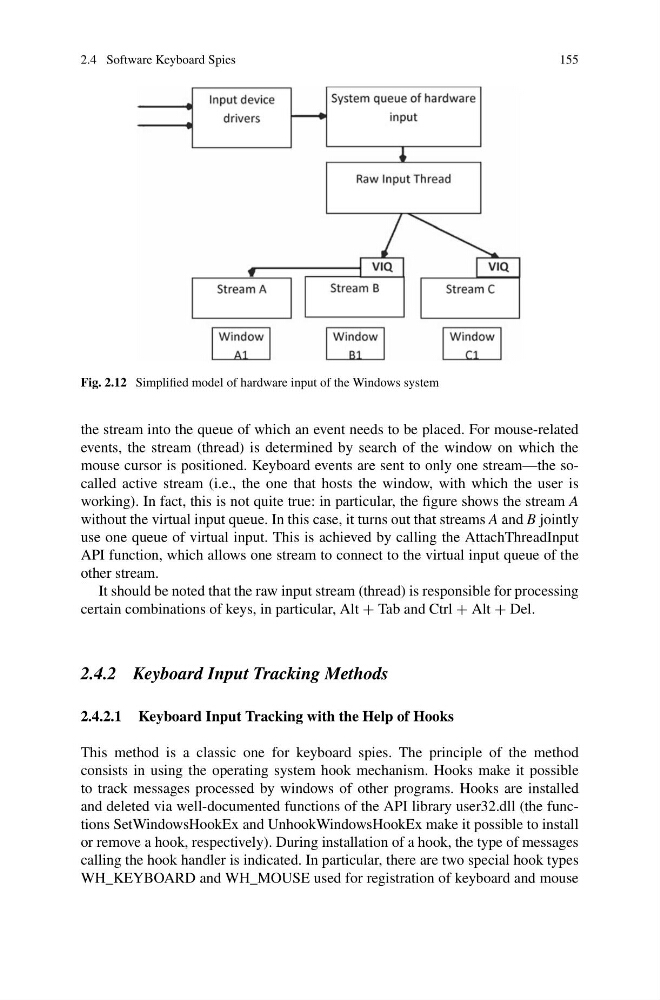
Fig. 2.12 Simplified model of hardware input of the Windows system
the stream into the queue of which an event needs to be placed. For mouse-related
events, the stream (thread) is determined by search of the window on which the
mouse cursor is positioned. Keyboard events are sent to only one stream—the socalled active stream (i.e., the one that hosts the window, with which the user is
working). In fact, this is not quite true: in particular, the figure shows the stream A
without the virtual input queue. In this case, it turns out that streams A and B jointly
use one queue of virtual input. This is achieved by calling the AttachThreadInput
API function, which allows one stream to connect to the virtual input queue of the
other stream.
It should be noted that the raw input stream (thread) is responsible for processing
certain combinations of keys, in particular, Alt + Tab and Ctrl + Alt + Del.
2.4.2 Keyboard Input Tracking Methods
2.4.2.1 Keyboard Input Tracking with the Help of Hooks
This method is a classic one for keyboard spies. The principle of the method
consists in using the operating system hook mechanism. Hooks make it possible
to track messages processed by windows of other programs. Hooks are installed
and deleted via well-documented functions of the API library user32.dll (the functions SetWindowsHookEx and UnhookWindowsHookEx make it possible to install
or remove a hook, respectively). During installation of a hook, the type of messages
calling the hook handler is indicated. In particular, there are two special hook types
WH_KEYBOARD and WH_MOUSE used for registration of keyboard and mouse
155
Fig. 2.12 Simplified model of hardware input of the Windows system
the stream into the queue of which an event needs to be placed. For mouse-related
events, the stream (thread) is determined by search of the window on which the
mouse cursor is positioned. Keyboard events are sent to only one stream—the socalled active stream (i.e., the one that hosts the window, with which the user is
working). In fact, this is not quite true: in particular, the figure shows the stream A
without the virtual input queue. In this case, it turns out that streams A and B jointly
use one queue of virtual input. This is achieved by calling the AttachThreadInput
API function, which allows one stream to connect to the virtual input queue of the
other stream.
It should be noted that the raw input stream (thread) is responsible for processing
certain combinations of keys, in particular, Alt + Tab and Ctrl + Alt + Del.
2.4.2 Keyboard Input Tracking Methods
2.4.2.1 Keyboard Input Tracking with the Help of Hooks
This method is a classic one for keyboard spies. The principle of the method
consists in using the operating system hook mechanism. Hooks make it possible
to track messages processed by windows of other programs. Hooks are installed
and deleted via well-documented functions of the API library user32.dll (the functions SetWindowsHookEx and UnhookWindowsHookEx make it possible to install
or remove a hook, respectively). During installation of a hook, the type of messages
calling the hook handler is indicated. In particular, there are two special hook types
WH_KEYBOARD and WH_MOUSE used for registration of keyboard and mouse