

24
F. Firouzi et al.
Azure IoT Edge Runtime
Telemetry Insight
Action
IoT Hub
Azure IoT Edge Device
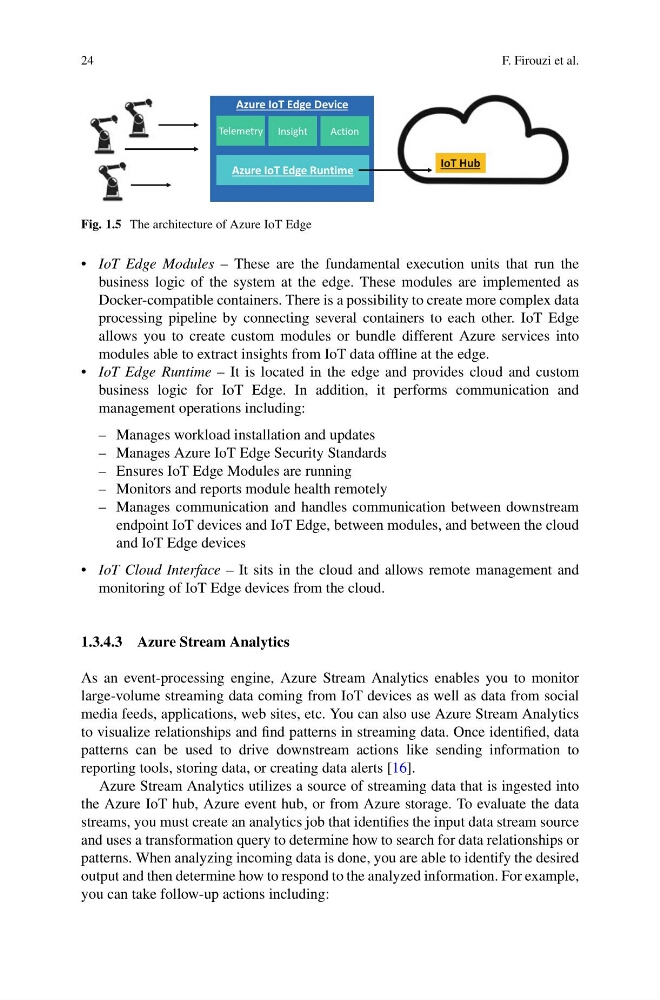
Fig. 1.5 The architecture of Azure IoT Edge
• IoT Edge Modules – These are the fundamental execution units that run the
business logic of the system at the edge. These modules are implemented as
Docker-compatible containers. There is a possibility to create more complex data
processing pipeline by connecting several containers to each other. IoT Edge
allows you to create custom modules or bundle different Azure services into
modules able to extract insights from IoT data offline at the edge.
• IoT Edge Runtime – It is located in the edge and provides cloud and custom
business logic for IoT Edge. In addition, it performs communication and
management operations including:
– Manages workload installation and updates
– Manages Azure IoT Edge Security Standards
– Ensures IoT Edge Modules are running
– Monitors and reports module health remotely
– Manages communication and handles communication between downstream
endpoint IoT devices and IoT Edge, between modules, and between the cloud
and IoT Edge devices
• IoT Cloud Interface – It sits in the cloud and allows remote management and
monitoring of IoT Edge devices from the cloud.
1.3.4.3 Azure Stream Analytics
As an event-processing engine, Azure Stream Analytics enables you to monitor
large-volume streaming data coming from IoT devices as well as data from social
media feeds, applications, web sites, etc. You can also use Azure Stream Analytics
to visualize relationships and find patterns in streaming data. Once identified, data
patterns can be used to drive downstream actions like sending information to
reporting tools, storing data, or creating data alerts [16].
Azure Stream Analytics utilizes a source of streaming data that is ingested into
the Azure IoT hub, Azure event hub, or from Azure storage. To evaluate the data
streams, you must create an analytics job that identifies the input data stream source
and uses a transformation query to determine how to search for data relationships or
patterns. When analyzing incoming data is done, you are able to identify the desired
output and then determine how to respond to the analyzed information. For example,
you can take follow-up actions including:
F. Firouzi et al.
Azure IoT Edge Runtime
Telemetry Insight
Action
IoT Hub
Azure IoT Edge Device
Fig. 1.5 The architecture of Azure IoT Edge
• IoT Edge Modules – These are the fundamental execution units that run the
business logic of the system at the edge. These modules are implemented as
Docker-compatible containers. There is a possibility to create more complex data
processing pipeline by connecting several containers to each other. IoT Edge
allows you to create custom modules or bundle different Azure services into
modules able to extract insights from IoT data offline at the edge.
• IoT Edge Runtime – It is located in the edge and provides cloud and custom
business logic for IoT Edge. In addition, it performs communication and
management operations including:
– Manages workload installation and updates
– Manages Azure IoT Edge Security Standards
– Ensures IoT Edge Modules are running
– Monitors and reports module health remotely
– Manages communication and handles communication between downstream
endpoint IoT devices and IoT Edge, between modules, and between the cloud
and IoT Edge devices
• IoT Cloud Interface – It sits in the cloud and allows remote management and
monitoring of IoT Edge devices from the cloud.
1.3.4.3 Azure Stream Analytics
As an event-processing engine, Azure Stream Analytics enables you to monitor
large-volume streaming data coming from IoT devices as well as data from social
media feeds, applications, web sites, etc. You can also use Azure Stream Analytics
to visualize relationships and find patterns in streaming data. Once identified, data
patterns can be used to drive downstream actions like sending information to
reporting tools, storing data, or creating data alerts [16].
Azure Stream Analytics utilizes a source of streaming data that is ingested into
the Azure IoT hub, Azure event hub, or from Azure storage. To evaluate the data
streams, you must create an analytics job that identifies the input data stream source
and uses a transformation query to determine how to search for data relationships or
patterns. When analyzing incoming data is done, you are able to identify the desired
output and then determine how to respond to the analyzed information. For example,
you can take follow-up actions including: