

4 Architecting IoT Cloud
181
Establishing relationships, or defining the right of access, between the owner, user,
device, and organizations is an elemental part of the authorization and authentication
mechanism. At the very least, connected devices can be accessible by three district
user groups including maintenance and operations service providers, owners, and
the original equipment manufacturer (OEM). The access must be thoughtfully
designed and managed to protect against any possible cybersecurity problems.
4.3.2 Software Updates and Maintenance
In a holistic IoT solution, it is very important to be able to perform the over-the-air
firmware and software updates. Indeed, the operations most frequently performed
by administrators are software and firmware updates. To do so, it would be very
helpful to automate these operations using workflow management, which executes
a sequence of commands on the device. These tasks can be completed on-demand
or they can be scheduled at a designated future time. Workflow engines are able to
provide powerful, user-friendly dashboards that specify the details of workflows as
well as scripting capabilities to program the engine.
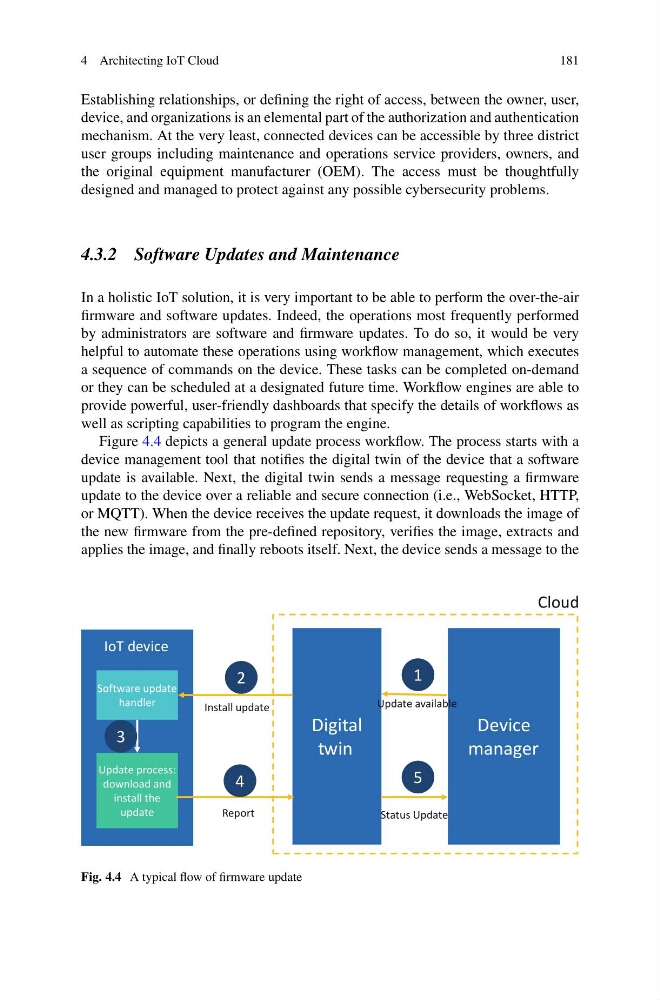
Figure 4.4 depicts a general update process workflow. The process starts with a
device management tool that notifies the digital twin of the device that a software
update is available. Next, the digital twin sends a message requesting a firmware
update to the device over a reliable and secure connection (i.e., WebSocket, HTTP,
or MQTT). When the device receives the update request, it downloads the image of
the new firmware from the pre-defined repository, verifies the image, extracts and
applies the image, and finally reboots itself. Next, the device sends a message to the
Software update
handler
Update process:
download and
install the
update
IoT device
Digital
twin
Device
manager
Cloud
1
2
3
4
5
Update available
Install update
Report
Status Update
Fig. 4.4 A typical flow of firmware update
181
Establishing relationships, or defining the right of access, between the owner, user,
device, and organizations is an elemental part of the authorization and authentication
mechanism. At the very least, connected devices can be accessible by three district
user groups including maintenance and operations service providers, owners, and
the original equipment manufacturer (OEM). The access must be thoughtfully
designed and managed to protect against any possible cybersecurity problems.
4.3.2 Software Updates and Maintenance
In a holistic IoT solution, it is very important to be able to perform the over-the-air
firmware and software updates. Indeed, the operations most frequently performed
by administrators are software and firmware updates. To do so, it would be very
helpful to automate these operations using workflow management, which executes
a sequence of commands on the device. These tasks can be completed on-demand
or they can be scheduled at a designated future time. Workflow engines are able to
provide powerful, user-friendly dashboards that specify the details of workflows as
well as scripting capabilities to program the engine.
Figure 4.4 depicts a general update process workflow. The process starts with a
device management tool that notifies the digital twin of the device that a software
update is available. Next, the digital twin sends a message requesting a firmware
update to the device over a reliable and secure connection (i.e., WebSocket, HTTP,
or MQTT). When the device receives the update request, it downloads the image of
the new firmware from the pre-defined repository, verifies the image, extracts and
applies the image, and finally reboots itself. Next, the device sends a message to the
Software update
handler
Update process:
download and
install the
update
IoT device
Digital
twin
Device
manager
Cloud
1
2
3
4
5
Update available
Install update
Report
Status Update
Fig. 4.4 A typical flow of firmware update