

74
2 Description of the Wolfram SystemModeler
input parameters, there is a change in the system properties that can be detected under
conditions of computational error.
When analyzing, the sensitivity is determined by the changes in the response of
the model to the deviations of individual parameters of the model. This allows us to
conclude about the relative importance of input variables for a particular model, to
identify key variables.
For example, when working with a spring pendulum, it would be useful to understand which parameter—it makes sense to change the mass or stiffness of the spring if
you want to change the nature of the oscillations, setting a certain natural frequency.
This is done using the CVODES, which can perform an input sensitivity analysis.
The sensitivity s i (t) for the state y i (t) with respect to the parameter p is determined
by the expression:
s i (t) =
∂ y i (t)
∂ p
In other words, at each time point, the sensitivity indicates how much the solution
for the state y i (t) changes with the slightest change in the parameter p.
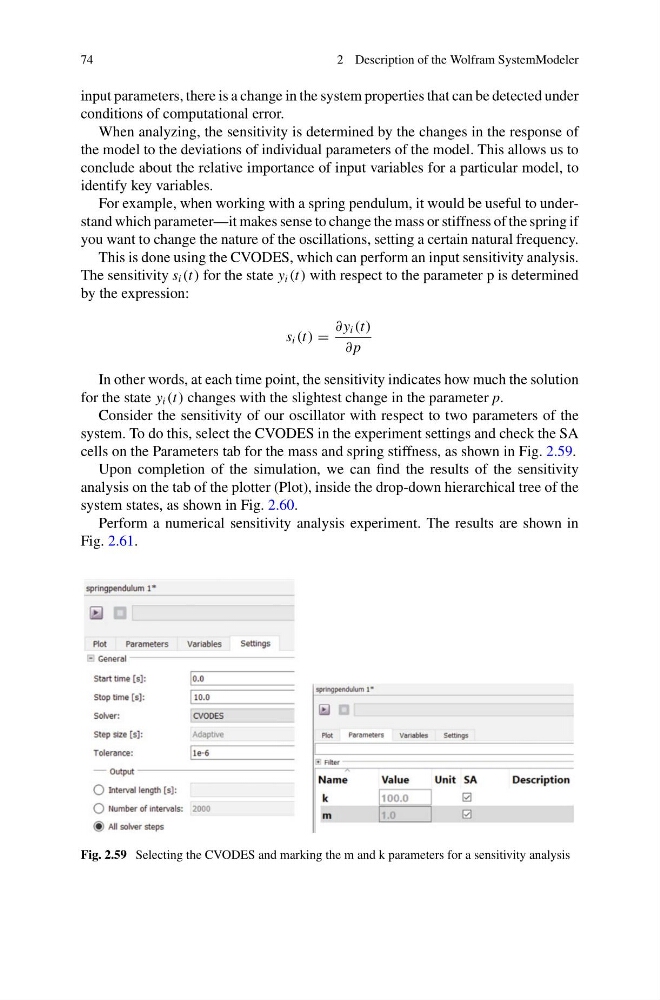
Consider the sensitivity of our oscillator with respect to two parameters of the
system. To do this, select the CVODES in the experiment settings and check the SA
cells on the Parameters tab for the mass and spring stiffness, as shown in Fig. 2.59.
Upon completion of the simulation, we can find the results of the sensitivity
analysis on the tab of the plotter (Plot), inside the drop-down hierarchical tree of the
system states, as shown in Fig. 2.60.
Perform a numerical sensitivity analysis experiment. The results are shown in
Fig. 2.61.
Fig. 2.59 Selecting the CVODES and marking the m and k parameters for a sensitivity analysis
2 Description of the Wolfram SystemModeler
input parameters, there is a change in the system properties that can be detected under
conditions of computational error.
When analyzing, the sensitivity is determined by the changes in the response of
the model to the deviations of individual parameters of the model. This allows us to
conclude about the relative importance of input variables for a particular model, to
identify key variables.
For example, when working with a spring pendulum, it would be useful to understand which parameter—it makes sense to change the mass or stiffness of the spring if
you want to change the nature of the oscillations, setting a certain natural frequency.
This is done using the CVODES, which can perform an input sensitivity analysis.
The sensitivity s i (t) for the state y i (t) with respect to the parameter p is determined
by the expression:
s i (t) =
∂ y i (t)
∂ p
In other words, at each time point, the sensitivity indicates how much the solution
for the state y i (t) changes with the slightest change in the parameter p.
Consider the sensitivity of our oscillator with respect to two parameters of the
system. To do this, select the CVODES in the experiment settings and check the SA
cells on the Parameters tab for the mass and spring stiffness, as shown in Fig. 2.59.
Upon completion of the simulation, we can find the results of the sensitivity
analysis on the tab of the plotter (Plot), inside the drop-down hierarchical tree of the
system states, as shown in Fig. 2.60.
Perform a numerical sensitivity analysis experiment. The results are shown in
Fig. 2.61.
Fig. 2.59 Selecting the CVODES and marking the m and k parameters for a sensitivity analysis