

2.4 Creating a Dynamic Model in Wolfram SystemModeler
53
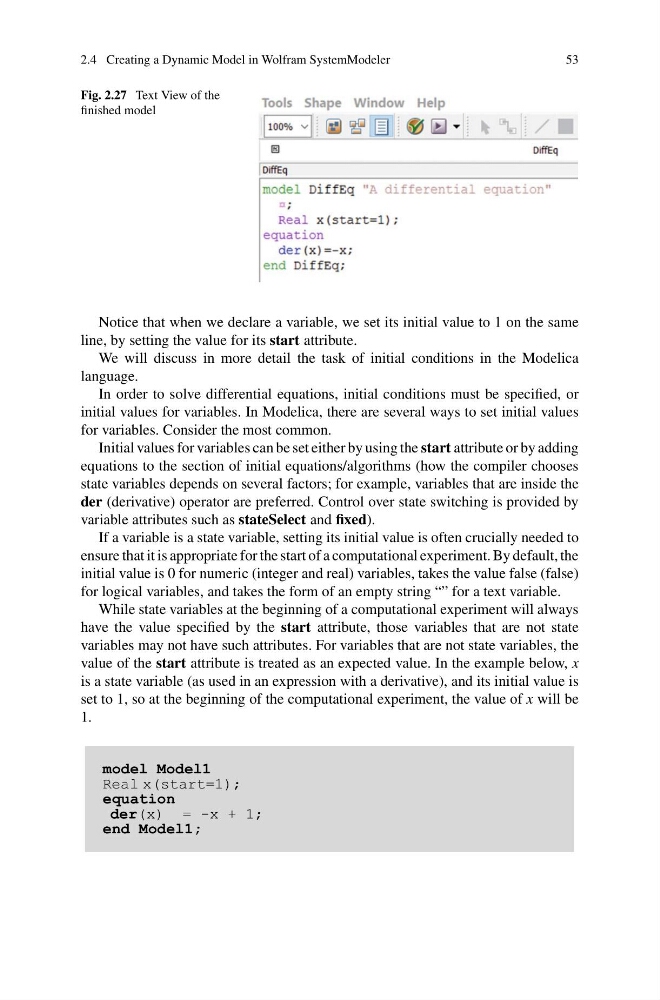
Fig. 2.27 Text View of the
finished model
Notice that when we declare a variable, we set its initial value to 1 on the same
line, by setting the value for its start attribute.
We will discuss in more detail the task of initial conditions in the Modelica
language.
In order to solve differential equations, initial conditions must be specified, or
initial values for variables. In Modelica, there are several ways to set initial values
for variables. Consider the most common.
Initial values for variables can be set either by using the start attribute or by adding
equations to the section of initial equations/algorithms (how the compiler chooses
state variables depends on several factors; for example, variables that are inside the
der (derivative) operator are preferred. Control over state switching is provided by
variable attributes such as stateSelect and fixed).
If a variable is a state variable, setting its initial value is often crucially needed to
ensure that it is appropriate for the start of a computational experiment. By default, the
initial value is 0 for numeric (integer and real) variables, takes the value false (false)
for logical variables, and takes the form of an empty string “” for a text variable.
While state variables at the beginning of a computational experiment will always
have the value specified by the start attribute, those variables that are not state
variables may not have such attributes. For variables that are not state variables, the
value of the start attribute is treated as an expected value. In the example below, x
is a state variable (as used in an expression with a derivative), and its initial value is
set to 1, so at the beginning of the computational experiment, the value of x will be
1.
model Model1
Real x(start=1);
equation
der(x) = -x + 1;
end Model1;
53
Fig. 2.27 Text View of the
finished model
Notice that when we declare a variable, we set its initial value to 1 on the same
line, by setting the value for its start attribute.
We will discuss in more detail the task of initial conditions in the Modelica
language.
In order to solve differential equations, initial conditions must be specified, or
initial values for variables. In Modelica, there are several ways to set initial values
for variables. Consider the most common.
Initial values for variables can be set either by using the start attribute or by adding
equations to the section of initial equations/algorithms (how the compiler chooses
state variables depends on several factors; for example, variables that are inside the
der (derivative) operator are preferred. Control over state switching is provided by
variable attributes such as stateSelect and fixed).
If a variable is a state variable, setting its initial value is often crucially needed to
ensure that it is appropriate for the start of a computational experiment. By default, the
initial value is 0 for numeric (integer and real) variables, takes the value false (false)
for logical variables, and takes the form of an empty string “” for a text variable.
While state variables at the beginning of a computational experiment will always
have the value specified by the start attribute, those variables that are not state
variables may not have such attributes. For variables that are not state variables, the
value of the start attribute is treated as an expected value. In the example below, x
is a state variable (as used in an expression with a derivative), and its initial value is
set to 1, so at the beginning of the computational experiment, the value of x will be
1.
model Model1
Real x(start=1);
equation
der(x) = -x + 1;
end Model1;