

3.10.1 GWAS Boosting
using the araGWAB Web
Application
1. Visit araGWAB https://www.inetbio.org/aragwab/ and click
the RUN tab.
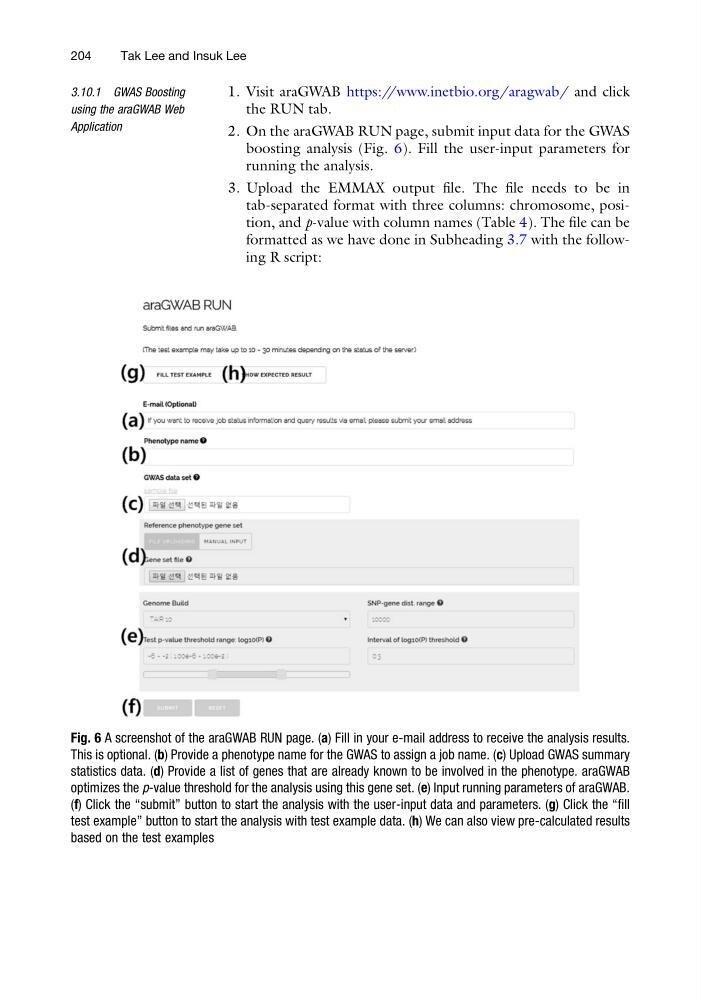
2. On the araGWAB RUN page, submit input data for the GWAS
boosting analysis (Fig. 6). Fill the user-input parameters for
running the analysis.
3. Upload the EMMAX output file. The file needs to be in
tab-separated format with three columns: chromosome, position, and p-value with column names (Table 4). The file can be
formatted as we have done in Subheading 3.7 with the following R script:
Fig. 6 A screenshot of the araGWAB RUN page. (a) Fill in your e-mail address to receive the analysis results.
This is optional. (b) Provide a phenotype name for the GWAS to assign a job name. (c) Upload GWAS summary
statistics data. (d) Provide a list of genes that are already known to be involved in the phenotype. araGWAB
optimizes the p-value threshold for the analysis using this gene set. (e) Input running parameters of araGWAB.
(f) Click the “submit” button to start the analysis with the user-input data and parameters. (g) Click the “fill
test example” button to start the analysis with test example data. (h) We can also view pre-calculated results
based on the test examples
204
Tak Lee and Insuk Lee
using the araGWAB Web
Application
1. Visit araGWAB https://www.inetbio.org/aragwab/ and click
the RUN tab.
2. On the araGWAB RUN page, submit input data for the GWAS
boosting analysis (Fig. 6). Fill the user-input parameters for
running the analysis.
3. Upload the EMMAX output file. The file needs to be in
tab-separated format with three columns: chromosome, position, and p-value with column names (Table 4). The file can be
formatted as we have done in Subheading 3.7 with the following R script:
Fig. 6 A screenshot of the araGWAB RUN page. (a) Fill in your e-mail address to receive the analysis results.
This is optional. (b) Provide a phenotype name for the GWAS to assign a job name. (c) Upload GWAS summary
statistics data. (d) Provide a list of genes that are already known to be involved in the phenotype. araGWAB
optimizes the p-value threshold for the analysis using this gene set. (e) Input running parameters of araGWAB.
(f) Click the “submit” button to start the analysis with the user-input data and parameters. (g) Click the “fill
test example” button to start the analysis with test example data. (h) We can also view pre-calculated results
based on the test examples
204
Tak Lee and Insuk Lee