

74
The role of CSS
Web Design with HTML and CSS Digital Classroom
4
12 Switch back to the test.html document and then click below the element and<br />
Choose Edit > Paste to place the <link> element, then save the the fi le by choosing<br />
File > Save.<br />
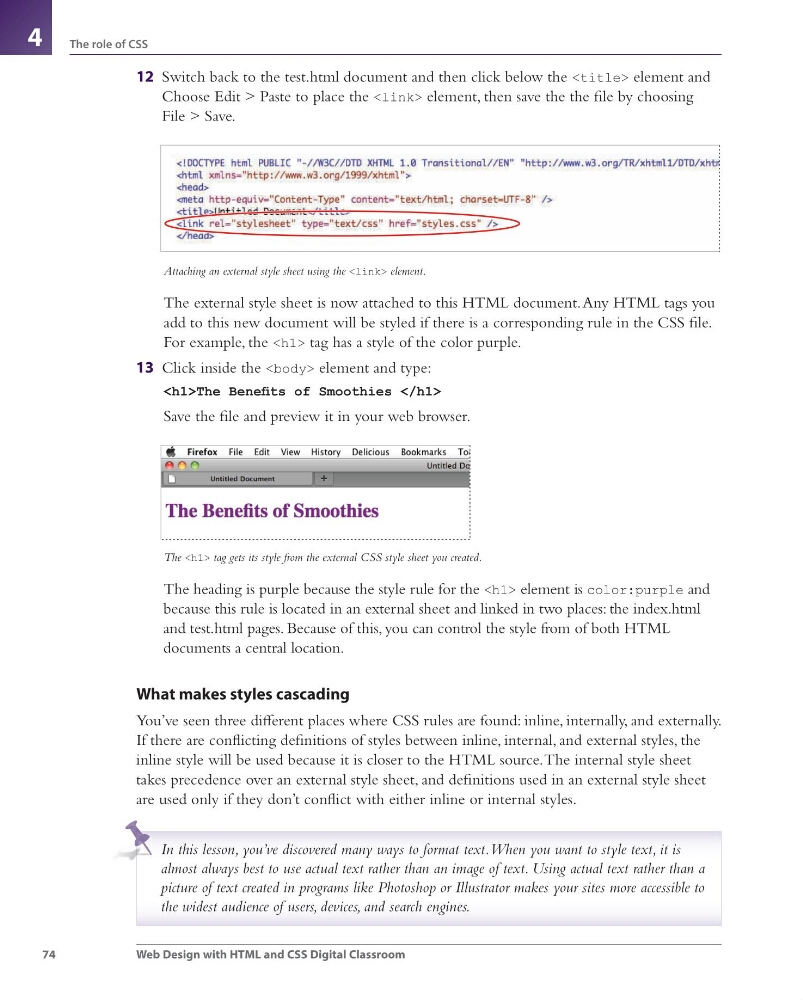
Attaching an external style sheet using the <link> element.<br />
The external style sheet is now attached to this HTML document. Any HTML tags you<br />
add to this new document will be styled if there is a corresponding rule in the CSS fi le.<br />
For example, the <h1> tag has a style of the color purple.<br />
13 Click inside the <body> element and type:<br />
<h1>The Benefi ts of Smoothies </h1><br />
Save the fi le and preview it in your web browser.<br />
The <h1> tag gets its style from the external CSS style sheet you created.<br />
The heading is purple because the style rule for the <h1> element is color:purple and<br />
because this rule is located in an external sheet and linked in two places: the index.html<br />
and test.html pages. Because of this, you can control the style from of both HTML<br />
documents a central location.<br />
What makes styles cascading<br />
You’ve seen three diff erent places where CSS rules are found: inline, internally, and externally.<br />
If there are confl icting defi nitions of styles between inline, internal, and external styles, the<br />
inline style will be used because it is closer to the HTML source. The internal style sheet<br />
takes precedence over an external style sheet, and defi nitions used in an external style sheet<br />
are used only if they don’t confl ict with either inline or internal styles.<br />
In this lesson, you’ve discovered many ways to format text. When you want to style text, it is<br />
almost always best to use actual text rather than an image of text. Using actual text rather than a<br />
picture of text created in programs like Photoshop or Illustrator makes your sites more accessible to<br />
the widest audience of users, devices, and search engines.<br />
webdesign.indb 74<br />
webdesign.indb 74<br />
3/17/11 1:50 PM<br />
3/17/11 1:50 PM </div>
</div>
<div style="clear: both"></div>
</div>
<div id="viewer_control">
<a href="/viewer/alto/14067/91" class="href_previous">Précédent</a> <span class="title">
<h1><a href="https://virtuallibrary.enssmal.edu.dz/idurl/1/14067"></a> - 92/307</h1>
<a href="/viewer/alto/14067/93" class="href_next">Suivant</a> </span>
</div>
</div>
</body>
</html>
<script src="/assets/javascripts/jquery2.js"></script>
<script src="/assets/javascripts/helpers.js"></script>
<script>
var height = $(window).height();
var width = $(window).width();
$('#viewer_img').height(height - 135);
$('#viewer_alto').height(height - 135);
</script>
</body>
</html>
The role of CSS
Web Design with HTML and CSS Digital Classroom
4
12 Switch back to the test.html document and then click below the