The role of CSS
67
Lesson 4, Fundamentals of HTML, XHMTL, and CSS
4
Styling a heading
To get a sense of how CSS works, you’ll create a simple CSS rule that changes the style of a
heading in your page. In your index.html page, you already have the content “SmoothieWorld”
nested inside an
tag. Perhaps one of the best ways to begin thinking about how CSS
works is to consider how the default style of this heading is rendered in the browser.
1 Examine the heading of the fi le you previewed in the last step of the previous exercise. The
style and formatting instructions are being provided by the browser. The size, color, and font
are provided by the browser because exact formatting instructions are not specifi ed. The
browser only knows that this is a headline. You will redefi ne this style with a CSS rule.
2 In your code, locate the tag on line 5, click once at the end of the line,<br />
following the closing tag, then press return to add a new line of code. Type the following:<br />
<style type="text/css"><br />
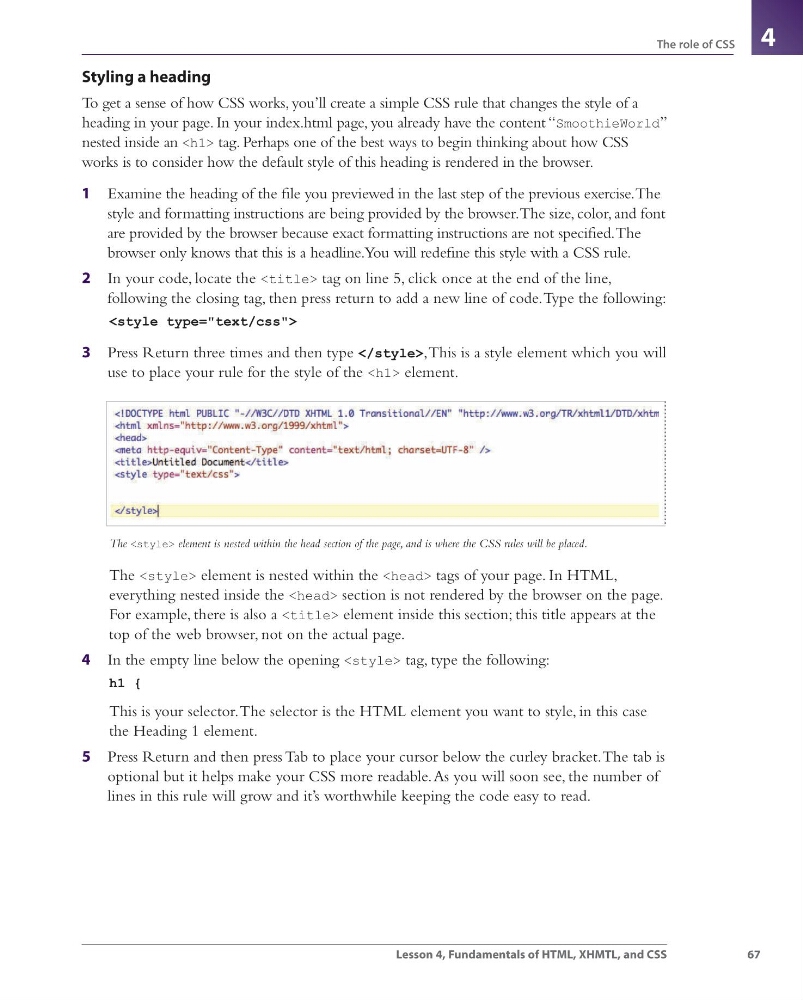
3 Press Return three times and then type </style>, This is a style element which you will<br />
use to place your rule for the style of the <h1> element.<br />
The <style> element is nested within the head section of the page, and is where the CSS rules will be placed.<br />
The <style> element is nested within the <head> tags of your page. In HTML,<br />
everything nested inside the <head> section is not rendered by the browser on the page.<br />
For example, there is also a <title> element inside this section; this title appears at the<br />
top of the web browser, not on the actual page.<br />
4 In the empty line below the opening <style> tag, type the following:<br />
h1 {<br />
This is your selector. The selector is the HTML element you want to style, in this case<br />
the Heading 1 element.<br />
5 Press Return and then press Tab to place your cursor below the curley bracket. The tab is<br />
optional but it helps make your CSS more readable. As you will soon see, the number of<br />
lines in this rule will grow and it’s worthwhile keeping the code easy to read.<br />
webdesign.indb 67<br />
webdesign.indb 67<br />
3/17/11 1:50 PM<br />
3/17/11 1:50 PM </div>
</div>
<div style="clear: both"></div>
</div>
<div id="viewer_control">
<a href="/viewer/alto/14067/84" class="href_previous">Précédent</a> <span class="title">
<h1><a href="https://virtuallibrary.enssmal.edu.dz/idurl/1/14067"></a> - 85/307</h1>
<a href="/viewer/alto/14067/86" class="href_next">Suivant</a> </span>
</div>
</div>
</body>
</html>
<script src="/assets/javascripts/jquery2.js"></script>
<script src="/assets/javascripts/helpers.js"></script>
<script>
var height = $(window).height();
var width = $(window).width();
$('#viewer_img').height(height - 135);
$('#viewer_alto').height(height - 135);
</script>
</body>
</html>

