

60
Part II — Getting Inside Gmail
Table 5-1 (continued)
Method
Description
getResponseHeader(“headerLabel”)
Returns the string value of a single header
label.
open(“method”, “URL”[, asyncFlag[,
Assigns the method, the URL, and the other
“userName”[, “password”]]])
optional attributes of a pending request.
send(content)
Sends the request, with an optional postable
string or bit of DOM object data.
setRequestHeader(“label”, “value”)
Assigns a label/value pair to the header to be
sent with a request.
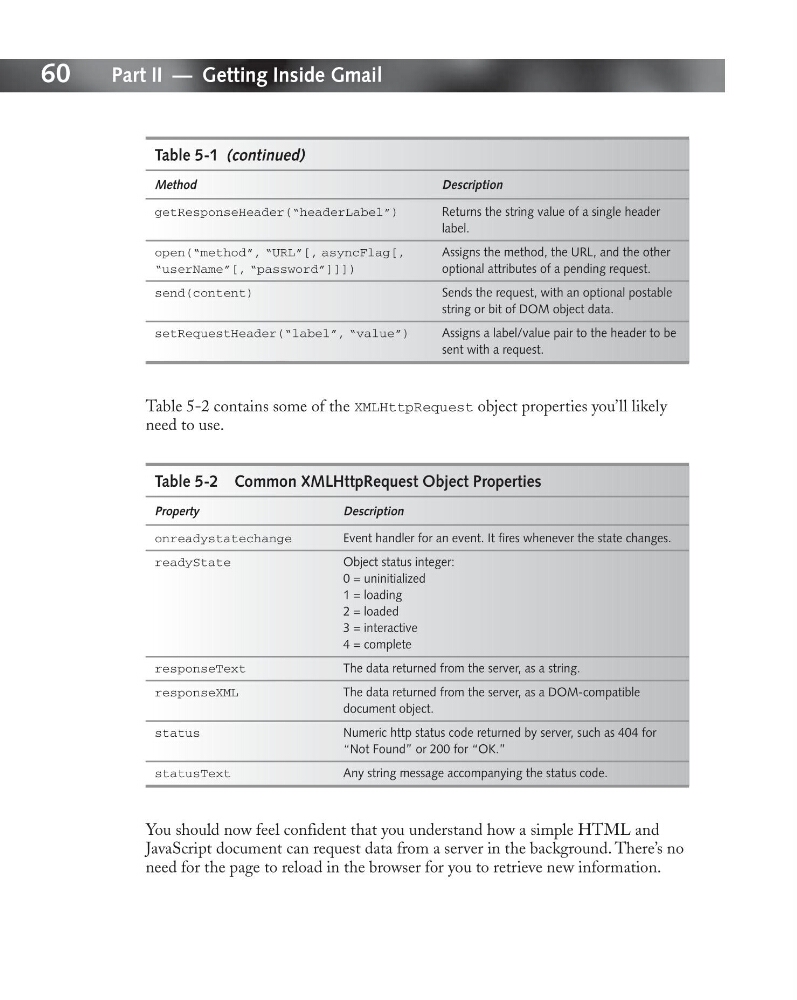
Table 5-2 contains some of the XMLHttpRequest object properties you’ll likely
need to use.
Table 5-2 Common XMLHttpRequest Object Properties
Property
Description
onreadystatechange
Event handler for an event. It fires whenever the state changes.
readyState
Object status integer:
0 = uninitialized
1 = loading
2 = loaded
3 = interactive
4 = complete
responseText
The data returned from the server, as a string.
responseXML
The data returned from the server, as a DOM-compatible
document object.
status
Numeric http status code returned by server, such as 404 for
“Not Found” or 200 for “OK.”
statusText
Any string message accompanying the status code.
You should now feel confident that you understand how a simple HTML and
JavaScript document can request data from a server in the background. There’s no
need for the page to reload in the browser for you to retrieve new information.
Part II — Getting Inside Gmail
Table 5-1 (continued)
Method
Description
getResponseHeader(“headerLabel”)
Returns the string value of a single header
label.
open(“method”, “URL”[, asyncFlag[,
Assigns the method, the URL, and the other
“userName”[, “password”]]])
optional attributes of a pending request.
send(content)
Sends the request, with an optional postable
string or bit of DOM object data.
setRequestHeader(“label”, “value”)
Assigns a label/value pair to the header to be
sent with a request.
Table 5-2 contains some of the XMLHttpRequest object properties you’ll likely
need to use.
Table 5-2 Common XMLHttpRequest Object Properties
Property
Description
onreadystatechange
Event handler for an event. It fires whenever the state changes.
readyState
Object status integer:
0 = uninitialized
1 = loading
2 = loaded
3 = interactive
4 = complete
responseText
The data returned from the server, as a string.
responseXML
The data returned from the server, as a DOM-compatible
document object.
status
Numeric http status code returned by server, such as 404 for
“Not Found” or 200 for “OK.”
statusText
Any string message accompanying the status code.
You should now feel confident that you understand how a simple HTML and
JavaScript document can request data from a server in the background. There’s no
need for the page to reload in the browser for you to retrieve new information.