

Image Snapshot
You can insert code that captures a snapshot of your MATLAB output. This is useful, for example, if
you have a for loop that modifies a figure that you want to capture after each iteration.
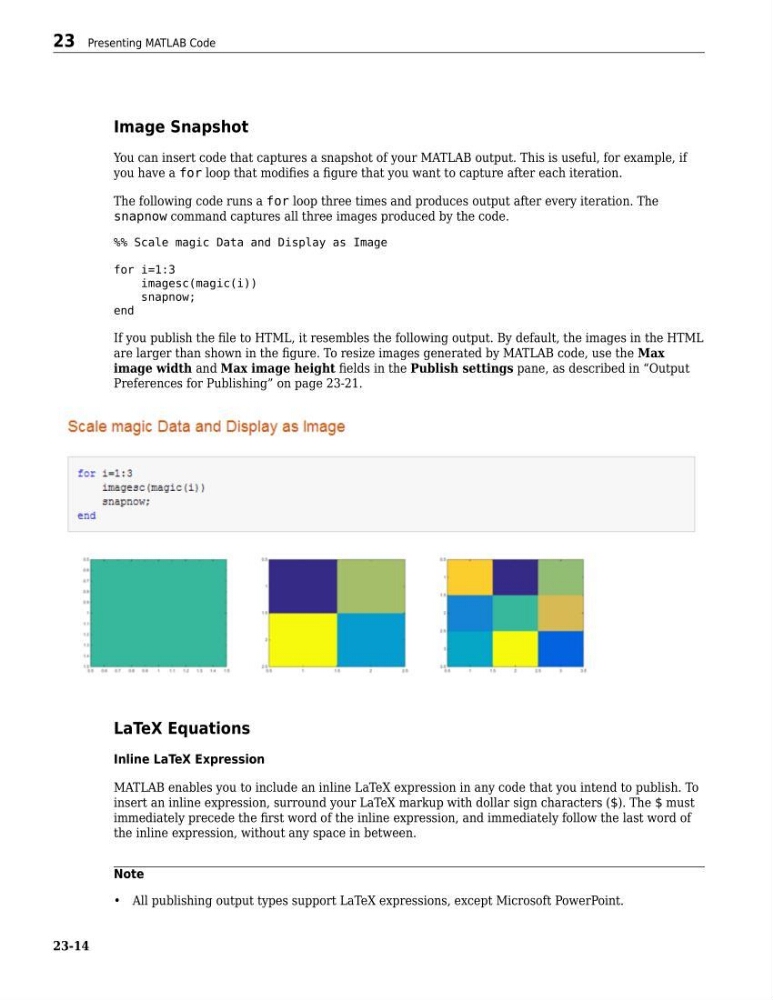
The following code runs a for loop three times and produces output after every iteration. The
snapnow command captures all three images produced by the code.
%% Scale magic Data and Display as Image
for i=1:3
imagesc(magic(i))
snapnow;
end
If you publish the file to HTML, it resembles the following output. By default, the images in the HTML
are larger than shown in the figure. To resize images generated by MATLAB code, use the Max
image width and Max image height fields in the Publish settings pane, as described in “Output
Preferences for Publishing” on page 23-21.
LaTeX Equations
Inline LaTeX Expression
MATLAB enables you to include an inline LaTeX expression in any code that you intend to publish. To
insert an inline expression, surround your LaTeX markup with dollar sign characters ($). The $ must
immediately precede the first word of the inline expression, and immediately follow the last word of
the inline expression, without any space in between.
Note
• All publishing output types support LaTeX expressions, except Microsoft PowerPoint.
23 Presenting MATLAB Code
23-14
You can insert code that captures a snapshot of your MATLAB output. This is useful, for example, if
you have a for loop that modifies a figure that you want to capture after each iteration.
The following code runs a for loop three times and produces output after every iteration. The
snapnow command captures all three images produced by the code.
%% Scale magic Data and Display as Image
for i=1:3
imagesc(magic(i))
snapnow;
end
If you publish the file to HTML, it resembles the following output. By default, the images in the HTML
are larger than shown in the figure. To resize images generated by MATLAB code, use the Max
image width and Max image height fields in the Publish settings pane, as described in “Output
Preferences for Publishing” on page 23-21.
LaTeX Equations
Inline LaTeX Expression
MATLAB enables you to include an inline LaTeX expression in any code that you intend to publish. To
insert an inline expression, surround your LaTeX markup with dollar sign characters ($). The $ must
immediately precede the first word of the inline expression, and immediately follow the last word of
the inline expression, without any space in between.
Note
• All publishing output types support LaTeX expressions, except Microsoft PowerPoint.
23 Presenting MATLAB Code
23-14