

Starting in R2019b
Updated Code
R2019a and Earlier
This function errors because
declaring a variable with the
same name as the imported
function nest is not supported.
function myvarfunc
import pkg.nest % Errors
nest = 1
end
Rename variable nest.
function myvarfunc
import pkg.nest % Errors
thisNest = 1
end
This function modifies variable
nest.
function myvarfunc
import pkg.nest
nest = 1 % Modifies variable nest and
% displays warning since R201
end
Fully qualified imports shadow outer scope definitions of the same
name
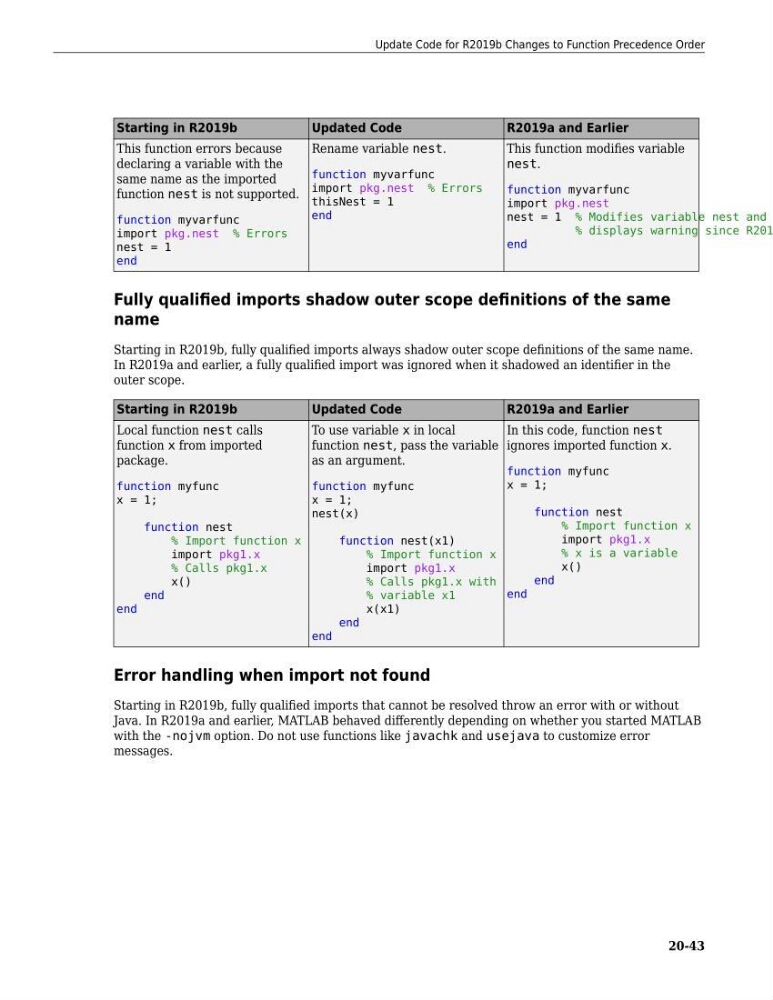
Starting in R2019b, fully qualified imports always shadow outer scope definitions of the same name.
In R2019a and earlier, a fully qualified import was ignored when it shadowed an identifier in the
outer scope.
Starting in R2019b
Updated Code
R2019a and Earlier
Local function nest calls
function x from imported
package.
function myfunc
x = 1;
function nest
% Import function x
import pkg1.x
% Calls pkg1.x
x()
end
end
To use variable x in local
function nest, pass the variable
as an argument.
function myfunc
x = 1;
nest(x)
function nest(x1)
% Import function x
import pkg1.x
% Calls pkg1.x with
% variable x1
x(x1)
end
end
In this code, function nest
ignores imported function x.
function myfunc
x = 1;
function nest
% Import function x
import pkg1.x
% x is a variable
x()
end
end
Error handling when import not found
Starting in R2019b, fully qualified imports that cannot be resolved throw an error with or without
Java. In R2019a and earlier, MATLAB behaved differently depending on whether you started MATLAB
with the -nojvm option. Do not use functions like javachk and usejava to customize error
messages.
Update Code for R2019b Changes to Function Precedence Order
20-43
Updated Code
R2019a and Earlier
This function errors because
declaring a variable with the
same name as the imported
function nest is not supported.
function myvarfunc
import pkg.nest % Errors
nest = 1
end
Rename variable nest.
function myvarfunc
import pkg.nest % Errors
thisNest = 1
end
This function modifies variable
nest.
function myvarfunc
import pkg.nest
nest = 1 % Modifies variable nest and
% displays warning since R201
end
Fully qualified imports shadow outer scope definitions of the same
name
Starting in R2019b, fully qualified imports always shadow outer scope definitions of the same name.
In R2019a and earlier, a fully qualified import was ignored when it shadowed an identifier in the
outer scope.
Starting in R2019b
Updated Code
R2019a and Earlier
Local function nest calls
function x from imported
package.
function myfunc
x = 1;
function nest
% Import function x
import pkg1.x
% Calls pkg1.x
x()
end
end
To use variable x in local
function nest, pass the variable
as an argument.
function myfunc
x = 1;
nest(x)
function nest(x1)
% Import function x
import pkg1.x
% Calls pkg1.x with
% variable x1
x(x1)
end
end
In this code, function nest
ignores imported function x.
function myfunc
x = 1;
function nest
% Import function x
import pkg1.x
% x is a variable
x()
end
end
Error handling when import not found
Starting in R2019b, fully qualified imports that cannot be resolved throw an error with or without
Java. In R2019a and earlier, MATLAB behaved differently depending on whether you started MATLAB
with the -nojvm option. Do not use functions like javachk and usejava to customize error
messages.
Update Code for R2019b Changes to Function Precedence Order
20-43