

Variables in the Expression
Function handles can store not only an expression, but also variables that the expression requires for
evaluation.
For example, create a handle to an anonymous function that requires coefficients a, b, and c.
a = 1.3;
b = .2;
c = 30;
parabola = @(x) a*x.^2 + b*x + c;
Because a, b, and c are available at the time you create parabola, the function handle includes
those values. The values persist within the function handle even if you clear the variables:
clear a b c
x = 1;
y = parabola(x)
y =
31.5000
To supply different values for the coefficients, you must create a new function handle:
a = -3.9;
b = 52;
c = 0;
parabola = @(x) a*x.^2 + b*x + c;
x = 1;
y = parabola(1)
y =
48.1000
You can save function handles and their associated values in a MAT-file and load them in a subsequent
MATLAB session using the save and load functions, such as
save myfile.mat parabola
Use only explicit variables when constructing anonymous functions. If an anonymous function
accesses any variable or nested function that is not explicitly referenced in the argument list or body,
MATLAB throws an error when you invoke the function. Implicit variables and function calls are often
encountered in the functions such as eval, evalin, assignin, and load. Avoid using these
functions in the body of anonymous functions.
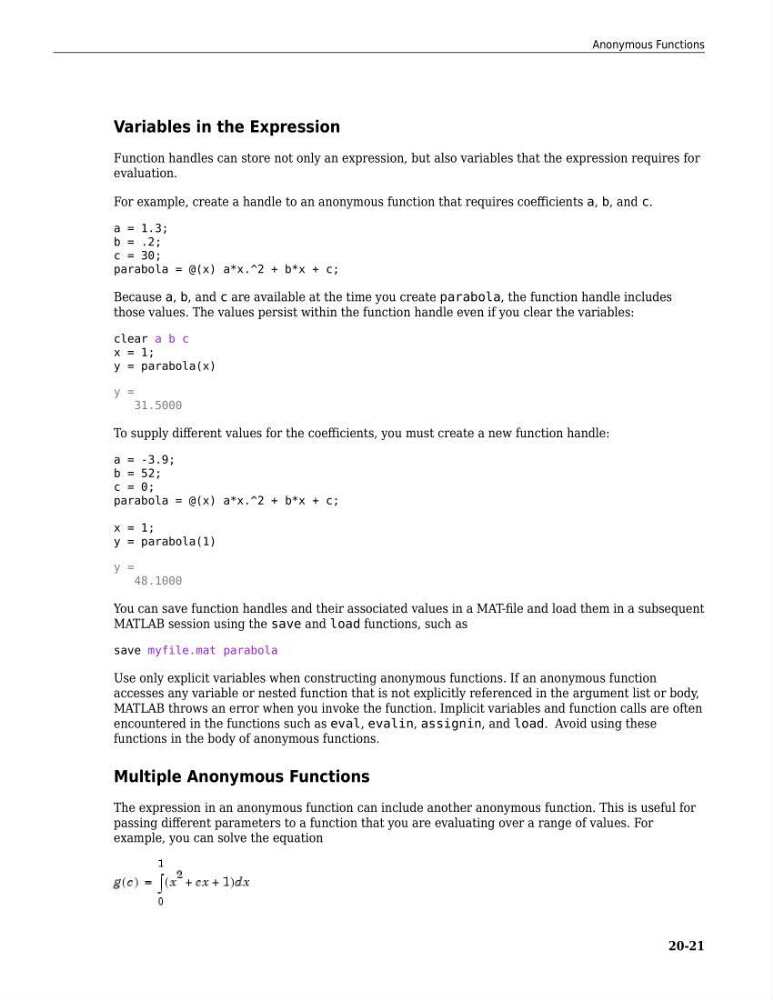
Multiple Anonymous Functions
The expression in an anonymous function can include another anonymous function. This is useful for
passing different parameters to a function that you are evaluating over a range of values. For
example, you can solve the equation
Anonymous Functions
20-21
Function handles can store not only an expression, but also variables that the expression requires for
evaluation.
For example, create a handle to an anonymous function that requires coefficients a, b, and c.
a = 1.3;
b = .2;
c = 30;
parabola = @(x) a*x.^2 + b*x + c;
Because a, b, and c are available at the time you create parabola, the function handle includes
those values. The values persist within the function handle even if you clear the variables:
clear a b c
x = 1;
y = parabola(x)
y =
31.5000
To supply different values for the coefficients, you must create a new function handle:
a = -3.9;
b = 52;
c = 0;
parabola = @(x) a*x.^2 + b*x + c;
x = 1;
y = parabola(1)
y =
48.1000
You can save function handles and their associated values in a MAT-file and load them in a subsequent
MATLAB session using the save and load functions, such as
save myfile.mat parabola
Use only explicit variables when constructing anonymous functions. If an anonymous function
accesses any variable or nested function that is not explicitly referenced in the argument list or body,
MATLAB throws an error when you invoke the function. Implicit variables and function calls are often
encountered in the functions such as eval, evalin, assignin, and load. Avoid using these
functions in the body of anonymous functions.
Multiple Anonymous Functions
The expression in an anonymous function can include another anonymous function. This is useful for
passing different parameters to a function that you are evaluating over a range of values. For
example, you can solve the equation
Anonymous Functions
20-21