

[n, m] = size(x);
rowTotals = zeros(1,n);
for i = 1:n
rowTotals(i) = addToSum;
end
function colsum = addToSum
colsum = 0;
thisrow = x(i,:);
for i = 1:m
colsum = colsum + thisrow(i);
end
end
end
When you run this code, instead of returning the sum of the values in each row and displaying:
ans =
10
10
MATLAB displays:
ans =
0
0
0
0
0
0
0
0
0
10
Examine the code by following these steps:
1
On the Home tab in the Environment section, click
Preferences and select MATLAB >
Colors > Programming tools. Ensure that Automatically highlight and Variables with
shared scope are selected.
2
Copy the rowsum code into the Editor.
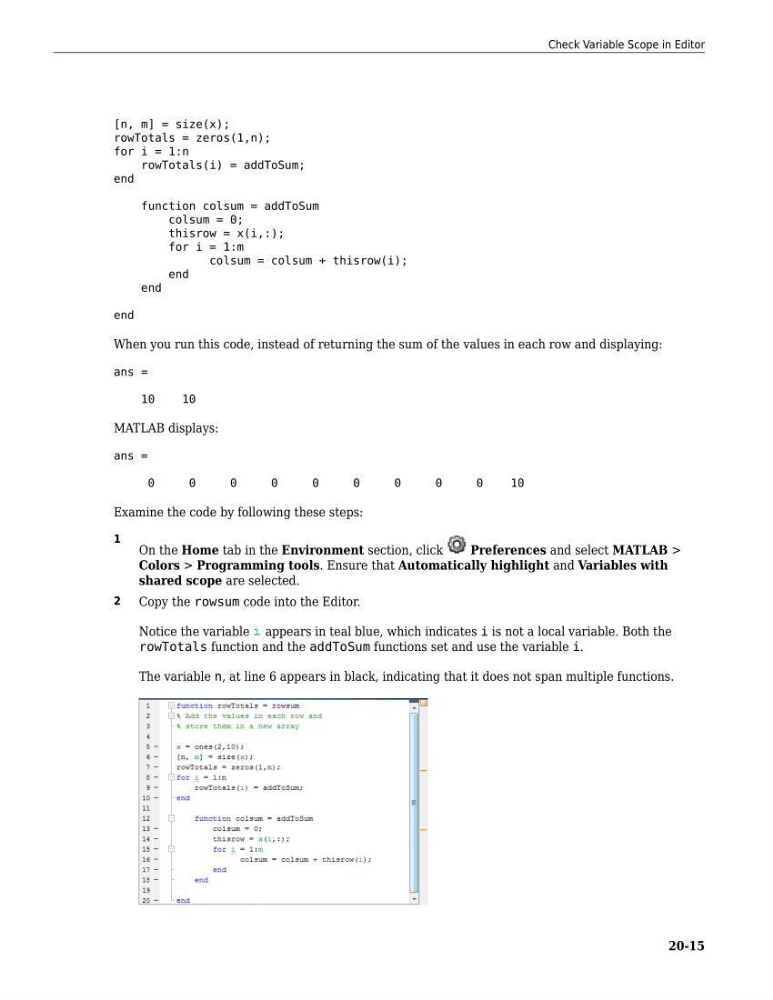
Notice the variable appears in teal blue, which indicates i is not a local variable. Both the
rowTotals function and the addToSum functions set and use the variable i.
The variable n, at line 6 appears in black, indicating that it does not span multiple functions.
Check Variable Scope in Editor
20-15
rowTotals = zeros(1,n);
for i = 1:n
rowTotals(i) = addToSum;
end
function colsum = addToSum
colsum = 0;
thisrow = x(i,:);
for i = 1:m
colsum = colsum + thisrow(i);
end
end
end
When you run this code, instead of returning the sum of the values in each row and displaying:
ans =
10
10
MATLAB displays:
ans =
0
0
0
0
0
0
0
0
0
10
Examine the code by following these steps:
1
On the Home tab in the Environment section, click
Preferences and select MATLAB >
Colors > Programming tools. Ensure that Automatically highlight and Variables with
shared scope are selected.
2
Copy the rowsum code into the Editor.
Notice the variable appears in teal blue, which indicates i is not a local variable. Both the
rowTotals function and the addToSum functions set and use the variable i.
The variable n, at line 6 appears in black, indicating that it does not span multiple functions.
Check Variable Scope in Editor
20-15