

Create a Real-time Dashboard Using the Live Editor
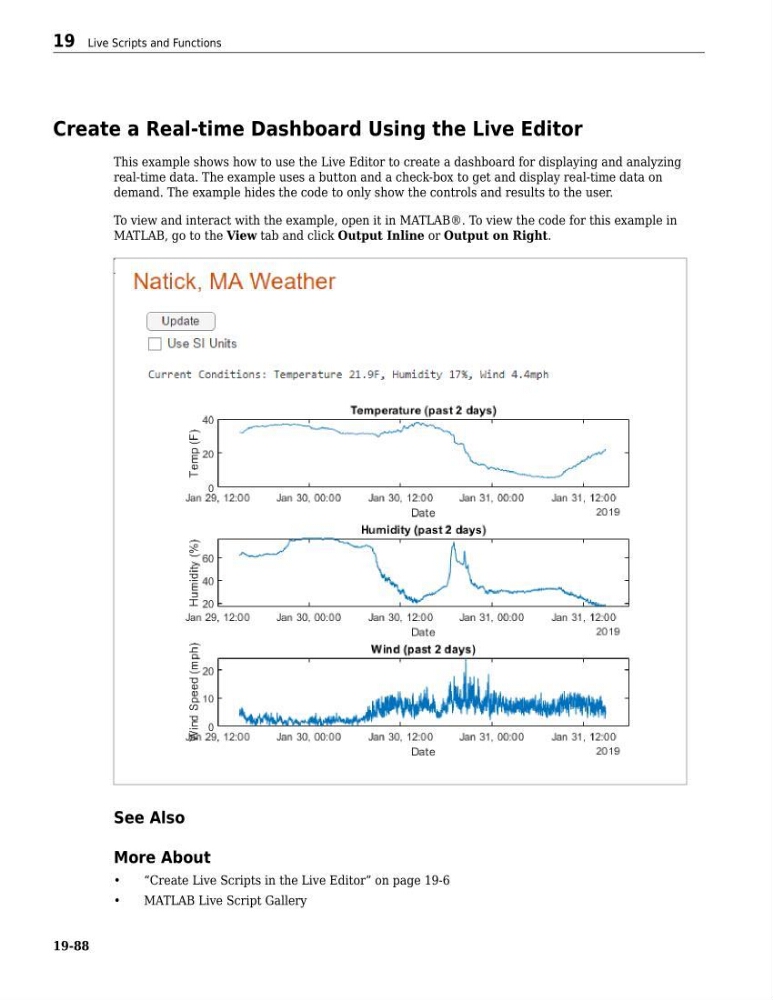
This example shows how to use the Live Editor to create a dashboard for displaying and analyzing
real-time data. The example uses a button and a check-box to get and display real-time data on
demand. The example hides the code to only show the controls and results to the user.
To view and interact with the example, open it in MATLAB®. To view the code for this example in
MATLAB, go to the View tab and click Output Inline or Output on Right.
See Also
More About
•
“Create Live Scripts in the Live Editor” on page 19-6
•
MATLAB Live Script Gallery
19 Live Scripts and Functions
19-88
This example shows how to use the Live Editor to create a dashboard for displaying and analyzing
real-time data. The example uses a button and a check-box to get and display real-time data on
demand. The example hides the code to only show the controls and results to the user.
To view and interact with the example, open it in MATLAB®. To view the code for this example in
MATLAB, go to the View tab and click Output Inline or Output on Right.
See Also
More About
•
“Create Live Scripts in the Live Editor” on page 19-6
•
MATLAB Live Script Gallery
19 Live Scripts and Functions
19-88