

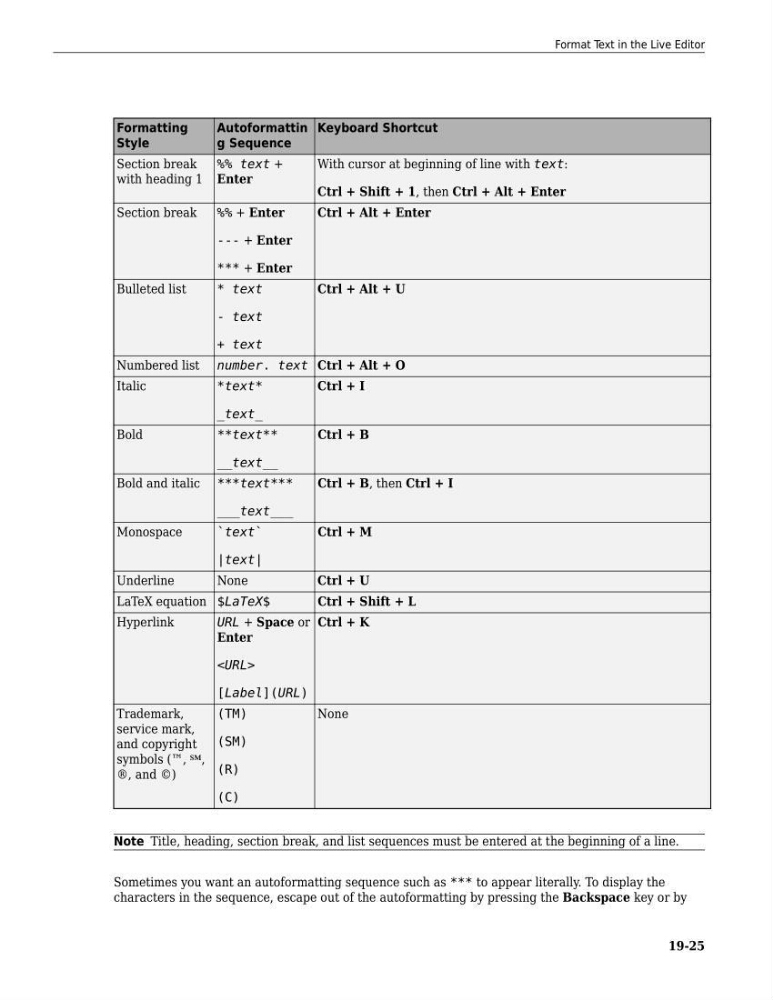
Formatting
Style
Autoformattin
g Sequence
Keyboard Shortcut
Section break
with heading 1
%% text +
Enter
With cursor at beginning of line with text:
Ctrl + Shift + 1, then Ctrl + Alt + Enter
Section break
%% + Enter
--- + Enter
*** + Enter
Ctrl + Alt + Enter
Bulleted list
* text
- text
+ text
Ctrl + Alt + U
Numbered list number. text Ctrl + Alt + O
Italic
*text*
_text_
Ctrl + I
Bold
**text**
__text__
Ctrl + B
Bold and italic ***text***
___text___
Ctrl + B, then Ctrl + I
Monospace
`text`
|text|
Ctrl + M
Underline
None
Ctrl + U
LaTeX equation $LaTeX$
Ctrl + Shift + L
Hyperlink
URL + Space or
Enter
[Label](URL)
Ctrl + K
Trademark,
service mark,
and copyright
symbols (™, ℠,
®, and ©)
(TM)
(SM)
(R)
(C)
None
Note Title, heading, section break, and list sequences must be entered at the beginning of a line.
Sometimes you want an autoformatting sequence such as *** to appear literally. To display the
characters in the sequence, escape out of the autoformatting by pressing the Backspace key or by
Format Text in the Live Editor
19-25
Style
Autoformattin
g Sequence
Keyboard Shortcut
Section break
with heading 1
%% text +
Enter
With cursor at beginning of line with text:
Ctrl + Shift + 1, then Ctrl + Alt + Enter
Section break
%% + Enter
--- + Enter
*** + Enter
Ctrl + Alt + Enter
Bulleted list
* text
- text
+ text
Ctrl + Alt + U
Numbered list number. text Ctrl + Alt + O
Italic
*text*
_text_
Ctrl + I
Bold
**text**
__text__
Ctrl + B
Bold and italic ***text***
___text___
Ctrl + B, then Ctrl + I
Monospace
`text`
|text|
Ctrl + M
Underline
None
Ctrl + U
LaTeX equation $LaTeX$
Ctrl + Shift + L
Hyperlink
URL + Space or
Enter
[Label](URL)
Ctrl + K
Trademark,
service mark,
and copyright
symbols (™, ℠,
®, and ©)
(TM)
(SM)
(R)
(C)
None
Note Title, heading, section break, and list sequences must be entered at the beginning of a line.
Sometimes you want an autoformatting sequence such as *** to appear literally. To display the
characters in the sequence, escape out of the autoformatting by pressing the Backspace key or by
Format Text in the Live Editor
19-25