

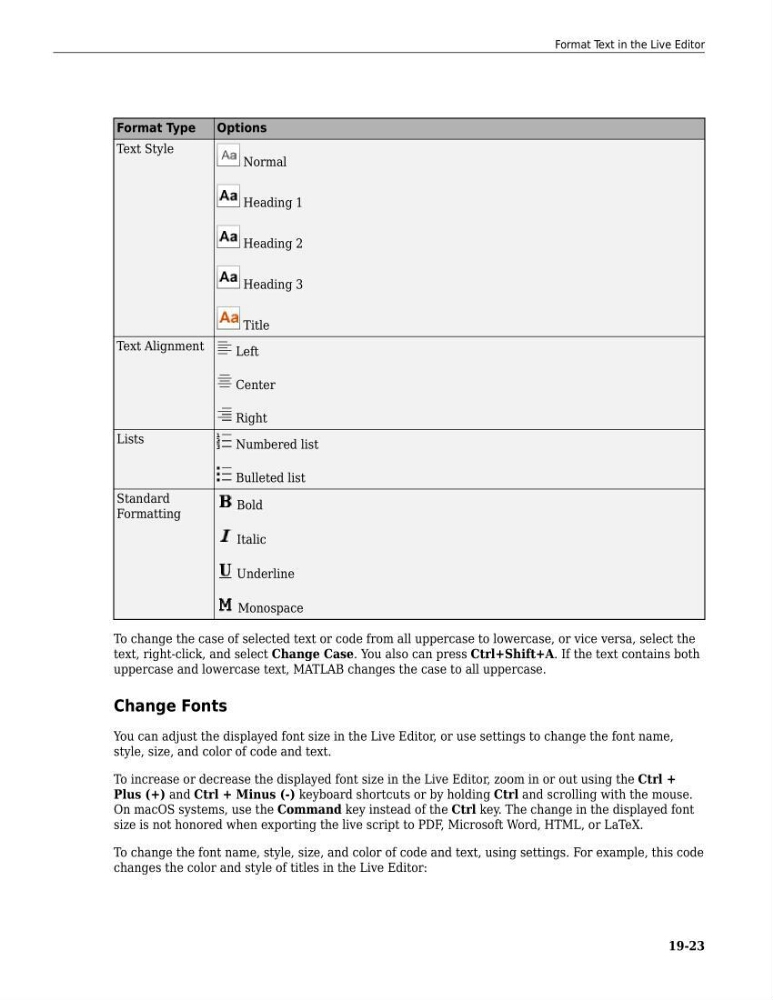
Format Type
Options
Text Style
Normal
Heading 1
Heading 2
Heading 3
Title
Text Alignment
Left
Center
Right
Lists
Numbered list
Bulleted list
Standard
Formatting
Bold
Italic
Underline
Monospace
To change the case of selected text or code from all uppercase to lowercase, or vice versa, select the
text, right-click, and select Change Case. You also can press Ctrl+Shift+A. If the text contains both
uppercase and lowercase text, MATLAB changes the case to all uppercase.
Change Fonts
You can adjust the displayed font size in the Live Editor, or use settings to change the font name,
style, size, and color of code and text.
To increase or decrease the displayed font size in the Live Editor, zoom in or out using the Ctrl +
Plus (+) and Ctrl + Minus (-) keyboard shortcuts or by holding Ctrl and scrolling with the mouse.
On macOS systems, use the Command key instead of the Ctrl key. The change in the displayed font
size is not honored when exporting the live script to PDF, Microsoft Word, HTML, or LaTeX.
To change the font name, style, size, and color of code and text, using settings. For example, this code
changes the color and style of titles in the Live Editor:
Format Text in the Live Editor
19-23
Options
Text Style
Normal
Heading 1
Heading 2
Heading 3
Title
Text Alignment
Left
Center
Right
Lists
Numbered list
Bulleted list
Standard
Formatting
Bold
Italic
Underline
Monospace
To change the case of selected text or code from all uppercase to lowercase, or vice versa, select the
text, right-click, and select Change Case. You also can press Ctrl+Shift+A. If the text contains both
uppercase and lowercase text, MATLAB changes the case to all uppercase.
Change Fonts
You can adjust the displayed font size in the Live Editor, or use settings to change the font name,
style, size, and color of code and text.
To increase or decrease the displayed font size in the Live Editor, zoom in or out using the Ctrl +
Plus (+) and Ctrl + Minus (-) keyboard shortcuts or by holding Ctrl and scrolling with the mouse.
On macOS systems, use the Command key instead of the Ctrl key. The change in the displayed font
size is not honored when exporting the live script to PDF, Microsoft Word, HTML, or LaTeX.
To change the font name, style, size, and color of code and text, using settings. For example, this code
changes the color and style of titles in the Live Editor:
Format Text in the Live Editor
19-23