

scatter(Age(Smoker==0),Systolic(Smoker==0));
hold off
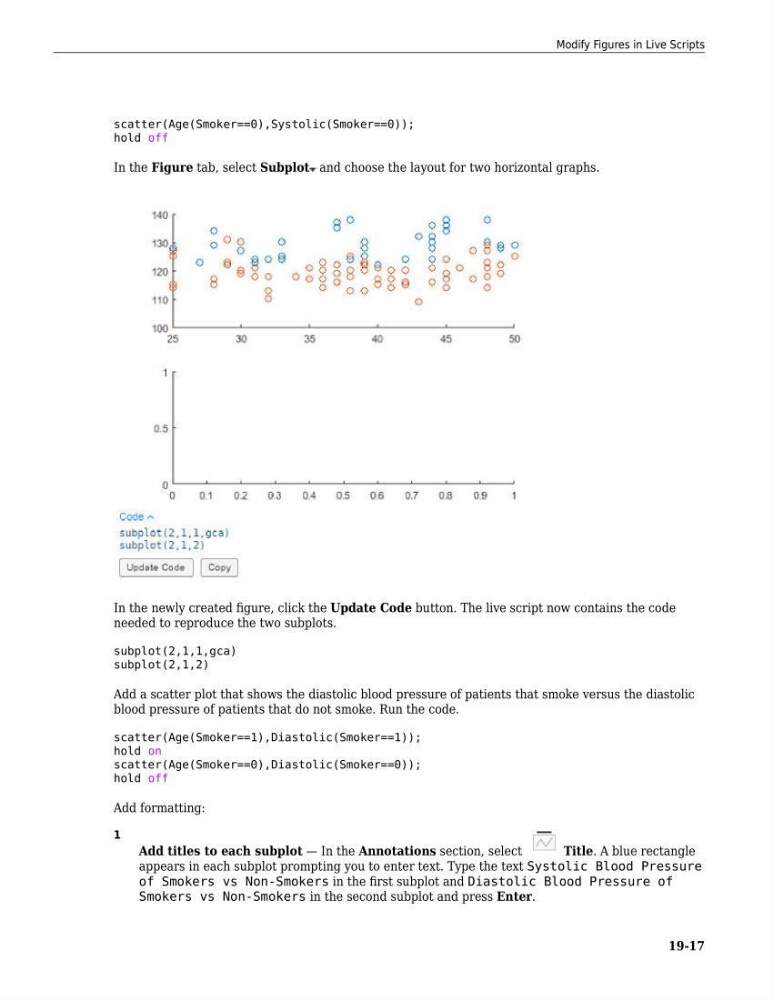
In the Figure tab, select Subplot and choose the layout for two horizontal graphs.
In the newly created figure, click the Update Code button. The live script now contains the code
needed to reproduce the two subplots.
subplot(2,1,1,gca)
subplot(2,1,2)
Add a scatter plot that shows the diastolic blood pressure of patients that smoke versus the diastolic
blood pressure of patients that do not smoke. Run the code.
scatter(Age(Smoker==1),Diastolic(Smoker==1));
hold on
scatter(Age(Smoker==0),Diastolic(Smoker==0));
hold off
Add formatting:
1
Add titles to each subplot — In the Annotations section, select
Title. A blue rectangle
appears in each subplot prompting you to enter text. Type the text Systolic Blood Pressure
of Smokers vs Non-Smokers in the first subplot and Diastolic Blood Pressure of
Smokers vs Non-Smokers in the second subplot and press Enter.
Modify Figures in Live Scripts
19-17
hold off
In the Figure tab, select Subplot and choose the layout for two horizontal graphs.
In the newly created figure, click the Update Code button. The live script now contains the code
needed to reproduce the two subplots.
subplot(2,1,1,gca)
subplot(2,1,2)
Add a scatter plot that shows the diastolic blood pressure of patients that smoke versus the diastolic
blood pressure of patients that do not smoke. Run the code.
scatter(Age(Smoker==1),Diastolic(Smoker==1));
hold on
scatter(Age(Smoker==0),Diastolic(Smoker==0));
hold off
Add formatting:
1
Add titles to each subplot — In the Annotations section, select
Title. A blue rectangle
appears in each subplot prompting you to enter text. Type the text Systolic Blood Pressure
of Smokers vs Non-Smokers in the first subplot and Diastolic Blood Pressure of
Smokers vs Non-Smokers in the second subplot and press Enter.
Modify Figures in Live Scripts
19-17