

Description of Map Class
A Map is actually an object, or instance, of a MATLAB class called Map. It is also a handle object and,
as such, it behaves like any other MATLAB handle object. This section gives a brief overview of the
Map class. For more details, see the containers.Map reference page.
Properties of Map Class
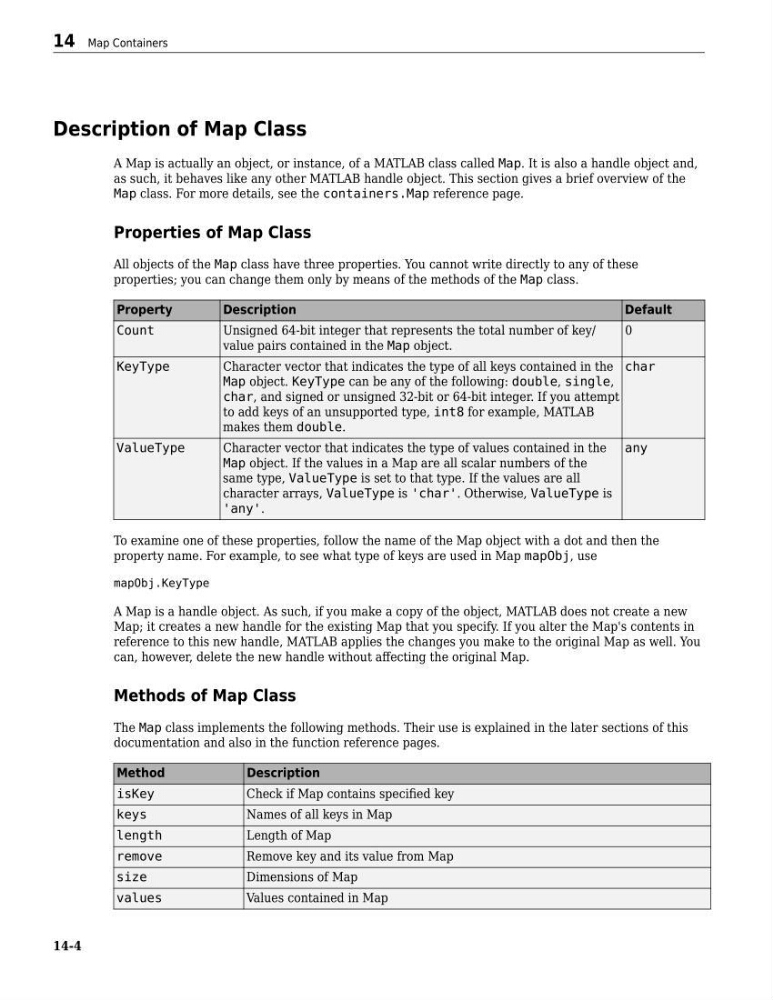
All objects of the Map class have three properties. You cannot write directly to any of these
properties; you can change them only by means of the methods of the Map class.
Property
Description
Default
Count
Unsigned 64-bit integer that represents the total number of key/
value pairs contained in the Map object.
0
KeyType
Character vector that indicates the type of all keys contained in the
Map object. KeyType can be any of the following: double, single,
char, and signed or unsigned 32-bit or 64-bit integer. If you attempt
to add keys of an unsupported type, int8 for example, MATLAB
makes them double.
char
ValueType
Character vector that indicates the type of values contained in the
Map object. If the values in a Map are all scalar numbers of the
same type, ValueType is set to that type. If the values are all
character arrays, ValueType is 'char'. Otherwise, ValueType is
'any'.
any
To examine one of these properties, follow the name of the Map object with a dot and then the
property name. For example, to see what type of keys are used in Map mapObj, use
mapObj.KeyType
A Map is a handle object. As such, if you make a copy of the object, MATLAB does not create a new
Map; it creates a new handle for the existing Map that you specify. If you alter the Map's contents in
reference to this new handle, MATLAB applies the changes you make to the original Map as well. You
can, however, delete the new handle without affecting the original Map.
Methods of Map Class
The Map class implements the following methods. Their use is explained in the later sections of this
documentation and also in the function reference pages.
Method
Description
isKey
Check if Map contains specified key
keys
Names of all keys in Map
length
Length of Map
remove
Remove key and its value from Map
size
Dimensions of Map
values
Values contained in Map
14 Map Containers
14-4
A Map is actually an object, or instance, of a MATLAB class called Map. It is also a handle object and,
as such, it behaves like any other MATLAB handle object. This section gives a brief overview of the
Map class. For more details, see the containers.Map reference page.
Properties of Map Class
All objects of the Map class have three properties. You cannot write directly to any of these
properties; you can change them only by means of the methods of the Map class.
Property
Description
Default
Count
Unsigned 64-bit integer that represents the total number of key/
value pairs contained in the Map object.
0
KeyType
Character vector that indicates the type of all keys contained in the
Map object. KeyType can be any of the following: double, single,
char, and signed or unsigned 32-bit or 64-bit integer. If you attempt
to add keys of an unsupported type, int8 for example, MATLAB
makes them double.
char
ValueType
Character vector that indicates the type of values contained in the
Map object. If the values in a Map are all scalar numbers of the
same type, ValueType is set to that type. If the values are all
character arrays, ValueType is 'char'. Otherwise, ValueType is
'any'.
any
To examine one of these properties, follow the name of the Map object with a dot and then the
property name. For example, to see what type of keys are used in Map mapObj, use
mapObj.KeyType
A Map is a handle object. As such, if you make a copy of the object, MATLAB does not create a new
Map; it creates a new handle for the existing Map that you specify. If you alter the Map's contents in
reference to this new handle, MATLAB applies the changes you make to the original Map as well. You
can, however, delete the new handle without affecting the original Map.
Methods of Map Class
The Map class implements the following methods. Their use is explained in the later sections of this
documentation and also in the function reference pages.
Method
Description
isKey
Check if Map contains specified key
keys
Names of all keys in Map
length
Length of Map
remove
Remove key and its value from Map
size
Dimensions of Map
values
Values contained in Map
14 Map Containers
14-4