

Structure Arrays
When you have data that you want to organize by name, you can use structures to store it. Structures
store data in containers called fields, which you can then access by the names you specify. Use dot
notation to create, assign, and access data in structure fields. If the value stored in a field is an array,
then you can use array indexing to access elements of the array. When you store multiple structures
as a structure array, you can use array indexing and dot notation to access individual structures and
their fields.
Create Scalar Structure
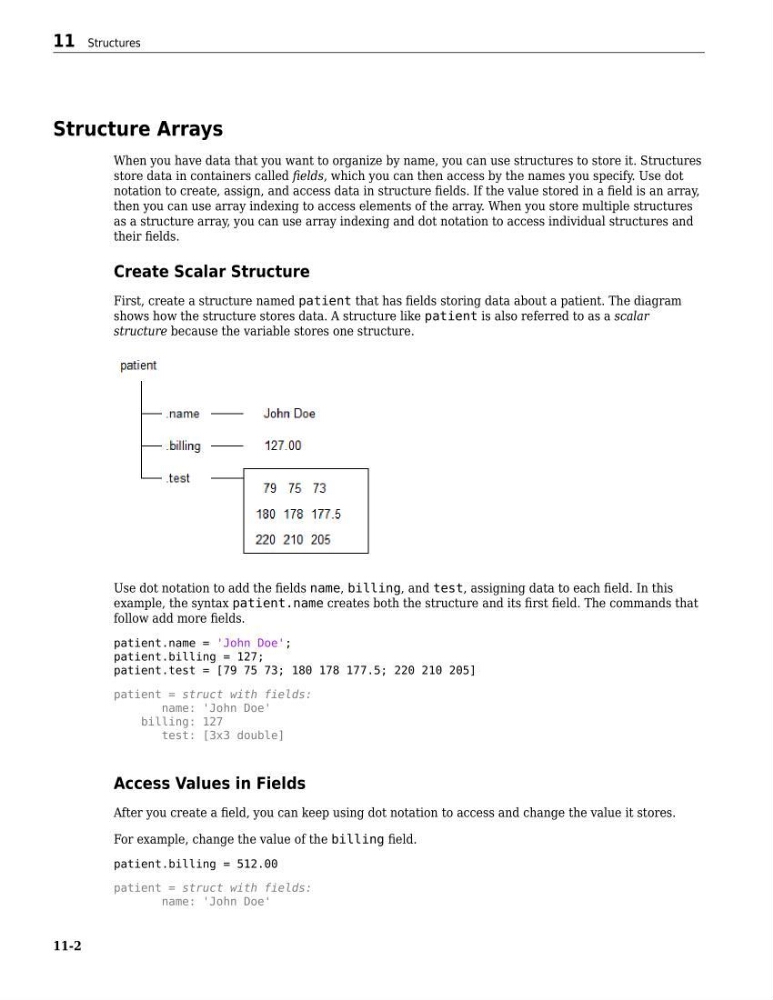
First, create a structure named patient that has fields storing data about a patient. The diagram
shows how the structure stores data. A structure like patient is also referred to as a scalar
structure because the variable stores one structure.
Use dot notation to add the fields name, billing, and test, assigning data to each field. In this
example, the syntax patient.name creates both the structure and its first field. The commands that
follow add more fields.
patient.name = 'John Doe';
patient.billing = 127;
patient.test = [79 75 73; 180 178 177.5; 220 210 205]
patient = struct with fields:
name: 'John Doe'
billing: 127
test: [3x3 double]
Access Values in Fields
After you create a field, you can keep using dot notation to access and change the value it stores.
For example, change the value of the billing field.
patient.billing = 512.00
patient = struct with fields:
name: 'John Doe'
11 Structures
11-2
When you have data that you want to organize by name, you can use structures to store it. Structures
store data in containers called fields, which you can then access by the names you specify. Use dot
notation to create, assign, and access data in structure fields. If the value stored in a field is an array,
then you can use array indexing to access elements of the array. When you store multiple structures
as a structure array, you can use array indexing and dot notation to access individual structures and
their fields.
Create Scalar Structure
First, create a structure named patient that has fields storing data about a patient. The diagram
shows how the structure stores data. A structure like patient is also referred to as a scalar
structure because the variable stores one structure.
Use dot notation to add the fields name, billing, and test, assigning data to each field. In this
example, the syntax patient.name creates both the structure and its first field. The commands that
follow add more fields.
patient.name = 'John Doe';
patient.billing = 127;
patient.test = [79 75 73; 180 178 177.5; 220 210 205]
patient = struct with fields:
name: 'John Doe'
billing: 127
test: [3x3 double]
Access Values in Fields
After you create a field, you can keep using dot notation to access and change the value it stores.
For example, change the value of the billing field.
patient.billing = 512.00
patient = struct with fields:
name: 'John Doe'
11 Structures
11-2