

disp('A')
and returns
A
Avoid Common Syntax Mistakes
Suppose that your workspace contains these variables:
filename = 'accounts.txt';
A = int8(1:8);
B = A;
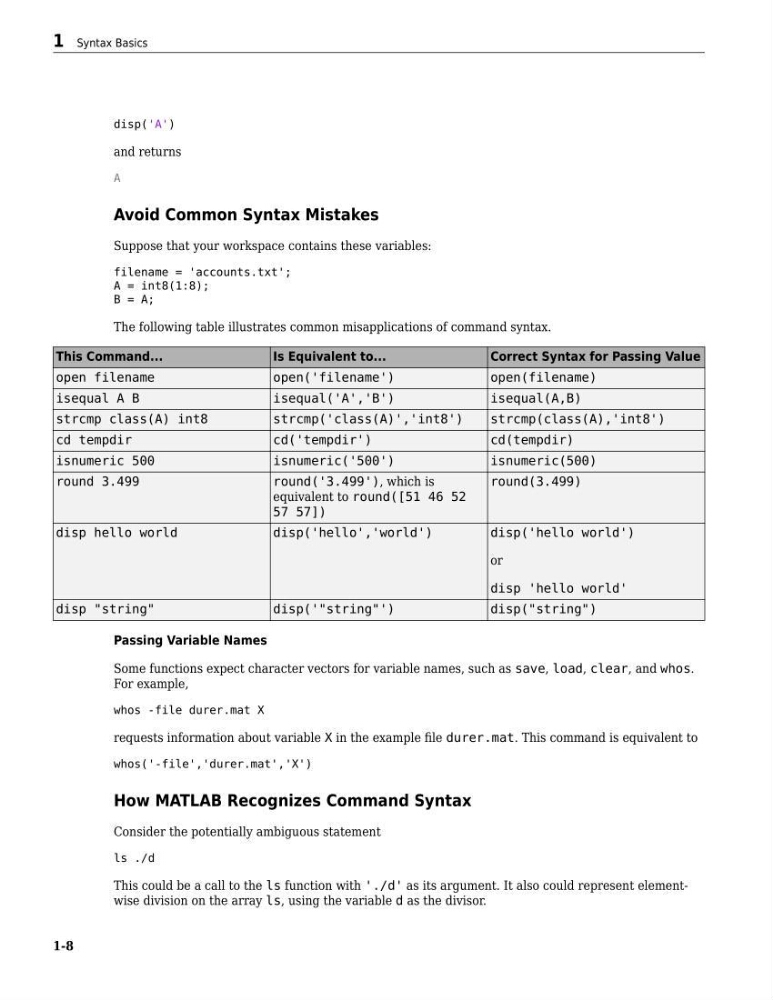
The following table illustrates common misapplications of command syntax.
This Command...
Is Equivalent to...
Correct Syntax for Passing Value
open filename
open('filename')
open(filename)
isequal A B
isequal('A','B')
isequal(A,B)
strcmp class(A) int8
strcmp('class(A)','int8')
strcmp(class(A),'int8')
cd tempdir
cd('tempdir')
cd(tempdir)
isnumeric 500
isnumeric('500')
isnumeric(500)
round 3.499
round('3.499'), which is
equivalent to round([51 46 52
57 57])
round(3.499)
disp hello world
disp('hello','world')
disp('hello world')
or
disp 'hello world'
disp "string"
disp('"string"')
disp("string")
Passing Variable Names
Some functions expect character vectors for variable names, such as save, load, clear, and whos.
For example,
whos -file durer.mat X
requests information about variable X in the example file durer.mat. This command is equivalent to
whos('-file','durer.mat','X')
How MATLAB Recognizes Command Syntax
Consider the potentially ambiguous statement
ls ./d
This could be a call to the ls function with './d' as its argument. It also could represent elementwise division on the array ls, using the variable d as the divisor.
1 Syntax Basics
1-8
and returns
A
Avoid Common Syntax Mistakes
Suppose that your workspace contains these variables:
filename = 'accounts.txt';
A = int8(1:8);
B = A;
The following table illustrates common misapplications of command syntax.
This Command...
Is Equivalent to...
Correct Syntax for Passing Value
open filename
open('filename')
open(filename)
isequal A B
isequal('A','B')
isequal(A,B)
strcmp class(A) int8
strcmp('class(A)','int8')
strcmp(class(A),'int8')
cd tempdir
cd('tempdir')
cd(tempdir)
isnumeric 500
isnumeric('500')
isnumeric(500)
round 3.499
round('3.499'), which is
equivalent to round([51 46 52
57 57])
round(3.499)
disp hello world
disp('hello','world')
disp('hello world')
or
disp 'hello world'
disp "string"
disp('"string"')
disp("string")
Passing Variable Names
Some functions expect character vectors for variable names, such as save, load, clear, and whos.
For example,
whos -file durer.mat X
requests information about variable X in the example file durer.mat. This command is equivalent to
whos('-file','durer.mat','X')
How MATLAB Recognizes Command Syntax
Consider the potentially ambiguous statement
ls ./d
This could be a call to the ls function with './d' as its argument. It also could represent elementwise division on the array ls, using the variable d as the divisor.
1 Syntax Basics
1-8