

load indoors
load outdoors
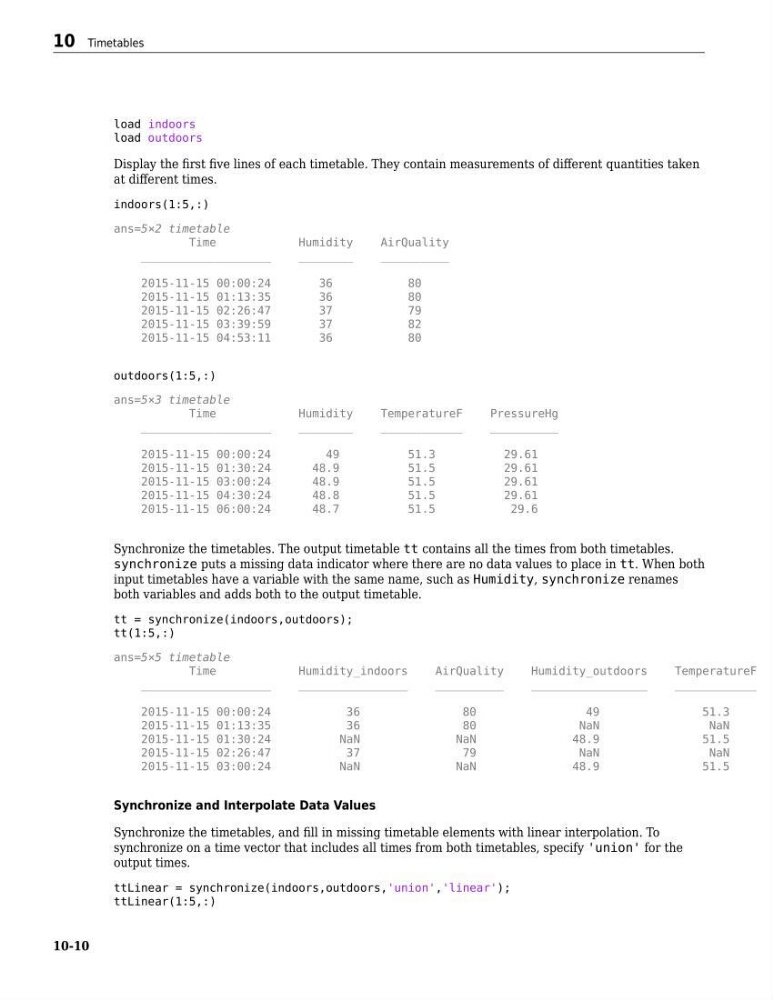
Display the first five lines of each timetable. They contain measurements of different quantities taken
at different times.
indoors(1:5,:)
ans=5×2 timetable
Time
Humidity
AirQuality
___________________
________
__________
2015-11-15 00:00:24
36
80
2015-11-15 01:13:35
36
80
2015-11-15 02:26:47
37
79
2015-11-15 03:39:59
37
82
2015-11-15 04:53:11
36
80
outdoors(1:5,:)
ans=5×3 timetable
Time
Humidity
TemperatureF
PressureHg
___________________
________
____________
__________
2015-11-15 00:00:24
49
51.3
29.61
2015-11-15 01:30:24
48.9
51.5
29.61
2015-11-15 03:00:24
48.9
51.5
29.61
2015-11-15 04:30:24
48.8
51.5
29.61
2015-11-15 06:00:24
48.7
51.5
29.6
Synchronize the timetables. The output timetable tt contains all the times from both timetables.
synchronize puts a missing data indicator where there are no data values to place in tt. When both
input timetables have a variable with the same name, such as Humidity, synchronize renames
both variables and adds both to the output timetable.
tt = synchronize(indoors,outdoors);
tt(1:5,:)
ans=5×5 timetable
Time
Humidity_indoors
AirQuality
Humidity_outdoors
TemperatureF
___________________
________________
__________
_________________
____________
2015-11-15 00:00:24
36
80
49
51.3
2015-11-15 01:13:35
36
80
NaN
NaN
2015-11-15 01:30:24
NaN
NaN
48.9
51.5
2015-11-15 02:26:47
37
79
NaN
NaN
2015-11-15 03:00:24
NaN
NaN
48.9
51.5
Synchronize and Interpolate Data Values
Synchronize the timetables, and fill in missing timetable elements with linear interpolation. To
synchronize on a time vector that includes all times from both timetables, specify 'union' for the
output times.
ttLinear = synchronize(indoors,outdoors,'union','linear');
ttLinear(1:5,:)
10 Timetables
10-10
load outdoors
Display the first five lines of each timetable. They contain measurements of different quantities taken
at different times.
indoors(1:5,:)
ans=5×2 timetable
Time
Humidity
AirQuality
___________________
________
__________
2015-11-15 00:00:24
36
80
2015-11-15 01:13:35
36
80
2015-11-15 02:26:47
37
79
2015-11-15 03:39:59
37
82
2015-11-15 04:53:11
36
80
outdoors(1:5,:)
ans=5×3 timetable
Time
Humidity
TemperatureF
PressureHg
___________________
________
____________
__________
2015-11-15 00:00:24
49
51.3
29.61
2015-11-15 01:30:24
48.9
51.5
29.61
2015-11-15 03:00:24
48.9
51.5
29.61
2015-11-15 04:30:24
48.8
51.5
29.61
2015-11-15 06:00:24
48.7
51.5
29.6
Synchronize the timetables. The output timetable tt contains all the times from both timetables.
synchronize puts a missing data indicator where there are no data values to place in tt. When both
input timetables have a variable with the same name, such as Humidity, synchronize renames
both variables and adds both to the output timetable.
tt = synchronize(indoors,outdoors);
tt(1:5,:)
ans=5×5 timetable
Time
Humidity_indoors
AirQuality
Humidity_outdoors
TemperatureF
___________________
________________
__________
_________________
____________
2015-11-15 00:00:24
36
80
49
51.3
2015-11-15 01:13:35
36
80
NaN
NaN
2015-11-15 01:30:24
NaN
NaN
48.9
51.5
2015-11-15 02:26:47
37
79
NaN
NaN
2015-11-15 03:00:24
NaN
NaN
48.9
51.5
Synchronize and Interpolate Data Values
Synchronize the timetables, and fill in missing timetable elements with linear interpolation. To
synchronize on a time vector that includes all times from both timetables, specify 'union' for the
output times.
ttLinear = synchronize(indoors,outdoors,'union','linear');
ttLinear(1:5,:)
10 Timetables
10-10