

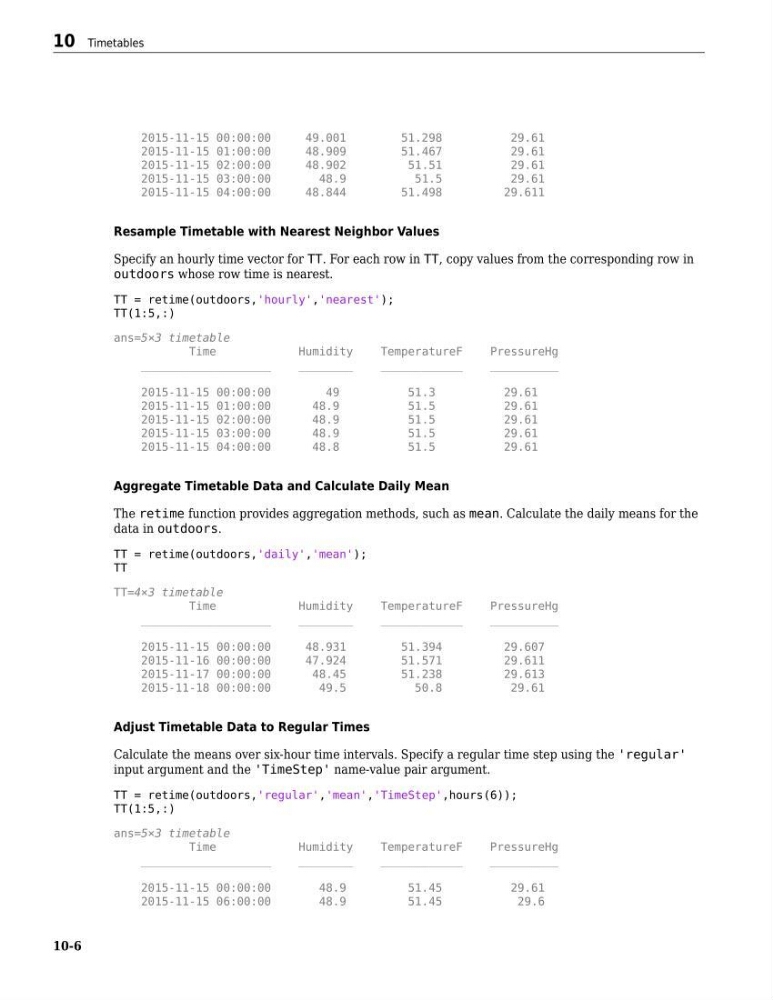
2015-11-15 00:00:00
49.001
51.298
29.61
2015-11-15 01:00:00
48.909
51.467
29.61
2015-11-15 02:00:00
48.902
51.51
29.61
2015-11-15 03:00:00
48.9
51.5
29.61
2015-11-15 04:00:00
48.844
51.498
29.611
Resample Timetable with Nearest Neighbor Values
Specify an hourly time vector for TT. For each row in TT, copy values from the corresponding row in
outdoors whose row time is nearest.
TT = retime(outdoors,'hourly','nearest');
TT(1:5,:)
ans=5×3 timetable
Time
Humidity
TemperatureF
PressureHg
___________________
________
____________
__________
2015-11-15 00:00:00
49
51.3
29.61
2015-11-15 01:00:00
48.9
51.5
29.61
2015-11-15 02:00:00
48.9
51.5
29.61
2015-11-15 03:00:00
48.9
51.5
29.61
2015-11-15 04:00:00
48.8
51.5
29.61
Aggregate Timetable Data and Calculate Daily Mean
The retime function provides aggregation methods, such as mean. Calculate the daily means for the
data in outdoors.
TT = retime(outdoors,'daily','mean');
TT
TT=4×3 timetable
Time
Humidity
TemperatureF
PressureHg
___________________
________
____________
__________
2015-11-15 00:00:00
48.931
51.394
29.607
2015-11-16 00:00:00
47.924
51.571
29.611
2015-11-17 00:00:00
48.45
51.238
29.613
2015-11-18 00:00:00
49.5
50.8
29.61
Adjust Timetable Data to Regular Times
Calculate the means over six-hour time intervals. Specify a regular time step using the 'regular'
input argument and the 'TimeStep' name-value pair argument.
TT = retime(outdoors,'regular','mean','TimeStep',hours(6));
TT(1:5,:)
ans=5×3 timetable
Time
Humidity
TemperatureF
PressureHg
___________________
________
____________
__________
2015-11-15 00:00:00
48.9
51.45
29.61
2015-11-15 06:00:00
48.9
51.45
29.6
10 Timetables
10-6
49.001
51.298
29.61
2015-11-15 01:00:00
48.909
51.467
29.61
2015-11-15 02:00:00
48.902
51.51
29.61
2015-11-15 03:00:00
48.9
51.5
29.61
2015-11-15 04:00:00
48.844
51.498
29.611
Resample Timetable with Nearest Neighbor Values
Specify an hourly time vector for TT. For each row in TT, copy values from the corresponding row in
outdoors whose row time is nearest.
TT = retime(outdoors,'hourly','nearest');
TT(1:5,:)
ans=5×3 timetable
Time
Humidity
TemperatureF
PressureHg
___________________
________
____________
__________
2015-11-15 00:00:00
49
51.3
29.61
2015-11-15 01:00:00
48.9
51.5
29.61
2015-11-15 02:00:00
48.9
51.5
29.61
2015-11-15 03:00:00
48.9
51.5
29.61
2015-11-15 04:00:00
48.8
51.5
29.61
Aggregate Timetable Data and Calculate Daily Mean
The retime function provides aggregation methods, such as mean. Calculate the daily means for the
data in outdoors.
TT = retime(outdoors,'daily','mean');
TT
TT=4×3 timetable
Time
Humidity
TemperatureF
PressureHg
___________________
________
____________
__________
2015-11-15 00:00:00
48.931
51.394
29.607
2015-11-16 00:00:00
47.924
51.571
29.611
2015-11-17 00:00:00
48.45
51.238
29.613
2015-11-18 00:00:00
49.5
50.8
29.61
Adjust Timetable Data to Regular Times
Calculate the means over six-hour time intervals. Specify a regular time step using the 'regular'
input argument and the 'TimeStep' name-value pair argument.
TT = retime(outdoors,'regular','mean','TimeStep',hours(6));
TT(1:5,:)
ans=5×3 timetable
Time
Humidity
TemperatureF
PressureHg
___________________
________
____________
__________
2015-11-15 00:00:00
48.9
51.45
29.61
2015-11-15 06:00:00
48.9
51.45
29.6
10 Timetables
10-6