

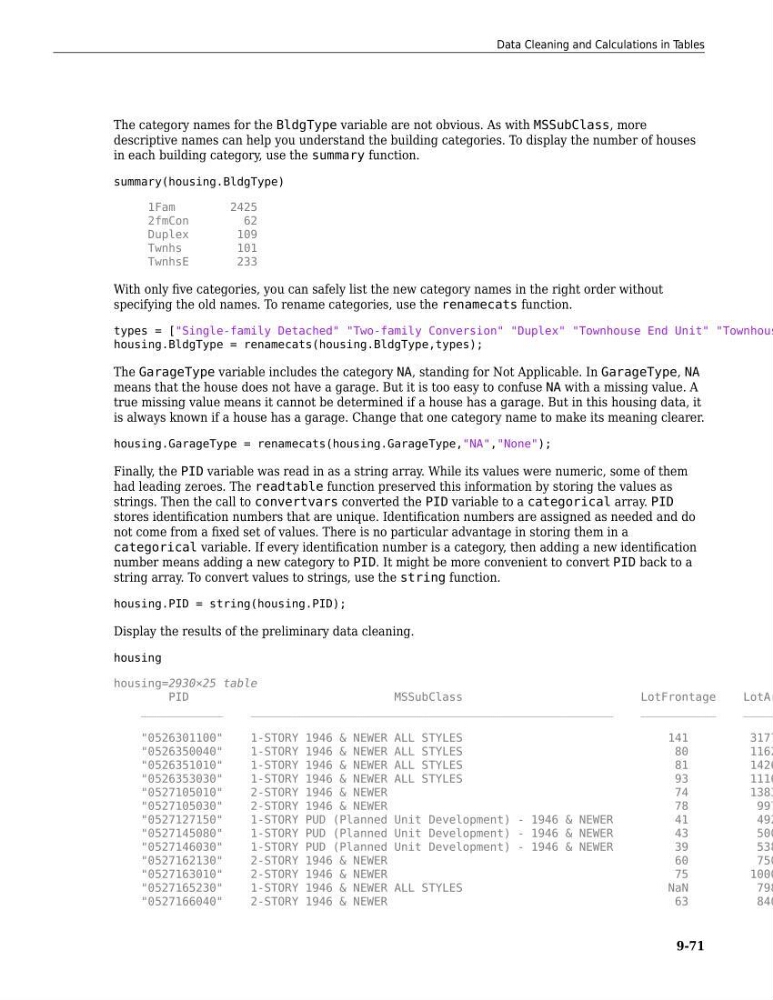
The category names for the BldgType variable are not obvious. As with MSSubClass, more
descriptive names can help you understand the building categories. To display the number of houses
in each building category, use the summary function.
summary(housing.BldgType)
1Fam
2425
2fmCon
62
Duplex
109
Twnhs
101
TwnhsE
233
With only five categories, you can safely list the new category names in the right order without
specifying the old names. To rename categories, use the renamecats function.
types = ["Single-family Detached" "Two-family Conversion" "Duplex" "Townhouse End Unit" "Townhous
housing.BldgType = renamecats(housing.BldgType,types);
The GarageType variable includes the category NA, standing for Not Applicable. In GarageType, NA
means that the house does not have a garage. But it is too easy to confuse NA with a missing value. A
true missing value means it cannot be determined if a house has a garage. But in this housing data, it
is always known if a house has a garage. Change that one category name to make its meaning clearer.
housing.GarageType = renamecats(housing.GarageType,"NA","None");
Finally, the PID variable was read in as a string array. While its values were numeric, some of them
had leading zeroes. The readtable function preserved this information by storing the values as
strings. Then the call to convertvars converted the PID variable to a categorical array. PID
stores identification numbers that are unique. Identification numbers are assigned as needed and do
not come from a fixed set of values. There is no particular advantage in storing them in a
categorical variable. If every identification number is a category, then adding a new identification
number means adding a new category to PID. It might be more convenient to convert PID back to a
string array. To convert values to strings, use the string function.
housing.PID = string(housing.PID);
Display the results of the preliminary data cleaning.
housing
housing=2930×25 table
PID
MSSubClass
LotFrontage
LotAr
____________
_____________________________________________________
___________
_____
"0526301100"
1-STORY 1946 & NEWER ALL STYLES
141
3177
"0526350040"
1-STORY 1946 & NEWER ALL STYLES
80
1162
"0526351010"
1-STORY 1946 & NEWER ALL STYLES
81
1426
"0526353030"
1-STORY 1946 & NEWER ALL STYLES
93
1116
"0527105010"
2-STORY 1946 & NEWER
74
1383
"0527105030"
2-STORY 1946 & NEWER
78
997
"0527127150"
1-STORY PUD (Planned Unit Development) - 1946 & NEWER
41
492
"0527145080"
1-STORY PUD (Planned Unit Development) - 1946 & NEWER
43
500
"0527146030"
1-STORY PUD (Planned Unit Development) - 1946 & NEWER
39
538
"0527162130"
2-STORY 1946 & NEWER
60
750
"0527163010"
2-STORY 1946 & NEWER
75
1000
"0527165230"
1-STORY 1946 & NEWER ALL STYLES
NaN
798
"0527166040"
2-STORY 1946 & NEWER
63
840
Data Cleaning and Calculations in Tables
9-71
descriptive names can help you understand the building categories. To display the number of houses
in each building category, use the summary function.
summary(housing.BldgType)
1Fam
2425
2fmCon
62
Duplex
109
Twnhs
101
TwnhsE
233
With only five categories, you can safely list the new category names in the right order without
specifying the old names. To rename categories, use the renamecats function.
types = ["Single-family Detached" "Two-family Conversion" "Duplex" "Townhouse End Unit" "Townhous
housing.BldgType = renamecats(housing.BldgType,types);
The GarageType variable includes the category NA, standing for Not Applicable. In GarageType, NA
means that the house does not have a garage. But it is too easy to confuse NA with a missing value. A
true missing value means it cannot be determined if a house has a garage. But in this housing data, it
is always known if a house has a garage. Change that one category name to make its meaning clearer.
housing.GarageType = renamecats(housing.GarageType,"NA","None");
Finally, the PID variable was read in as a string array. While its values were numeric, some of them
had leading zeroes. The readtable function preserved this information by storing the values as
strings. Then the call to convertvars converted the PID variable to a categorical array. PID
stores identification numbers that are unique. Identification numbers are assigned as needed and do
not come from a fixed set of values. There is no particular advantage in storing them in a
categorical variable. If every identification number is a category, then adding a new identification
number means adding a new category to PID. It might be more convenient to convert PID back to a
string array. To convert values to strings, use the string function.
housing.PID = string(housing.PID);
Display the results of the preliminary data cleaning.
housing
housing=2930×25 table
PID
MSSubClass
LotFrontage
LotAr
____________
_____________________________________________________
___________
_____
"0526301100"
1-STORY 1946 & NEWER ALL STYLES
141
3177
"0526350040"
1-STORY 1946 & NEWER ALL STYLES
80
1162
"0526351010"
1-STORY 1946 & NEWER ALL STYLES
81
1426
"0526353030"
1-STORY 1946 & NEWER ALL STYLES
93
1116
"0527105010"
2-STORY 1946 & NEWER
74
1383
"0527105030"
2-STORY 1946 & NEWER
78
997
"0527127150"
1-STORY PUD (Planned Unit Development) - 1946 & NEWER
41
492
"0527145080"
1-STORY PUD (Planned Unit Development) - 1946 & NEWER
43
500
"0527146030"
1-STORY PUD (Planned Unit Development) - 1946 & NEWER
39
538
"0527162130"
2-STORY 1946 & NEWER
60
750
"0527163010"
2-STORY 1946 & NEWER
75
1000
"0527165230"
1-STORY 1946 & NEWER ALL STYLES
NaN
798
"0527166040"
2-STORY 1946 & NEWER
63
840
Data Cleaning and Calculations in Tables
9-71