

Type of Output
Syntax
Rows
Variables
Examples
Array,
concatenating
data from
specified rows
and variables
with specified
data type
S =
vartype(type);
T{rows,S}
Specified as:
• Row numbers
(between 1 and
m)
• Names, if T has
row names
• Times, if T is a
timetable
• Colon (:),
meaning all
rows
Specified as a data
type, such as
'numeric',
'categorical',
or 'datetime'
• S =
vartype('num
eric');
T{1:5,S}
Array
concatenated
from the first
five rows and
the numeric
variables of T
Array,
concatenating
data from all
rows and
variables
T.Variables
Not specified
Not specified
• T.Variables
Identical to
array returned
by T{:,:}
Tables Containing Specified Rows and Variables
Load sample data for 100 patients from the patients MAT-file to workspace variables.
load patients
whos
Name
Size
Bytes Class
Attributes
Age
100x1
800 double
Diastolic
100x1
800 double
Gender
100x1
11412 cell
Height
100x1
800 double
LastName
100x1
11616 cell
Location
100x1
14208 cell
SelfAssessedHealthStatus
100x1
11540 cell
Smoker
100x1
100 logical
Systolic
100x1
800 double
Weight
100x1
800 double
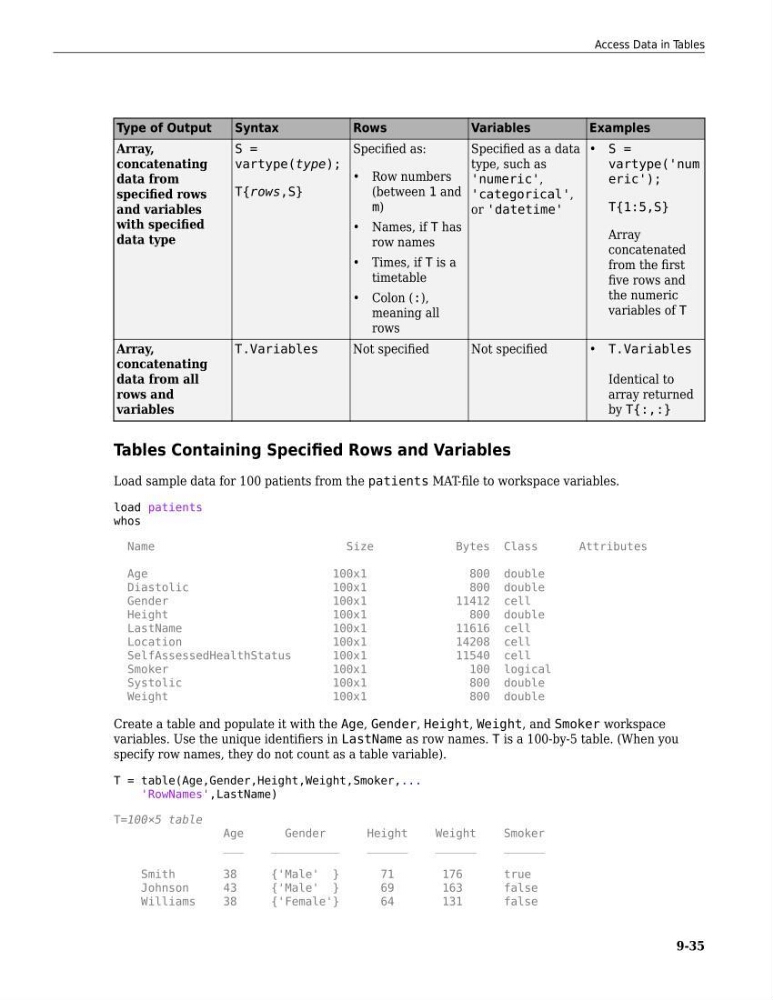
Create a table and populate it with the Age, Gender, Height, Weight, and Smoker workspace
variables. Use the unique identifiers in LastName as row names. T is a 100-by-5 table. (When you
specify row names, they do not count as a table variable).
T = table(Age,Gender,Height,Weight,Smoker,...
'RowNames',LastName)
T=100×5 table
Age
Gender
Height
Weight
Smoker
___
__________
______
______
______
Smith
38
{'Male' }
71
176
true
Johnson
43
{'Male' }
69
163
false
Williams
38
{'Female'}
64
131
false
Access Data in Tables
9-35
Syntax
Rows
Variables
Examples
Array,
concatenating
data from
specified rows
and variables
with specified
data type
S =
vartype(type);
T{rows,S}
Specified as:
• Row numbers
(between 1 and
m)
• Names, if T has
row names
• Times, if T is a
timetable
• Colon (:),
meaning all
rows
Specified as a data
type, such as
'numeric',
'categorical',
or 'datetime'
• S =
vartype('num
eric');
T{1:5,S}
Array
concatenated
from the first
five rows and
the numeric
variables of T
Array,
concatenating
data from all
rows and
variables
T.Variables
Not specified
Not specified
• T.Variables
Identical to
array returned
by T{:,:}
Tables Containing Specified Rows and Variables
Load sample data for 100 patients from the patients MAT-file to workspace variables.
load patients
whos
Name
Size
Bytes Class
Attributes
Age
100x1
800 double
Diastolic
100x1
800 double
Gender
100x1
11412 cell
Height
100x1
800 double
LastName
100x1
11616 cell
Location
100x1
14208 cell
SelfAssessedHealthStatus
100x1
11540 cell
Smoker
100x1
100 logical
Systolic
100x1
800 double
Weight
100x1
800 double
Create a table and populate it with the Age, Gender, Height, Weight, and Smoker workspace
variables. Use the unique identifiers in LastName as row names. T is a 100-by-5 table. (When you
specify row names, they do not count as a table variable).
T = table(Age,Gender,Height,Weight,Smoker,...
'RowNames',LastName)
T=100×5 table
Age
Gender
Height
Weight
Smoker
___
__________
______
______
______
Smith
38
{'Male' }
71
176
true
Johnson
43
{'Male' }
69
163
false
Williams
38
{'Female'}
64
131
false
Access Data in Tables
9-35