

{'egh3'}
3
{'no' }
7
7
{'pkn4'}
2
{'no' }
2
2
{'ple2'}
2
{'no' }
2
2
{'pnj5'}
463
{'no' }
463
463
{'wnn3'}
6
{'no' }
6
6
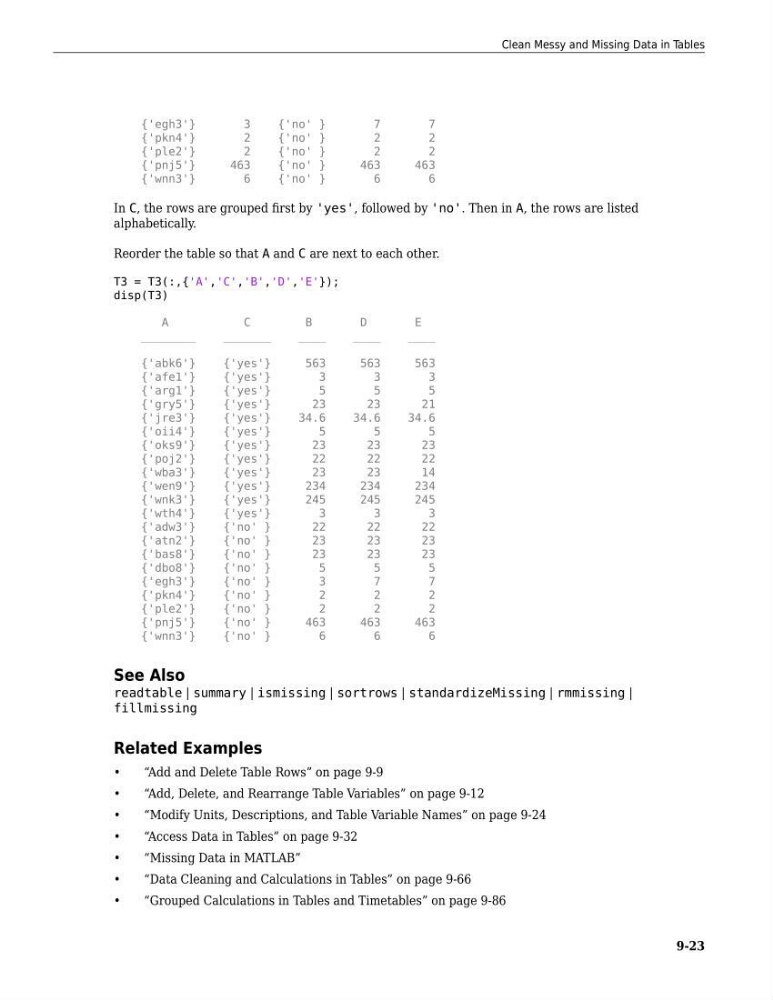
In C, the rows are grouped first by 'yes', followed by 'no'. Then in A, the rows are listed
alphabetically.
Reorder the table so that A and C are next to each other.
T3 = T3(:,{'A','C','B','D','E'});
disp(T3)
A
C
B
D
E
________
_______
____
____
____
{'abk6'}
{'yes'}
563
563
563
{'afe1'}
{'yes'}
3
3
3
{'arg1'}
{'yes'}
5
5
5
{'gry5'}
{'yes'}
23
23
21
{'jre3'}
{'yes'}
34.6
34.6
34.6
{'oii4'}
{'yes'}
5
5
5
{'oks9'}
{'yes'}
23
23
23
{'poj2'}
{'yes'}
22
22
22
{'wba3'}
{'yes'}
23
23
14
{'wen9'}
{'yes'}
234
234
234
{'wnk3'}
{'yes'}
245
245
245
{'wth4'}
{'yes'}
3
3
3
{'adw3'}
{'no' }
22
22
22
{'atn2'}
{'no' }
23
23
23
{'bas8'}
{'no' }
23
23
23
{'dbo8'}
{'no' }
5
5
5
{'egh3'}
{'no' }
3
7
7
{'pkn4'}
{'no' }
2
2
2
{'ple2'}
{'no' }
2
2
2
{'pnj5'}
{'no' }
463
463
463
{'wnn3'}
{'no' }
6
6
6
See Also
readtable | summary | ismissing | sortrows | standardizeMissing | rmmissing |
fillmissing
Related Examples
•
“Add and Delete Table Rows” on page 9-9
•
“Add, Delete, and Rearrange Table Variables” on page 9-12
•
“Modify Units, Descriptions, and Table Variable Names” on page 9-24
•
“Access Data in Tables” on page 9-32
•
“Missing Data in MATLAB”
•
“Data Cleaning and Calculations in Tables” on page 9-66
•
“Grouped Calculations in Tables and Timetables” on page 9-86
Clean Messy and Missing Data in Tables
9-23
3
{'no' }
7
7
{'pkn4'}
2
{'no' }
2
2
{'ple2'}
2
{'no' }
2
2
{'pnj5'}
463
{'no' }
463
463
{'wnn3'}
6
{'no' }
6
6
In C, the rows are grouped first by 'yes', followed by 'no'. Then in A, the rows are listed
alphabetically.
Reorder the table so that A and C are next to each other.
T3 = T3(:,{'A','C','B','D','E'});
disp(T3)
A
C
B
D
E
________
_______
____
____
____
{'abk6'}
{'yes'}
563
563
563
{'afe1'}
{'yes'}
3
3
3
{'arg1'}
{'yes'}
5
5
5
{'gry5'}
{'yes'}
23
23
21
{'jre3'}
{'yes'}
34.6
34.6
34.6
{'oii4'}
{'yes'}
5
5
5
{'oks9'}
{'yes'}
23
23
23
{'poj2'}
{'yes'}
22
22
22
{'wba3'}
{'yes'}
23
23
14
{'wen9'}
{'yes'}
234
234
234
{'wnk3'}
{'yes'}
245
245
245
{'wth4'}
{'yes'}
3
3
3
{'adw3'}
{'no' }
22
22
22
{'atn2'}
{'no' }
23
23
23
{'bas8'}
{'no' }
23
23
23
{'dbo8'}
{'no' }
5
5
5
{'egh3'}
{'no' }
3
7
7
{'pkn4'}
{'no' }
2
2
2
{'ple2'}
{'no' }
2
2
2
{'pnj5'}
{'no' }
463
463
463
{'wnn3'}
{'no' }
6
6
6
See Also
readtable | summary | ismissing | sortrows | standardizeMissing | rmmissing |
fillmissing
Related Examples
•
“Add and Delete Table Rows” on page 9-9
•
“Add, Delete, and Rearrange Table Variables” on page 9-12
•
“Modify Units, Descriptions, and Table Variable Names” on page 9-24
•
“Access Data in Tables” on page 9-32
•
“Missing Data in MATLAB”
•
“Data Cleaning and Calculations in Tables” on page 9-66
•
“Grouped Calculations in Tables and Timetables” on page 9-86
Clean Messy and Missing Data in Tables
9-23