

Import Table Using Import Tool
Finally, you can interactively preview and import data from spreadsheets or delimited text files by
using the Import Tool. There are two ways to open the Import Tool.
• MATLAB Toolstrip: On the Home tab, in the Variable section, click Import Data.
• MATLAB command prompt: Enter uiimport(filename), where filename is the name of a text
or spreadsheet file.
For example, open the outages.csv sample file by using uiimport and which to get the path to
the file.
uiimport(which("outages.csv"))
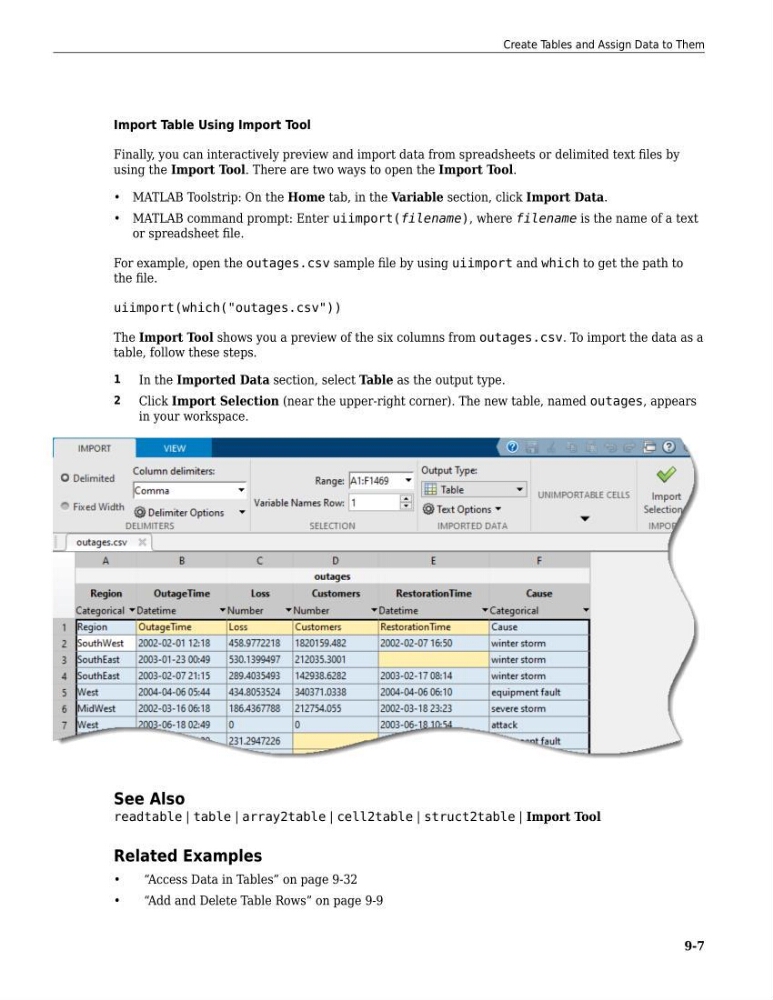
The Import Tool shows you a preview of the six columns from outages.csv. To import the data as a
table, follow these steps.
1
In the Imported Data section, select Table as the output type.
2
Click Import Selection (near the upper-right corner). The new table, named outages, appears
in your workspace.
See Also
readtable | table | array2table | cell2table | struct2table | Import Tool
Related Examples
•
“Access Data in Tables” on page 9-32
•
“Add and Delete Table Rows” on page 9-9
Create Tables and Assign Data to Them
9-7
Finally, you can interactively preview and import data from spreadsheets or delimited text files by
using the Import Tool. There are two ways to open the Import Tool.
• MATLAB Toolstrip: On the Home tab, in the Variable section, click Import Data.
• MATLAB command prompt: Enter uiimport(filename), where filename is the name of a text
or spreadsheet file.
For example, open the outages.csv sample file by using uiimport and which to get the path to
the file.
uiimport(which("outages.csv"))
The Import Tool shows you a preview of the six columns from outages.csv. To import the data as a
table, follow these steps.
1
In the Imported Data section, select Table as the output type.
2
Click Import Selection (near the upper-right corner). The new table, named outages, appears
in your workspace.
See Also
readtable | table | array2table | cell2table | struct2table | Import Tool
Related Examples
•
“Access Data in Tables” on page 9-32
•
“Add and Delete Table Rows” on page 9-9
Create Tables and Assign Data to Them
9-7