

Date and Time Arithmetic
This example shows how to add and subtract date and time values to calculate future and past dates
and elapsed durations in exact units or calendar units. You can add, subtract, multiply, and divide
date and time arrays in the same way that you use these operators with other MATLAB® data types.
However, there is some behavior that is specific to dates and time.
Add and Subtract Durations to Datetime Array
Create a datetime scalar. By default, datetime arrays are not associated with a time zone.
t1 = datetime('now')
t1 = datetime
01-Sep-2021 13:47:20
Find future points in time by adding a sequence of hours.
t2 = t1 + hours(1:3)
t2 = 1x3 datetime
01-Sep-2021 14:47:20
01-Sep-2021 15:47:20
01-Sep-2021 16:47:20
Verify that the difference between each pair of datetime values in t2 is 1 hour.
dt = diff(t2)
dt = 1x2 duration
01:00:00
01:00:00
diff returns durations in terms of exact numbers of hours, minutes, and seconds.
Subtract a sequence of minutes from a datetime to find past points in time.
t2 = t1 - minutes(20:10:40)
t2 = 1x3 datetime
01-Sep-2021 13:27:20
01-Sep-2021 13:17:20
01-Sep-2021 13:07:20
Add a numeric array to a datetime array. MATLAB® treats each value in the numeric array as a
number of exact, 24-hour days.
t2 = t1 + [1:3]
t2 = 1x3 datetime
02-Sep-2021 13:47:20
03-Sep-2021 13:47:20
04-Sep-2021 13:47:20
Add to Datetime with Time Zone
If you work with datetime values in different time zones, or if you want to account for daylight saving
time changes, work with datetime arrays that are associated with time zones. Create a datetime
scalar representing March 8, 2014 in New York.
t1 = datetime(2014,3,8,0,0,0,'TimeZone','America/New_York')
7 Dates and Time
7-28
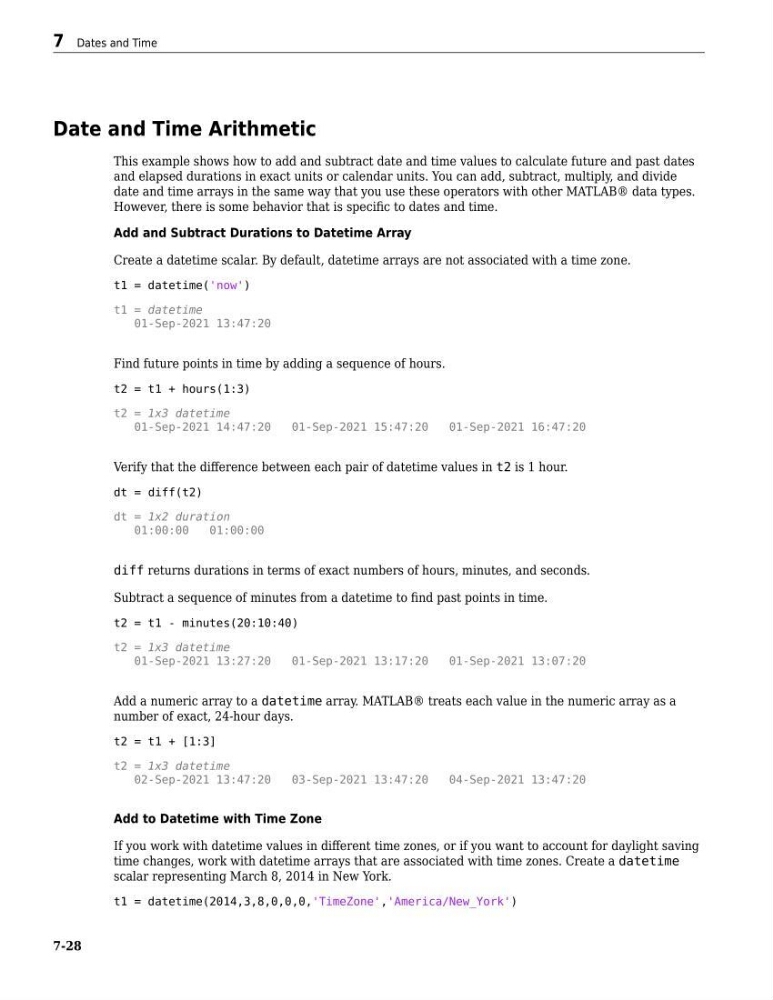
This example shows how to add and subtract date and time values to calculate future and past dates
and elapsed durations in exact units or calendar units. You can add, subtract, multiply, and divide
date and time arrays in the same way that you use these operators with other MATLAB® data types.
However, there is some behavior that is specific to dates and time.
Add and Subtract Durations to Datetime Array
Create a datetime scalar. By default, datetime arrays are not associated with a time zone.
t1 = datetime('now')
t1 = datetime
01-Sep-2021 13:47:20
Find future points in time by adding a sequence of hours.
t2 = t1 + hours(1:3)
t2 = 1x3 datetime
01-Sep-2021 14:47:20
01-Sep-2021 15:47:20
01-Sep-2021 16:47:20
Verify that the difference between each pair of datetime values in t2 is 1 hour.
dt = diff(t2)
dt = 1x2 duration
01:00:00
01:00:00
diff returns durations in terms of exact numbers of hours, minutes, and seconds.
Subtract a sequence of minutes from a datetime to find past points in time.
t2 = t1 - minutes(20:10:40)
t2 = 1x3 datetime
01-Sep-2021 13:27:20
01-Sep-2021 13:17:20
01-Sep-2021 13:07:20
Add a numeric array to a datetime array. MATLAB® treats each value in the numeric array as a
number of exact, 24-hour days.
t2 = t1 + [1:3]
t2 = 1x3 datetime
02-Sep-2021 13:47:20
03-Sep-2021 13:47:20
04-Sep-2021 13:47:20
Add to Datetime with Time Zone
If you work with datetime values in different time zones, or if you want to account for daylight saving
time changes, work with datetime arrays that are associated with time zones. Create a datetime
scalar representing March 8, 2014 in New York.
t1 = datetime(2014,3,8,0,0,0,'TimeZone','America/New_York')
7 Dates and Time
7-28