

• If the field width w is greater than p+1+n, then the whole part of the output value is padded to the
left with w-(p+1+n) additional characters. The additional characters are space characters unless
the formatting operator includes the 0 flag. In that case, the additional characters are zeroes.
Specify Field Width and Precision Outside Format Specifier
You can specify the field width and precision using values from a sequential argument list. Use an
asterisk (*) in place of the field width or precision fields of the formatting operator.
For example, format and display three numbers. In each case, use an asterisk to specify that the field
width or precision come from input arguments that follow the format specifier.
txt = sprintf('%*f
%.*f
%*.*f',...
15,123.45678,...
3,16.42837,...
6,4,pi)
txt =
'
123.456780
16.428
3.1416'
The table describes the effects of each formatting operator in the example.
Formatting Operator
Description
%*f
Specify width as the following input argument,
15.
%.*f
Specify precision as the following input
argument, 3.
%*.*f
Specify width and precision as the following input
arguments, 6, and 4.
You can mix the two styles. For example, get the field width from the following input argument and
the precision from the format specifier.
txt = sprintf('%*.2f', 5, 123.45678)
txt =
'123.46'
Specify Numbered Identifiers in Width and Precision Fields
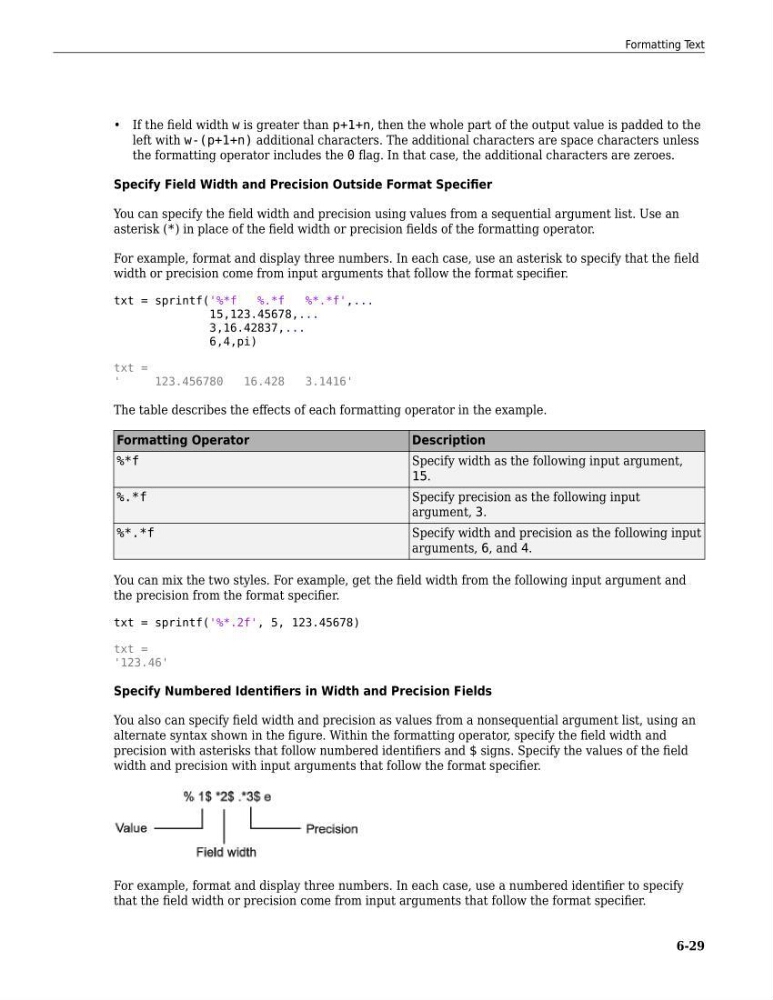
You also can specify field width and precision as values from a nonsequential argument list, using an
alternate syntax shown in the figure. Within the formatting operator, specify the field width and
precision with asterisks that follow numbered identifiers and $ signs. Specify the values of the field
width and precision with input arguments that follow the format specifier.
For example, format and display three numbers. In each case, use a numbered identifier to specify
that the field width or precision come from input arguments that follow the format specifier.
Formatting Text
6-29
left with w-(p+1+n) additional characters. The additional characters are space characters unless
the formatting operator includes the 0 flag. In that case, the additional characters are zeroes.
Specify Field Width and Precision Outside Format Specifier
You can specify the field width and precision using values from a sequential argument list. Use an
asterisk (*) in place of the field width or precision fields of the formatting operator.
For example, format and display three numbers. In each case, use an asterisk to specify that the field
width or precision come from input arguments that follow the format specifier.
txt = sprintf('%*f
%.*f
%*.*f',...
15,123.45678,...
3,16.42837,...
6,4,pi)
txt =
'
123.456780
16.428
3.1416'
The table describes the effects of each formatting operator in the example.
Formatting Operator
Description
%*f
Specify width as the following input argument,
15.
%.*f
Specify precision as the following input
argument, 3.
%*.*f
Specify width and precision as the following input
arguments, 6, and 4.
You can mix the two styles. For example, get the field width from the following input argument and
the precision from the format specifier.
txt = sprintf('%*.2f', 5, 123.45678)
txt =
'123.46'
Specify Numbered Identifiers in Width and Precision Fields
You also can specify field width and precision as values from a nonsequential argument list, using an
alternate syntax shown in the figure. Within the formatting operator, specify the field width and
precision with asterisks that follow numbered identifiers and $ signs. Specify the values of the field
width and precision with input arguments that follow the format specifier.
For example, format and display three numbers. In each case, use a numbered identifier to specify
that the field width or precision come from input arguments that follow the format specifier.
Formatting Text
6-29