

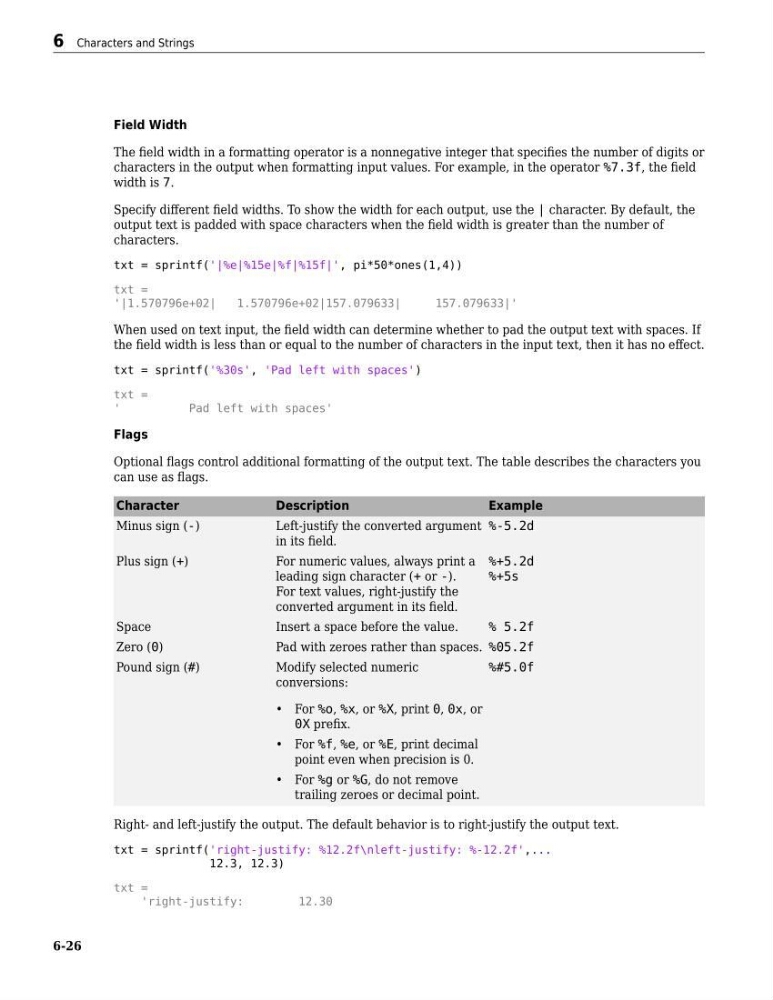
Field Width
The field width in a formatting operator is a nonnegative integer that specifies the number of digits or
characters in the output when formatting input values. For example, in the operator %7.3f, the field
width is 7.
Specify different field widths. To show the width for each output, use the | character. By default, the
output text is padded with space characters when the field width is greater than the number of
characters.
txt = sprintf('|%e|%15e|%f|%15f|', pi*50*ones(1,4))
txt =
'|1.570796e+02|
1.570796e+02|157.079633|
157.079633|'
When used on text input, the field width can determine whether to pad the output text with spaces. If
the field width is less than or equal to the number of characters in the input text, then it has no effect.
txt = sprintf('%30s', 'Pad left with spaces')
txt =
'
Pad left with spaces'
Flags
Optional flags control additional formatting of the output text. The table describes the characters you
can use as flags.
Character
Description
Example
Minus sign (-)
Left-justify the converted argument
in its field.
%-5.2d
Plus sign (+)
For numeric values, always print a
leading sign character (+ or -).
For text values, right-justify the
converted argument in its field.
%+5.2d
%+5s
Space
Insert a space before the value.
% 5.2f
Zero (0)
Pad with zeroes rather than spaces. %05.2f
Pound sign (#)
Modify selected numeric
conversions:
• For %o, %x, or %X, print 0, 0x, or
0X prefix.
• For %f, %e, or %E, print decimal
point even when precision is 0.
• For %g or %G, do not remove
trailing zeroes or decimal point.
%#5.0f
Right- and left-justify the output. The default behavior is to right-justify the output text.
txt = sprintf('right-justify: %12.2f\nleft-justify: %-12.2f',...
12.3, 12.3)
txt =
'right-justify:
12.30
6 Characters and Strings
6-26
The field width in a formatting operator is a nonnegative integer that specifies the number of digits or
characters in the output when formatting input values. For example, in the operator %7.3f, the field
width is 7.
Specify different field widths. To show the width for each output, use the | character. By default, the
output text is padded with space characters when the field width is greater than the number of
characters.
txt = sprintf('|%e|%15e|%f|%15f|', pi*50*ones(1,4))
txt =
'|1.570796e+02|
1.570796e+02|157.079633|
157.079633|'
When used on text input, the field width can determine whether to pad the output text with spaces. If
the field width is less than or equal to the number of characters in the input text, then it has no effect.
txt = sprintf('%30s', 'Pad left with spaces')
txt =
'
Pad left with spaces'
Flags
Optional flags control additional formatting of the output text. The table describes the characters you
can use as flags.
Character
Description
Example
Minus sign (-)
Left-justify the converted argument
in its field.
%-5.2d
Plus sign (+)
For numeric values, always print a
leading sign character (+ or -).
For text values, right-justify the
converted argument in its field.
%+5.2d
%+5s
Space
Insert a space before the value.
% 5.2f
Zero (0)
Pad with zeroes rather than spaces. %05.2f
Pound sign (#)
Modify selected numeric
conversions:
• For %o, %x, or %X, print 0, 0x, or
0X prefix.
• For %f, %e, or %E, print decimal
point even when precision is 0.
• For %g or %G, do not remove
trailing zeroes or decimal point.
%#5.0f
Right- and left-justify the output. The default behavior is to right-justify the output text.
txt = sprintf('right-justify: %12.2f\nleft-justify: %-12.2f',...
12.3, 12.3)
txt =
'right-justify:
12.30
6 Characters and Strings
6-26