

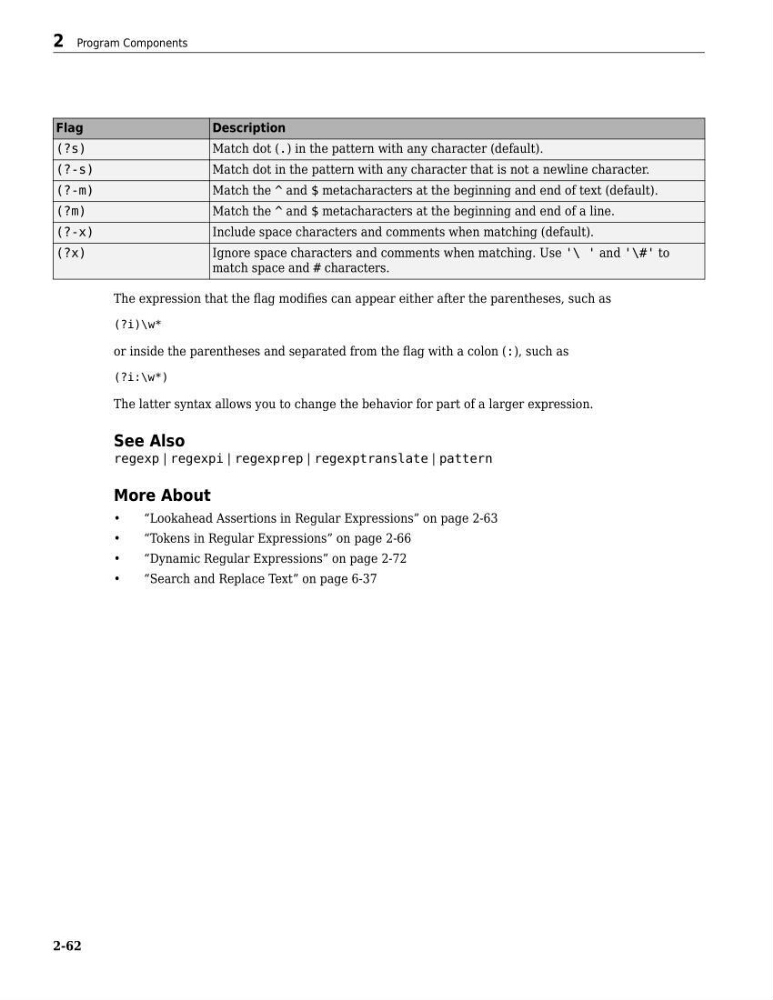
Flag
Description
(?s)
Match dot (.) in the pattern with any character (default).
(?-s)
Match dot in the pattern with any character that is not a newline character.
(?-m)
Match the ^ and $ metacharacters at the beginning and end of text (default).
(?m)
Match the ^ and $ metacharacters at the beginning and end of a line.
(?-x)
Include space characters and comments when matching (default).
(?x)
Ignore space characters and comments when matching. Use '\ ' and '\#' to
match space and # characters.
The expression that the flag modifies can appear either after the parentheses, such as
(?i)\w*
or inside the parentheses and separated from the flag with a colon (:), such as
(?i:\w*)
The latter syntax allows you to change the behavior for part of a larger expression.
See Also
regexp | regexpi | regexprep | regexptranslate | pattern
More About
•
“Lookahead Assertions in Regular Expressions” on page 2-63
•
“Tokens in Regular Expressions” on page 2-66
•
“Dynamic Regular Expressions” on page 2-72
•
“Search and Replace Text” on page 6-37
2 Program Components
2-62
Description
(?s)
Match dot (.) in the pattern with any character (default).
(?-s)
Match dot in the pattern with any character that is not a newline character.
(?-m)
Match the ^ and $ metacharacters at the beginning and end of text (default).
(?m)
Match the ^ and $ metacharacters at the beginning and end of a line.
(?-x)
Include space characters and comments when matching (default).
(?x)
Ignore space characters and comments when matching. Use '\ ' and '\#' to
match space and # characters.
The expression that the flag modifies can appear either after the parentheses, such as
(?i)\w*
or inside the parentheses and separated from the flag with a colon (:), such as
(?i:\w*)
The latter syntax allows you to change the behavior for part of a larger expression.
See Also
regexp | regexpi | regexprep | regexptranslate | pattern
More About
•
“Lookahead Assertions in Regular Expressions” on page 2-63
•
“Tokens in Regular Expressions” on page 2-66
•
“Dynamic Regular Expressions” on page 2-72
•
“Search and Replace Text” on page 6-37
2 Program Components
2-62