

CHAPTER 5 ■ IOT PATTERNS: REALTIME CLIENTS
85
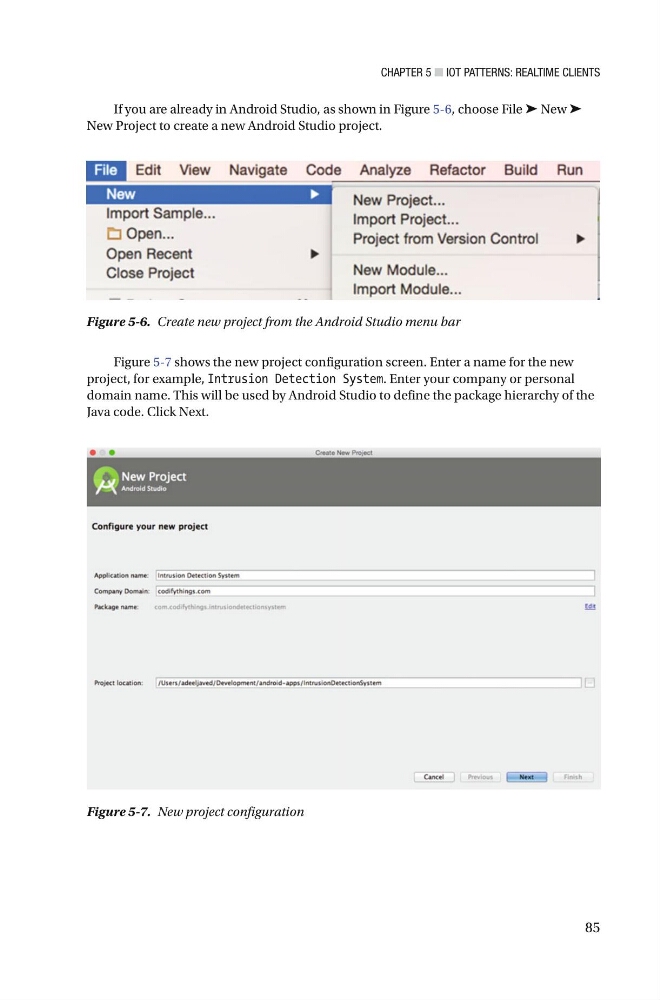
Figure 5-7 shows the new project configuration screen. Enter a name for the new
project, for example, Intrusion Detection System . Enter your company or personal
domain name. This will be used by Android Studio to define the package hierarchy of the
Java code. Click Next.
Figure 5-6. Create new project from the Android Studio menu bar
Figure 5-7. New project configuration
If you are already in Android Studio, as shown in Figure 5-6 , choose File ➤ New ➤
New Project to create a new Android Studio project .
85
Figure 5-7 shows the new project configuration screen. Enter a name for the new
project, for example, Intrusion Detection System . Enter your company or personal
domain name. This will be used by Android Studio to define the package hierarchy of the
Java code. Click Next.
Figure 5-6. Create new project from the Android Studio menu bar
Figure 5-7. New project configuration
If you are already in Android Studio, as shown in Figure 5-6 , choose File ➤ New ➤
New Project to create a new Android Studio project .