

Turn, Turn, Turn
android:layout_width="fill_parent"
android:layout_height="wrap_content"
android:text="Save"
/>
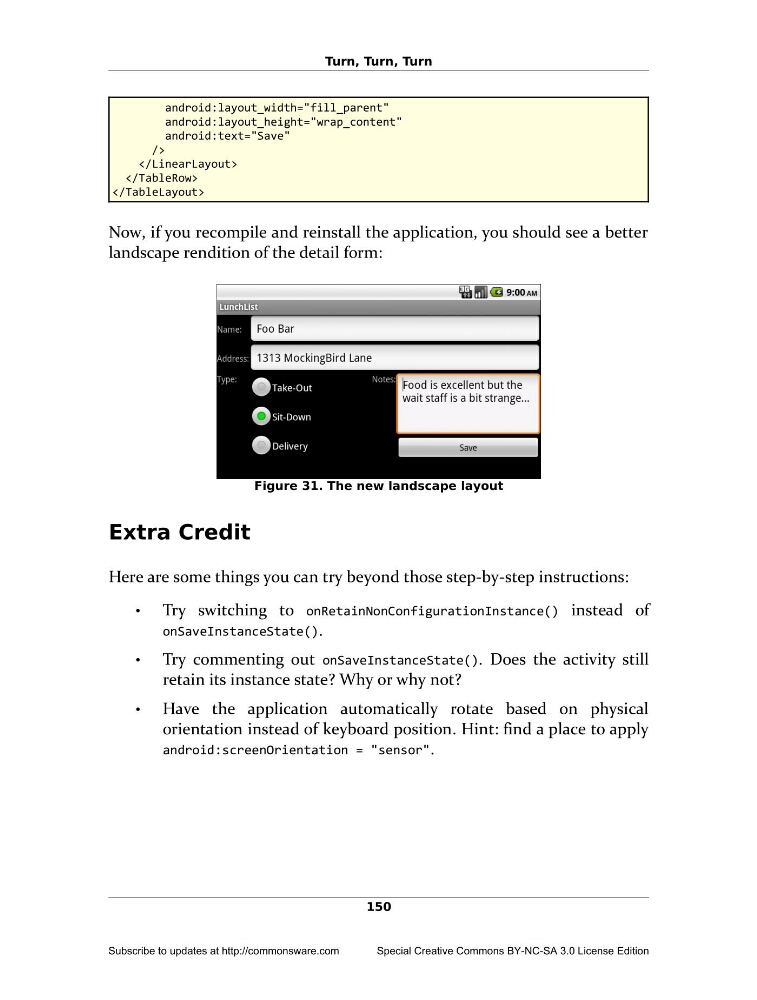
Now, if you recompile and reinstall the application, you should see a better
landscape rendition of the detail form:
Figure 31. The new landscape layout
Extra Credit
Here are some things you can try beyond those step-by-step instructions:
•
Try switching to onRetainNonConfigurationInstance() instead of
onSaveInstanceState().
•
Try commenting out onSaveInstanceState(). Does the activity still
retain its instance state? Why or why not?
•
Have the application automatically rotate based on physical
orientation instead of keyboard position. Hint: find a place to apply
android:screenOrientation = "sensor".
150
Subscribe to updates at http://commonsware.com
Special Creative Commons BY-NC-SA 3.0 License Edition
android:layout_width="fill_parent"
android:layout_height="wrap_content"
android:text="Save"
/>
Now, if you recompile and reinstall the application, you should see a better
landscape rendition of the detail form:
Figure 31. The new landscape layout
Extra Credit
Here are some things you can try beyond those step-by-step instructions:
•
Try switching to onRetainNonConfigurationInstance() instead of
onSaveInstanceState().
•
Try commenting out onSaveInstanceState(). Does the activity still
retain its instance state? Why or why not?
•
Have the application automatically rotate based on physical
orientation instead of keyboard position. Hint: find a place to apply
android:screenOrientation = "sensor".
150
Subscribe to updates at http://commonsware.com
Special Creative Commons BY-NC-SA 3.0 License Edition