

160
Practical MATLAB
® Applications for Engineers
The script fi le current_voltage is executed and the results are shown as follows:
>> current _ voltage
***********************************************************************
****************************R E S U L T S****************************
***********************************************************************
The currents I1 I2 I3 I4 I5 I6 I7 and I8 (in amps) are given by:
1.0000
1.5000
0.5000
1.5000
4.5000
3.0000
3.0000
6.0000
***********************************************************************
The voltage Vab is:
45
volts
***********************************************************************
Example 2.17
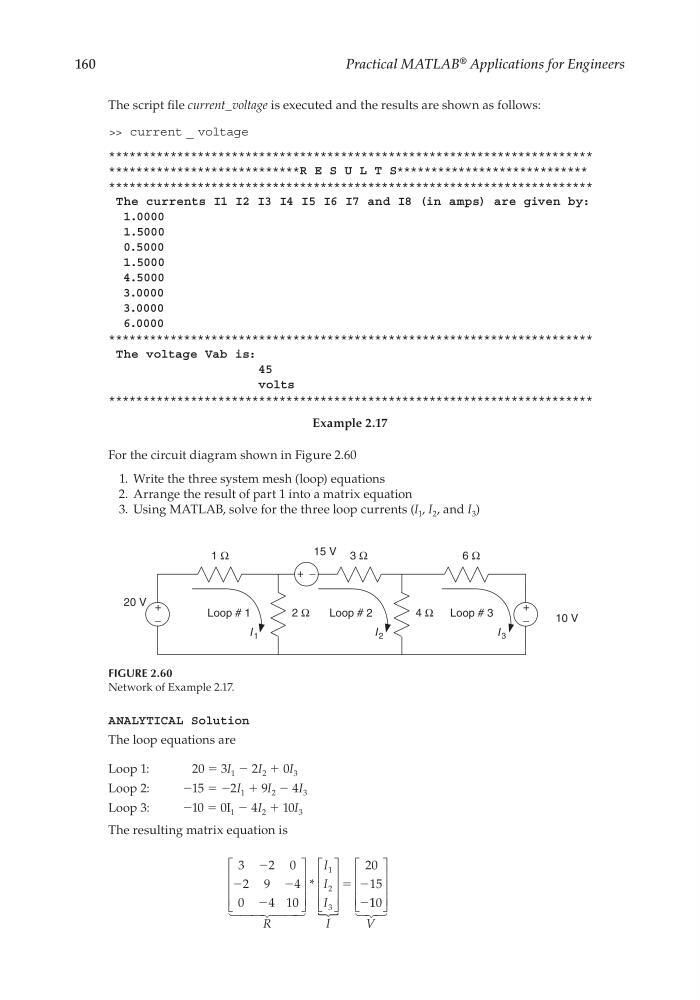
For the circuit diagram shown in Figure 2.60
1. Write the three system mesh (loop) equations
2. Arrange the result of part 1 into a matrix equation
3. Using MATLAB, solve for the three loop currents (I 1 , I 2 , and I 3 )
FIGURE 2.60
Network of Example 2.17.
I 1
2 Ω
20 V
I 2
I 3
Loop # 1
Loop # 2
Loop # 3
10 V
15 V
+
−
+
−
+ −
4 Ω
6 Ω
3 Ω
1 Ω
ANALYTICAL Solution
The loop equations are
Loop 1:
20 = 3I 1 − 2I 2 + 0I 3
Loop 2:
−15 = −2I 1 + 9I 2 − 4I 3
Loop 3:
−10 = 0I 1 − 4I 2 + 10I 3
The resulting matrix equation is
3
2 0
2 9
4
0
4 10
20
15
1
2
3
Ϫ
Ϫ
Ϫ
Ϫ
Ϫ
Ϫ
R
I
I
I
I
*
ϭ
1 10
V
CRC_47760_CH002.indd 160
CRC_47760_CH002.indd 160
7/23/2008 1:38:50 PM
7/23/2008 1:38:50 PM
Practical MATLAB
® Applications for Engineers
The script fi le current_voltage is executed and the results are shown as follows:
>> current _ voltage
***********************************************************************
****************************R E S U L T S****************************
***********************************************************************
The currents I1 I2 I3 I4 I5 I6 I7 and I8 (in amps) are given by:
1.0000
1.5000
0.5000
1.5000
4.5000
3.0000
3.0000
6.0000
***********************************************************************
The voltage Vab is:
45
volts
***********************************************************************
Example 2.17
For the circuit diagram shown in Figure 2.60
1. Write the three system mesh (loop) equations
2. Arrange the result of part 1 into a matrix equation
3. Using MATLAB, solve for the three loop currents (I 1 , I 2 , and I 3 )
FIGURE 2.60
Network of Example 2.17.
I 1
2 Ω
20 V
I 2
I 3
Loop # 1
Loop # 2
Loop # 3
10 V
15 V
+
−
+
−
+ −
4 Ω
6 Ω
3 Ω
1 Ω
ANALYTICAL Solution
The loop equations are
Loop 1:
20 = 3I 1 − 2I 2 + 0I 3
Loop 2:
−15 = −2I 1 + 9I 2 − 4I 3
Loop 3:
−10 = 0I 1 − 4I 2 + 10I 3
The resulting matrix equation is
3
2 0
2 9
4
0
4 10
20
15
1
2
3
Ϫ
Ϫ
Ϫ
Ϫ
Ϫ
Ϫ
R
I
I
I
I
*
ϭ
1 10
V
CRC_47760_CH002.indd 160
CRC_47760_CH002.indd 160
7/23/2008 1:38:50 PM
7/23/2008 1:38:50 PM