

Getting Started with FLAME
63
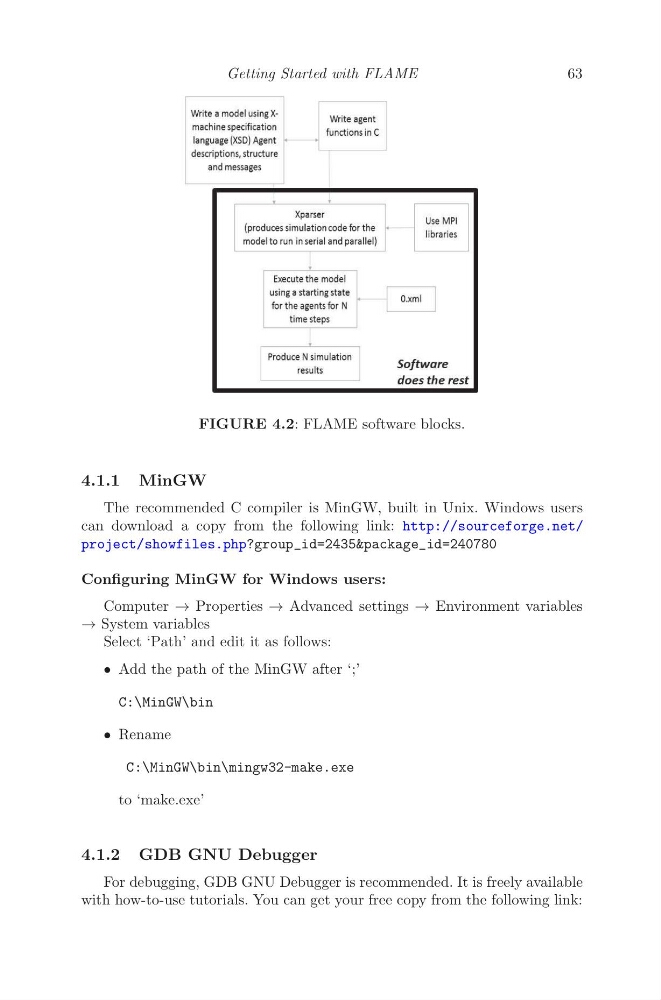
FIGURE 4.2: FLAME software blocks.
4.1.1 MinGW
The recommended C compiler is MinGW, built in Unix. Windows users
can download a copy from the following link: http://sourceforge.net/
project/showfiles.php?group_id=2435&package_id=240780
Configuring MinGW for Windows users:
Computer → Properties → Advanced settings → Environment variables
→ System variables
Select ‘Path’ and edit it as follows:
• Add the path of the MinGW after ‘;’
C:\MinGW\bin
• Rename
C:\MinGW\bin\mingw32-make.exe
to ‘make.exe’
4.1.2 GDB GNU Debugger
For debugging, GDB GNU Debugger is recommended. It is freely available
with how-to-use tutorials. You can get your free copy from the following link:
63
FIGURE 4.2: FLAME software blocks.
4.1.1 MinGW
The recommended C compiler is MinGW, built in Unix. Windows users
can download a copy from the following link: http://sourceforge.net/
project/showfiles.php?group_id=2435&package_id=240780
Configuring MinGW for Windows users:
Computer → Properties → Advanced settings → Environment variables
→ System variables
Select ‘Path’ and edit it as follows:
• Add the path of the MinGW after ‘;’
C:\MinGW\bin
• Rename
C:\MinGW\bin\mingw32-make.exe
to ‘make.exe’
4.1.2 GDB GNU Debugger
For debugging, GDB GNU Debugger is recommended. It is freely available
with how-to-use tutorials. You can get your free copy from the following link: