

470 Appendix
is clearer. For clarity, the latter expression is more verbose
than required, has π previously defined, and is slightly less
efficient.
• Don’t be clever. Sometimes the shortest, “cleverest” way
of programming something can be the worst. In addition to
giving rise to lack of clarity, some shortcuts make it difficult
to transfer programs between computers. This is especially true
of programs that exploit specific properties of an individual
computer or compiler, such as local variants of a standard
programming language.
• Keep a perspective on precision. The program calculates
and manipulates numbers that, at least in theory, correspond to
physical entities. It is worth keeping track of the precision associated with the data and other quantities, and of that required
to compute the desired results.
• Organize programs and data. Related programs and the
associated files can be grouped into directories which include
files listing and explaining the directory’s contents. Data files
can be organized similarly. Often seismograms, for example,
go through multiple processing stages carried out by different
programs. A common practice is to use specific types of file
names to indicate various intermediate stages. In addition, the
data files begin with headers, information identifying the data
and recording the operations applied to it. The headers and file
names should be updated by the programs themselves, rather
than “by hand” at each stage. The output, whether text or
graphic, should contain the parameters required to replicate
the result. This can be especially important for interactive data
processing because input files are not kept.
A.8.3 Representation of numbers
Several simple concepts about numerical calculations on a
computer are worth bearing in mind. One is the consequences
of the way in which numbers are represented and manipulated.
Because computers use binary (base 2) arithmetic, numbers
are written as sets of bits, single binary digits, grouped into
words. Some general ideas about these representations can be
illustrated without going into the schemes used by various
computers.
Integers are represented by their binary equivalent. Thus 46
(decimal) is 101110, because
46 = 1 × 2 5 + 0 × 2 4 + 1 × 2 3 + 1 × 2 2 + 1 × 2 1 + 0 × 2 0 .
Many computers represent integers by 16- or 32-bit words.
The word length governs the range of possible integers. For example, using 16 bits, one of which indicates the sign, the largest
positive integer that can be represented is
111 1111 1111 1111 (binary) = 2 15 − 1 = 32,767.
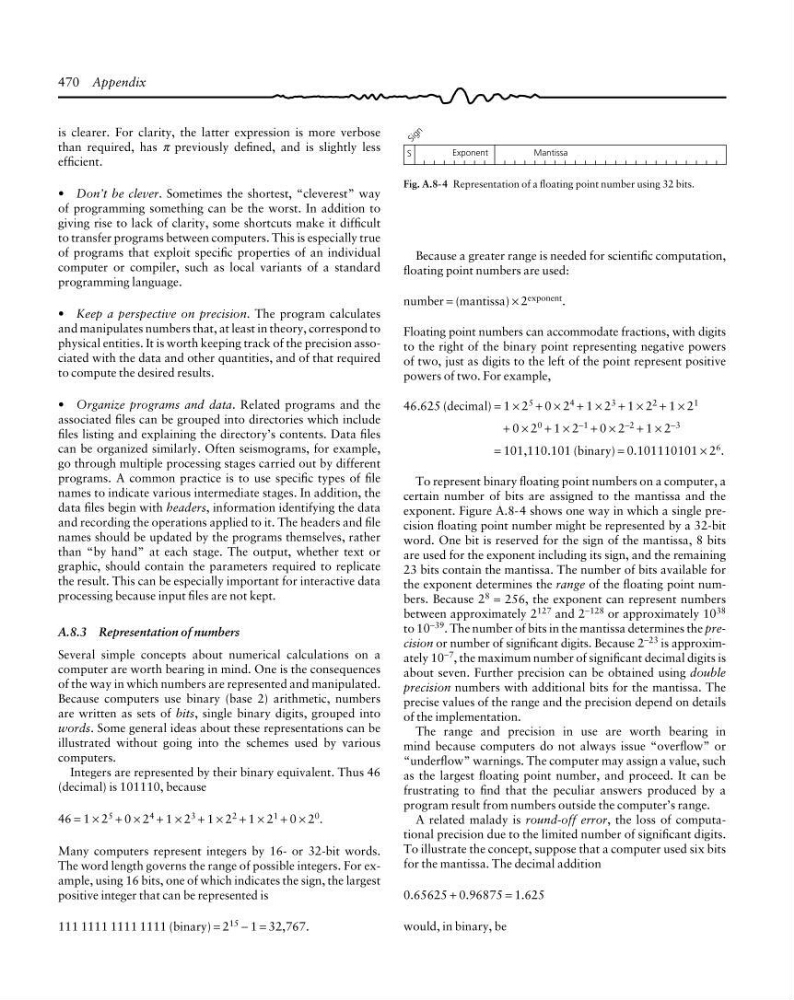
Fig. A.8-4 Representation of a floating point number using 32 bits.
Exponent
Mantissa
S
S i g n
Because a greater range is needed for scientific computation,
floating point numbers are used:
number = (mantissa) × 2 exponent .
Floating point numbers can accommodate fractions, with digits
to the right of the binary point representing negative powers
of two, just as digits to the left of the point represent positive
powers of two. For example,
46.625 (decimal) = 1 × 2 5 + 0 × 2 4 + 1 × 2 3 + 1 × 2 2 + 1 × 2 1
+ 0 × 2
0
+ 1 × 2
−1
+ 0 × 2
−2
+ 1 × 2
−3
= 101,110.101 (binary) = 0.101110101 × 2 6 .
To represent binary floating point numbers on a computer, a
certain number of bits are assigned to the mantissa and the
exponent. Figure A.8-4 shows one way in which a single precision floating point number might be represented by a 32-bit
word. One bit is reserved for the sign of the mantissa, 8 bits
are used for the exponent including its sign, and the remaining
23 bits contain the mantissa. The number of bits available for
the exponent determines the range of the floating point numbers. Because 2 8 = 256, the exponent can represent numbers
between approximately 2 127 and 2 −128 or approximately 10 38
to 10 −39 . The number of bits in the mantissa determines the precision or number of significant digits. Because 2 −23 is approximately 10 −7 , the maximum number of significant decimal digits is
about seven. Further precision can be obtained using double
precision numbers with additional bits for the mantissa. The
precise values of the range and the precision depend on details
of the implementation.
The range and precision in use are worth bearing in
mind because computers do not always issue “overflow” or
“underflow” warnings. The computer may assign a value, such
as the largest floating point number, and proceed. It can be
frustrating to find that the peculiar answers produced by a
program result from numbers outside the computer’s range.
A related malady is round-off error, the loss of computational precision due to the limited number of significant digits.
To illustrate the concept, suppose that a computer used six bits
for the mantissa. The decimal addition
0.65625 + 0.96875 = 1.625
would, in binary, be
is clearer. For clarity, the latter expression is more verbose
than required, has π previously defined, and is slightly less
efficient.
• Don’t be clever. Sometimes the shortest, “cleverest” way
of programming something can be the worst. In addition to
giving rise to lack of clarity, some shortcuts make it difficult
to transfer programs between computers. This is especially true
of programs that exploit specific properties of an individual
computer or compiler, such as local variants of a standard
programming language.
• Keep a perspective on precision. The program calculates
and manipulates numbers that, at least in theory, correspond to
physical entities. It is worth keeping track of the precision associated with the data and other quantities, and of that required
to compute the desired results.
• Organize programs and data. Related programs and the
associated files can be grouped into directories which include
files listing and explaining the directory’s contents. Data files
can be organized similarly. Often seismograms, for example,
go through multiple processing stages carried out by different
programs. A common practice is to use specific types of file
names to indicate various intermediate stages. In addition, the
data files begin with headers, information identifying the data
and recording the operations applied to it. The headers and file
names should be updated by the programs themselves, rather
than “by hand” at each stage. The output, whether text or
graphic, should contain the parameters required to replicate
the result. This can be especially important for interactive data
processing because input files are not kept.
A.8.3 Representation of numbers
Several simple concepts about numerical calculations on a
computer are worth bearing in mind. One is the consequences
of the way in which numbers are represented and manipulated.
Because computers use binary (base 2) arithmetic, numbers
are written as sets of bits, single binary digits, grouped into
words. Some general ideas about these representations can be
illustrated without going into the schemes used by various
computers.
Integers are represented by their binary equivalent. Thus 46
(decimal) is 101110, because
46 = 1 × 2 5 + 0 × 2 4 + 1 × 2 3 + 1 × 2 2 + 1 × 2 1 + 0 × 2 0 .
Many computers represent integers by 16- or 32-bit words.
The word length governs the range of possible integers. For example, using 16 bits, one of which indicates the sign, the largest
positive integer that can be represented is
111 1111 1111 1111 (binary) = 2 15 − 1 = 32,767.
Fig. A.8-4 Representation of a floating point number using 32 bits.
Exponent
Mantissa
S
S i g n
Because a greater range is needed for scientific computation,
floating point numbers are used:
number = (mantissa) × 2 exponent .
Floating point numbers can accommodate fractions, with digits
to the right of the binary point representing negative powers
of two, just as digits to the left of the point represent positive
powers of two. For example,
46.625 (decimal) = 1 × 2 5 + 0 × 2 4 + 1 × 2 3 + 1 × 2 2 + 1 × 2 1
+ 0 × 2
0
+ 1 × 2
−1
+ 0 × 2
−2
+ 1 × 2
−3
= 101,110.101 (binary) = 0.101110101 × 2 6 .
To represent binary floating point numbers on a computer, a
certain number of bits are assigned to the mantissa and the
exponent. Figure A.8-4 shows one way in which a single precision floating point number might be represented by a 32-bit
word. One bit is reserved for the sign of the mantissa, 8 bits
are used for the exponent including its sign, and the remaining
23 bits contain the mantissa. The number of bits available for
the exponent determines the range of the floating point numbers. Because 2 8 = 256, the exponent can represent numbers
between approximately 2 127 and 2 −128 or approximately 10 38
to 10 −39 . The number of bits in the mantissa determines the precision or number of significant digits. Because 2 −23 is approximately 10 −7 , the maximum number of significant decimal digits is
about seven. Further precision can be obtained using double
precision numbers with additional bits for the mantissa. The
precise values of the range and the precision depend on details
of the implementation.
The range and precision in use are worth bearing in
mind because computers do not always issue “overflow” or
“underflow” warnings. The computer may assign a value, such
as the largest floating point number, and proceed. It can be
frustrating to find that the peculiar answers produced by a
program result from numbers outside the computer’s range.
A related malady is round-off error, the loss of computational precision due to the limited number of significant digits.
To illustrate the concept, suppose that a computer used six bits
for the mantissa. The decimal addition
0.65625 + 0.96875 = 1.625
would, in binary, be