

35
4.10 Grey Out Images to Remove Emphasis
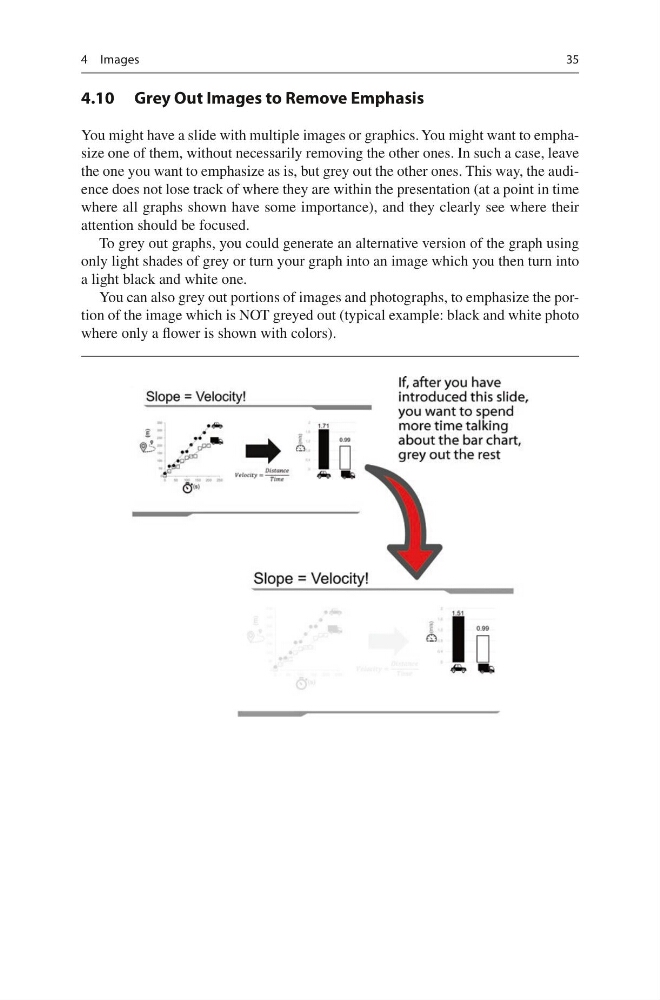
You might have a slide with multiple images or graphics. You might want to emphasize one of them, without necessarily removing the other ones. In such a case, leave
the one you want to emphasize as is, but grey out the other ones. This way, the audience does not lose track of where they are within the presentation (at a point in time
where all graphs shown have some importance), and they clearly see where their
attention should be focused.
To grey out graphs, you could generate an alternative version of the graph using
only light shades of grey or turn your graph into an image which you then turn into
a light black and white one.
You can also grey out portions of images and photographs, to emphasize the portion of the image which is NOT greyed out (typical example: black and white photo
where only a flower is shown with colors).
4 Images
4.10 Grey Out Images to Remove Emphasis
You might have a slide with multiple images or graphics. You might want to emphasize one of them, without necessarily removing the other ones. In such a case, leave
the one you want to emphasize as is, but grey out the other ones. This way, the audience does not lose track of where they are within the presentation (at a point in time
where all graphs shown have some importance), and they clearly see where their
attention should be focused.
To grey out graphs, you could generate an alternative version of the graph using
only light shades of grey or turn your graph into an image which you then turn into
a light black and white one.
You can also grey out portions of images and photographs, to emphasize the portion of the image which is NOT greyed out (typical example: black and white photo
where only a flower is shown with colors).
4 Images