

5. In “Perform Peak Picking,” click in “Set Parameters Up.” At
“Runs For Peak Picking” tab, ensure all runs are selected.
6. Ensure the sensitivity is set to default, and keep peak picking on
automatic at the “Peaking Limits” tab. Keep the chromatographic peak width box unchecked.
7. Set the “Maximum Charge” to 5.
8. Click “OK” to close the “Peak Picking Parameters.”
9. In the “Set Up An Experiment Design” window, click “Next.”
10. On the “Identify Peptides” tab, verify if the “Use MS
E data
from my runs to identify peptides” is selected and click to set
parameters.
11. Under “Enter the search parameters,” select an appropriate
database.
12. For “Common search parameters,” select trypsin as “digest
reagents,” 1 maximum as “missed cleavages,” 600 kDa as
“max protein mass,” carbamidomethyl C as a fixed modification, and methionine oxidation as a variable modification.
13. For “Search tolerance parameters,” select FDR less than 1% (see
Note 16).
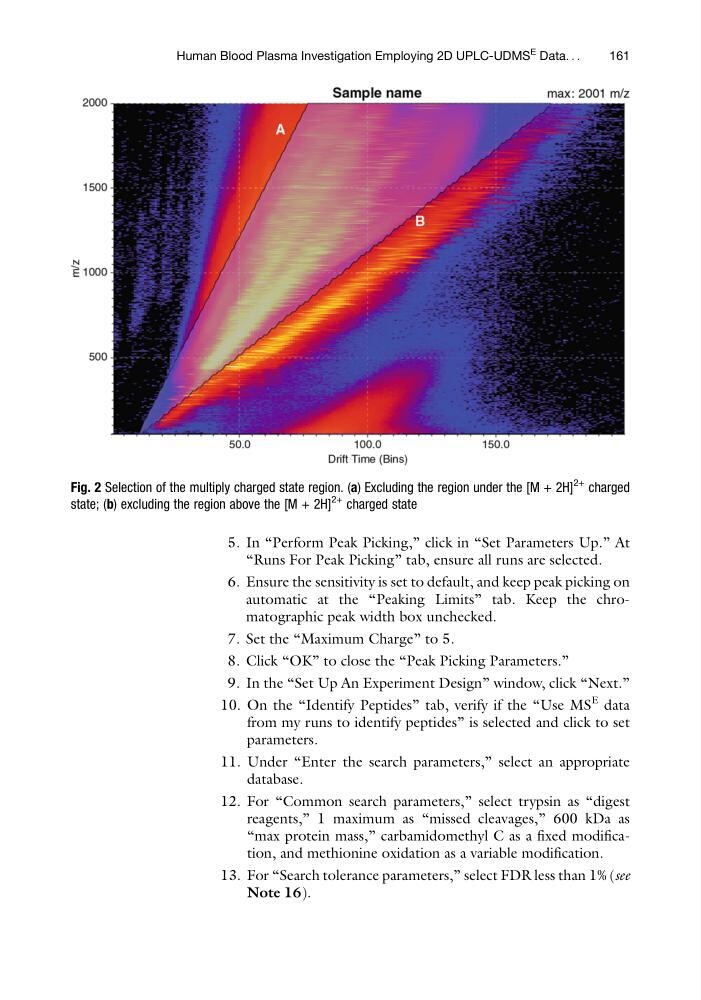
Fig. 2 Selection of the multiply charged state region. (a) Excluding the region under the [M + 2H]
2+
charged
state; (b) excluding the region above the [M + 2H]
2+
charged state
Human Blood Plasma Investigation Employing 2D UPLC-UDMS
E Data. . .
161
“Runs For Peak Picking” tab, ensure all runs are selected.
6. Ensure the sensitivity is set to default, and keep peak picking on
automatic at the “Peaking Limits” tab. Keep the chromatographic peak width box unchecked.
7. Set the “Maximum Charge” to 5.
8. Click “OK” to close the “Peak Picking Parameters.”
9. In the “Set Up An Experiment Design” window, click “Next.”
10. On the “Identify Peptides” tab, verify if the “Use MS
E data
from my runs to identify peptides” is selected and click to set
parameters.
11. Under “Enter the search parameters,” select an appropriate
database.
12. For “Common search parameters,” select trypsin as “digest
reagents,” 1 maximum as “missed cleavages,” 600 kDa as
“max protein mass,” carbamidomethyl C as a fixed modification, and methionine oxidation as a variable modification.
13. For “Search tolerance parameters,” select FDR less than 1% (see
Note 16).
Fig. 2 Selection of the multiply charged state region. (a) Excluding the region under the [M + 2H]
2+
charged
state; (b) excluding the region above the [M + 2H]
2+
charged state
Human Blood Plasma Investigation Employing 2D UPLC-UDMS
E Data. . .
161