

194
G. D. Johnson and D. J. Krusienski
Data Window
Analog-to-Digital
Converter
Preprocessing
Feature
Extraction
T+2 T+1 T
f(T)=[f 1 ,f 2 . . .f n ]
Feature Vector
Overlap
Application
Device
s
d
n
a
m
m
o
C
e
c
i
v
e
D
k
c
a
b
d
e
e
F
r
e
s
U
Brain-Computer Interface
Brain Signals
Digitized Signals
e.g., Spatial Filter
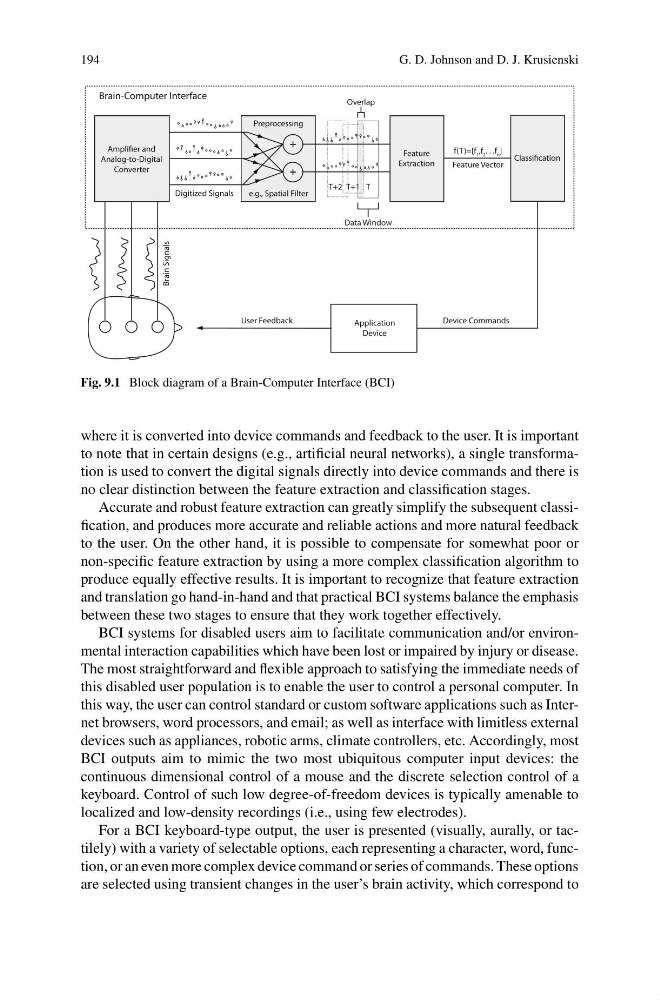
Fig. 9.1 Block diagram of a Brain-Computer Interface (BCI)
where it is converted into device commands and feedback to the user. It is important
to note that in certain designs (e.g., artificial neural networks), a single transformation is used to convert the digital signals directly into device commands and there is
no clear distinction between the feature extraction and classification stages.
Accurate and robust feature extraction can greatly simplify the subsequent classification, and produces more accurate and reliable actions and more natural feedback
to the user. On the other hand, it is possible to compensate for somewhat poor or
non-specific feature extraction by using a more complex classification algorithm to
produce equally effective results. It is important to recognize that feature extraction
and translation go hand-in-hand and that practical BCI systems balance the emphasis
between these two stages to ensure that they work together effectively.
BCI systems for disabled users aim to facilitate communication and/or environmental interaction capabilities which have been lost or impaired by injury or disease.
The most straightforward and flexible approach to satisfying the immediate needs of
this disabled user population is to enable the user to control a personal computer. In
this way, the user can control standard or custom software applications such as Internet browsers, word processors, and email; as well as interface with limitless external
devices such as appliances, robotic arms, climate controllers, etc. Accordingly, most
BCI outputs aim to mimic the two most ubiquitous computer input devices: the
continuous dimensional control of a mouse and the discrete selection control of a
keyboard. Control of such low degree-of-freedom devices is typically amenable to
localized and low-density recordings (i.e., using few electrodes).
For a BCI keyboard-type output, the user is presented (visually, aurally, or tactilely) with a variety of selectable options, each representing a character, word, function, or an even more complex device command or series of commands. These options
are selected using transient changes in the user’s brain activity, which correspond to
G. D. Johnson and D. J. Krusienski
Data Window
Analog-to-Digital
Converter
Preprocessing
Feature
Extraction
T+2 T+1 T
f(T)=[f 1 ,f 2 . . .f n ]
Feature Vector
Overlap
Application
Device
s
d
n
a
m
m
o
C
e
c
i
v
e
D
k
c
a
b
d
e
e
F
r
e
s
U
Brain-Computer Interface
Brain Signals
Digitized Signals
e.g., Spatial Filter
Fig. 9.1 Block diagram of a Brain-Computer Interface (BCI)
where it is converted into device commands and feedback to the user. It is important
to note that in certain designs (e.g., artificial neural networks), a single transformation is used to convert the digital signals directly into device commands and there is
no clear distinction between the feature extraction and classification stages.
Accurate and robust feature extraction can greatly simplify the subsequent classification, and produces more accurate and reliable actions and more natural feedback
to the user. On the other hand, it is possible to compensate for somewhat poor or
non-specific feature extraction by using a more complex classification algorithm to
produce equally effective results. It is important to recognize that feature extraction
and translation go hand-in-hand and that practical BCI systems balance the emphasis
between these two stages to ensure that they work together effectively.
BCI systems for disabled users aim to facilitate communication and/or environmental interaction capabilities which have been lost or impaired by injury or disease.
The most straightforward and flexible approach to satisfying the immediate needs of
this disabled user population is to enable the user to control a personal computer. In
this way, the user can control standard or custom software applications such as Internet browsers, word processors, and email; as well as interface with limitless external
devices such as appliances, robotic arms, climate controllers, etc. Accordingly, most
BCI outputs aim to mimic the two most ubiquitous computer input devices: the
continuous dimensional control of a mouse and the discrete selection control of a
keyboard. Control of such low degree-of-freedom devices is typically amenable to
localized and low-density recordings (i.e., using few electrodes).
For a BCI keyboard-type output, the user is presented (visually, aurally, or tactilely) with a variety of selectable options, each representing a character, word, function, or an even more complex device command or series of commands. These options
are selected using transient changes in the user’s brain activity, which correspond to