

1. Create a new directory for each tomogram and navigate to the
directory in the command terminal. IMOD requires this
because of the extensive number of files generated during
reconstruction.
2. If data is collected on a 4 k  4 k detector (or larger), the
reconstruction process is faster with a two-fold bin. This is
optional, but effective, unless the data is specifically intended
for high-resolution averaging. Bin the data two-fold in the x
and y axis using the following command:
binvol -x 2 -y 2 -z 1
3. Inspect the tilt-series by opening it with the “3dmod” program
within IMOD to ensure that the target was successfully tracked
and that there are no high-angle images that need to be
removed from the reconstruction. This is typically due to a
grid bar entering view at high-angle or some large surface
contamination. If the tilt-series appears to be of very low contrast, proceed with the protocol to see if the issue is resolved
during the “Pre-Processing” step. Use the following command
to open the tilt-series stack:
3dmod
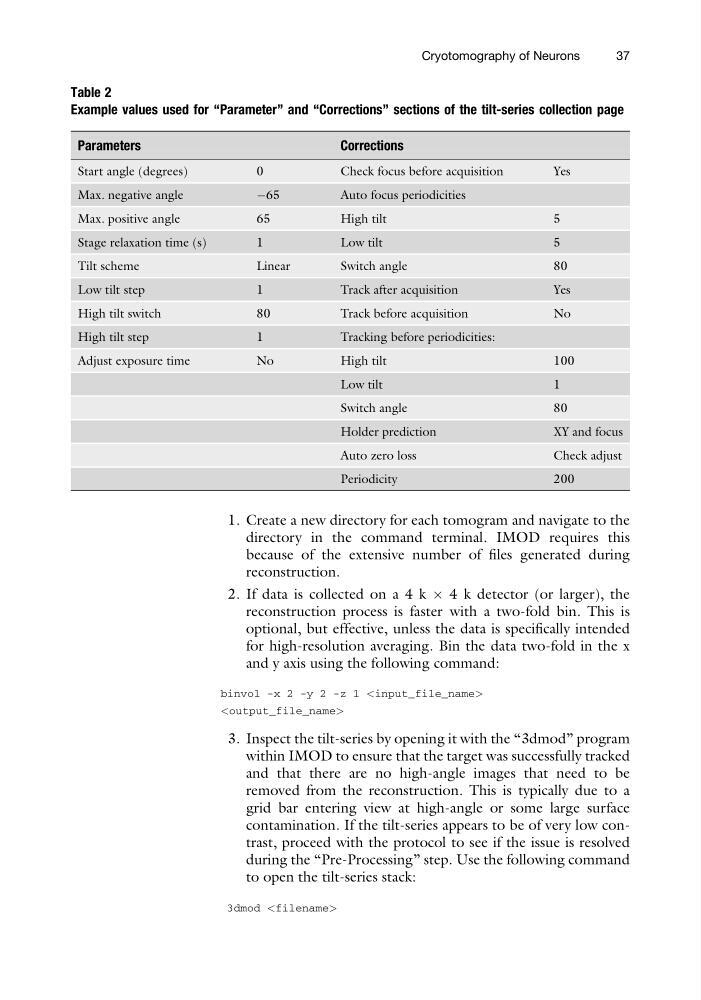
Table 2
Example values used for “Parameter” and “Corrections” sections of the tilt-series collection page
Parameters
Corrections
Start angle (degrees)
0
Check focus before acquisition
Yes
Max. negative angle
À65
Auto focus periodicities
Max. positive angle
65
High tilt
5
Stage relaxation time (s)
1
Low tilt
5
Tilt scheme
Linear
Switch angle
80
Low tilt step
1
Track after acquisition
Yes
High tilt switch
80
Track before acquisition
No
High tilt step
1
Tracking before periodicities:
Adjust exposure time
No
High tilt
100
Low tilt
1
Switch angle
80
Holder prediction
XY and focus
Auto zero loss
Check adjust
Periodicity
200
Cryotomography of Neurons
37
directory in the command terminal. IMOD requires this
because of the extensive number of files generated during
reconstruction.
2. If data is collected on a 4 k  4 k detector (or larger), the
reconstruction process is faster with a two-fold bin. This is
optional, but effective, unless the data is specifically intended
for high-resolution averaging. Bin the data two-fold in the x
and y axis using the following command:
binvol -x 2 -y 2 -z 1
3. Inspect the tilt-series by opening it with the “3dmod” program
within IMOD to ensure that the target was successfully tracked
and that there are no high-angle images that need to be
removed from the reconstruction. This is typically due to a
grid bar entering view at high-angle or some large surface
contamination. If the tilt-series appears to be of very low contrast, proceed with the protocol to see if the issue is resolved
during the “Pre-Processing” step. Use the following command
to open the tilt-series stack:
3dmod
Table 2
Example values used for “Parameter” and “Corrections” sections of the tilt-series collection page
Parameters
Corrections
Start angle (degrees)
0
Check focus before acquisition
Yes
Max. negative angle
À65
Auto focus periodicities
Max. positive angle
65
High tilt
5
Stage relaxation time (s)
1
Low tilt
5
Tilt scheme
Linear
Switch angle
80
Low tilt step
1
Track after acquisition
Yes
High tilt switch
80
Track before acquisition
No
High tilt step
1
Tracking before periodicities:
Adjust exposure time
No
High tilt
100
Low tilt
1
Switch angle
80
Holder prediction
XY and focus
Auto zero loss
Check adjust
Periodicity
200
Cryotomography of Neurons
37