

4. Skip directly to seed model creation to generate a seed model
and track the beads throughout the tilt-series. These steps are
identical to conventional tilt-series alignment.
5. Using IMOD, the transforms generated by the fiducial model
will automatically be applied to the raw tilt-series (original
input). The reconstruction step is thus also identical to conventional tilt-series as shown below.
4.3.2
Fast-Incremental Data
The current SerialEM version (3.7) produces a single stack of movie
frames containing the entire tilt-scheme data and skips saving blank
frames based on a user-defined threshold. Nevertheless, the program automatically pads the tilt-series with one blank frame at the
start, and one at the end, which first need to be removed. Frames
that are part of each discrete tilt angle must then be extracted,
motion-corrected, and placed into the final tilt stack in the correct
order. We have written a bash script that performs these postprocessing steps.
1. Download the Fast-incremental script (https://github.com/
chreifi/fasttilt) and add it to your list of environment variables
on your linux machine.
2. Execute the script, providing the following files for input: input
tilt-series, angles.txt file obtained from running the WriteFrameSeriesAngles function in SerialEM, as well as gain reference
and defects file. The script also provides options for doing
motion correction using Alignframes or Motioncor2.
3. Once successfully processed, the output tilt stack from the Fastincremental script can be processed in IMOD just as in conventional cryo-ET.
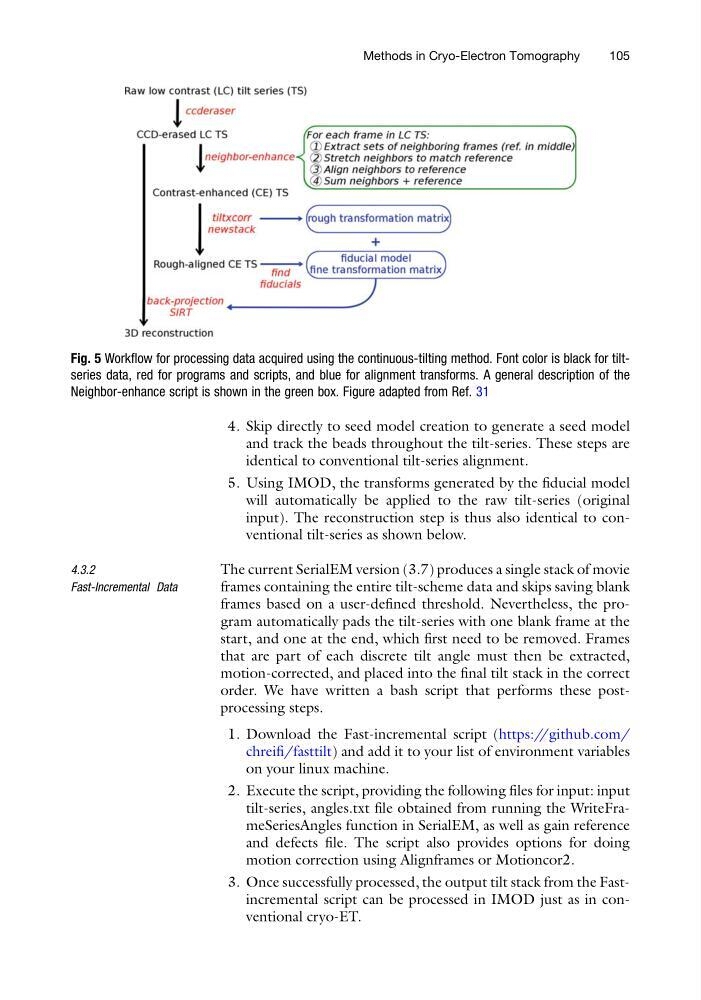
Fig. 5 Workflow for processing data acquired using the continuous-tilting method. Font color is black for tiltseries data, red for programs and scripts, and blue for alignment transforms. A general description of the
Neighbor-enhance script is shown in the green box. Figure adapted from Ref. 31
Methods in Cryo-Electron Tomography
105
and track the beads throughout the tilt-series. These steps are
identical to conventional tilt-series alignment.
5. Using IMOD, the transforms generated by the fiducial model
will automatically be applied to the raw tilt-series (original
input). The reconstruction step is thus also identical to conventional tilt-series as shown below.
4.3.2
Fast-Incremental Data
The current SerialEM version (3.7) produces a single stack of movie
frames containing the entire tilt-scheme data and skips saving blank
frames based on a user-defined threshold. Nevertheless, the program automatically pads the tilt-series with one blank frame at the
start, and one at the end, which first need to be removed. Frames
that are part of each discrete tilt angle must then be extracted,
motion-corrected, and placed into the final tilt stack in the correct
order. We have written a bash script that performs these postprocessing steps.
1. Download the Fast-incremental script (https://github.com/
chreifi/fasttilt) and add it to your list of environment variables
on your linux machine.
2. Execute the script, providing the following files for input: input
tilt-series, angles.txt file obtained from running the WriteFrameSeriesAngles function in SerialEM, as well as gain reference
and defects file. The script also provides options for doing
motion correction using Alignframes or Motioncor2.
3. Once successfully processed, the output tilt stack from the Fastincremental script can be processed in IMOD just as in conventional cryo-ET.
Fig. 5 Workflow for processing data acquired using the continuous-tilting method. Font color is black for tiltseries data, red for programs and scripts, and blue for alignment transforms. A general description of the
Neighbor-enhance script is shown in the green box. Figure adapted from Ref. 31
Methods in Cryo-Electron Tomography
105